Feature overview
Everything it does, and where it stops.
macOS 12 or later · Requires Git 2.38.0 or newer, already installed · Account optional
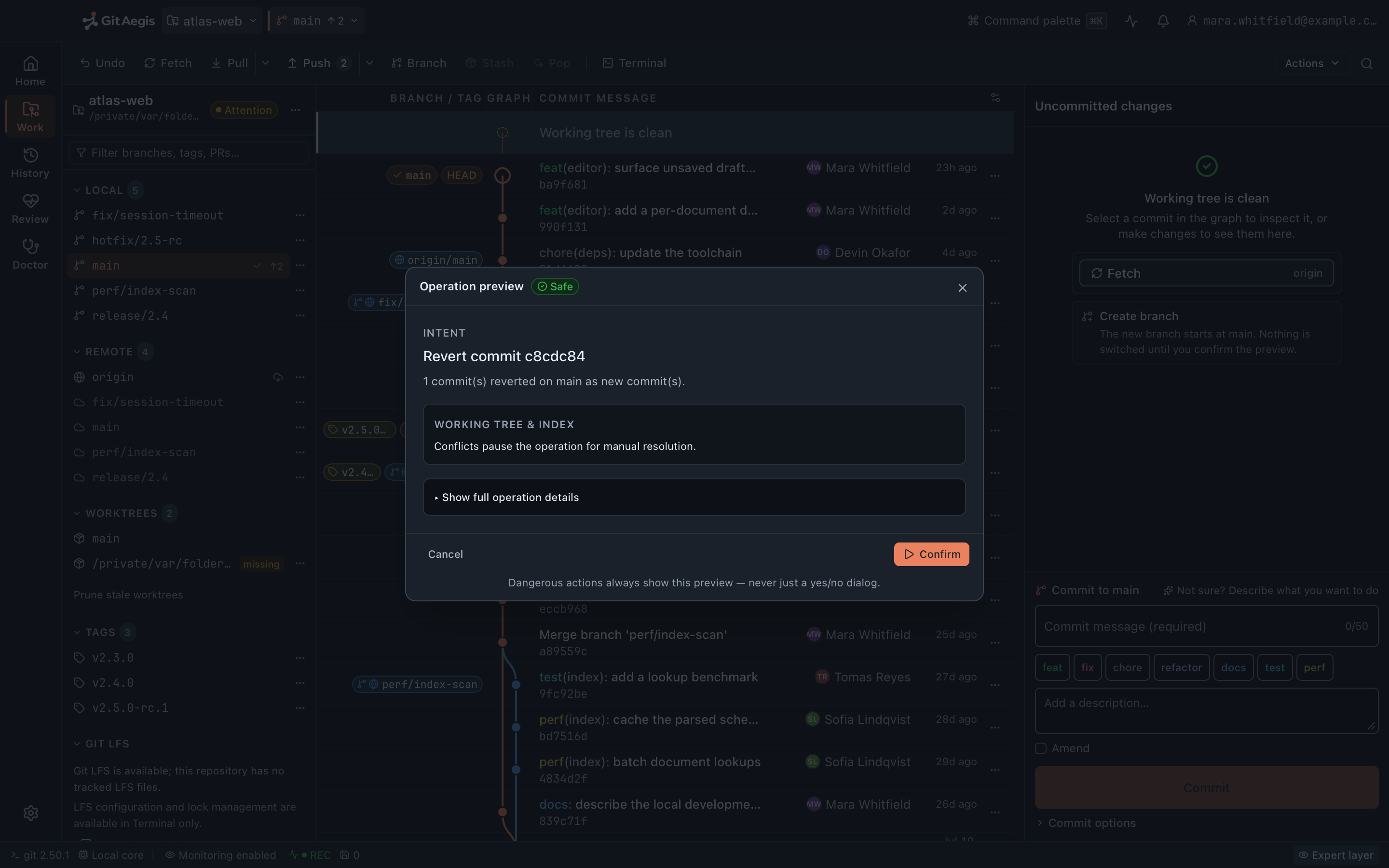
Three questions a Git client should be able to answer
What is about to happen?
Not “are you sure?”: the actual commands, the risk level, the preconditions that were checked, and what will be saved before any of it runs.
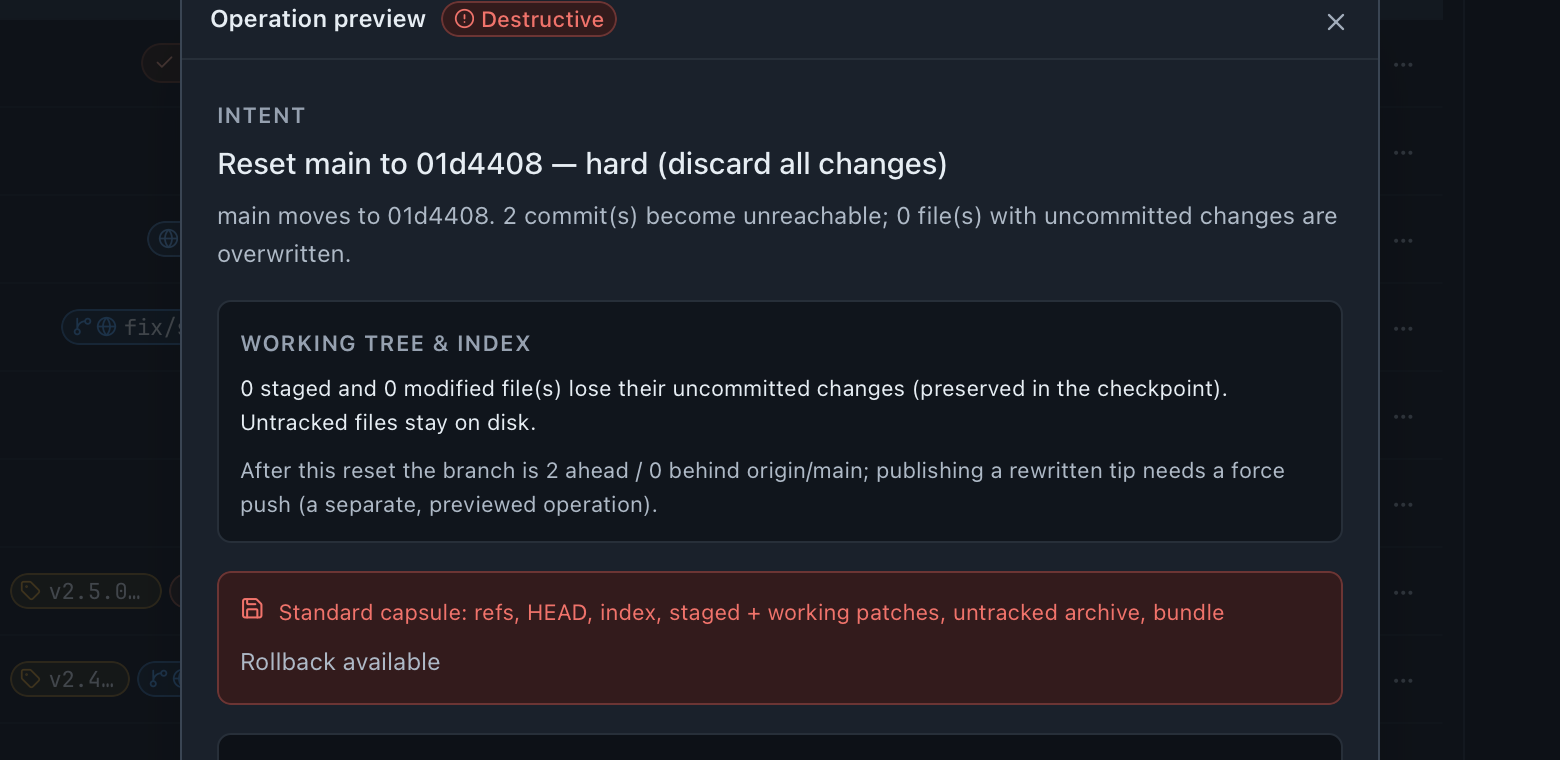
The plan, before it runs: intent, risk, capsule, rollback. What already happened?
Including the things the client itself didn't do: your terminal, a build script, an agent running in another window.
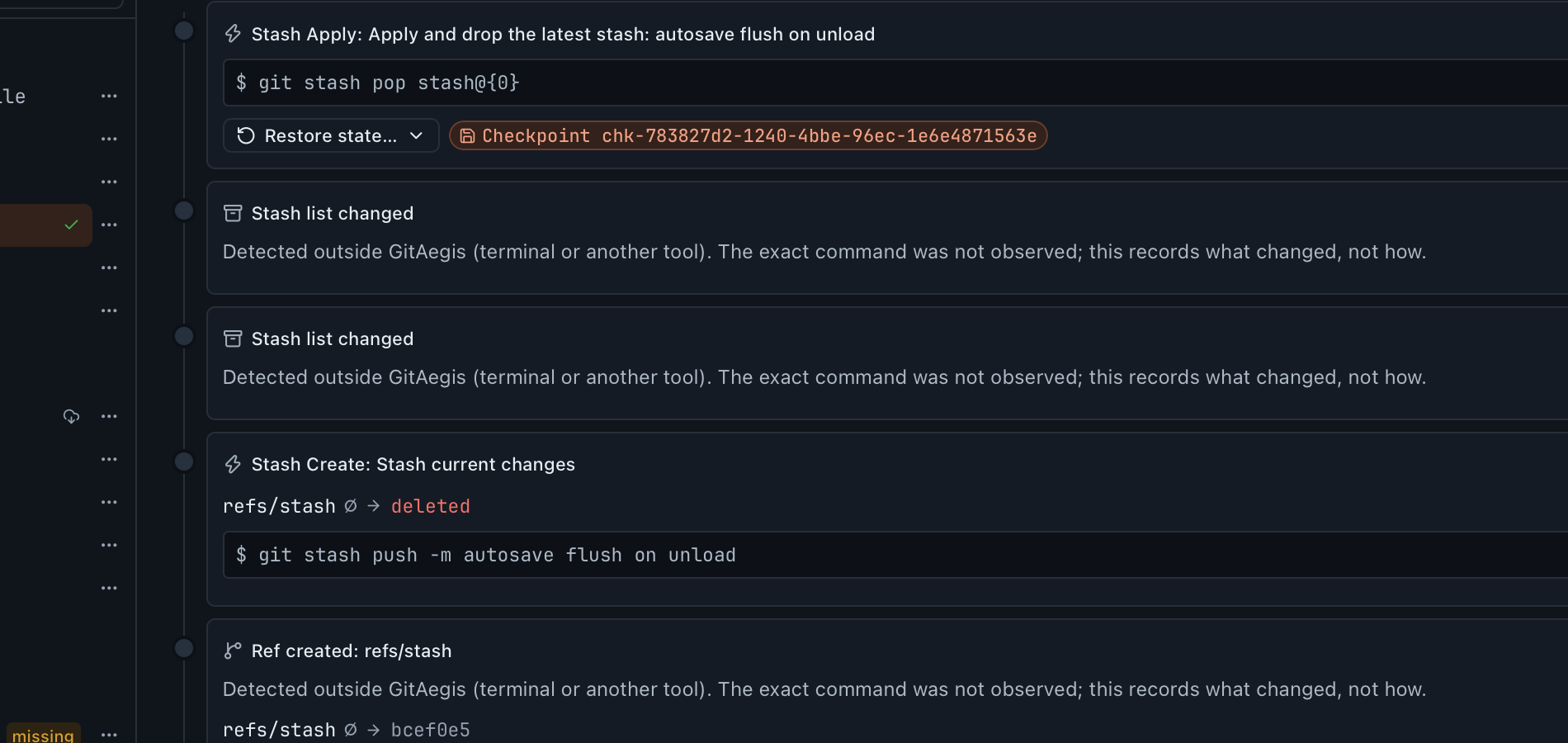
External changes land on the same timeline as the app's own operations. 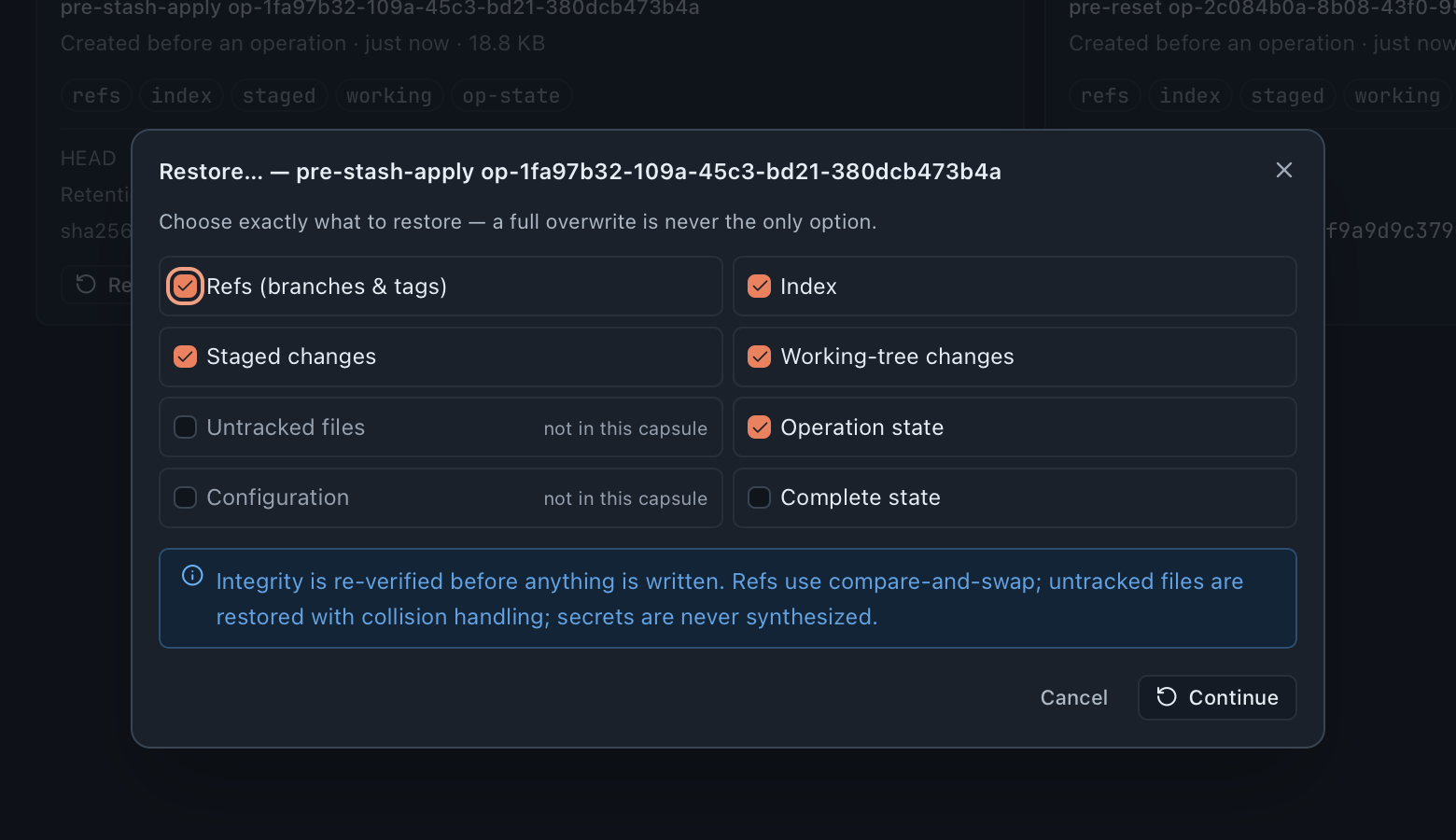
Put back the whole capsule, or only the domain you actually need.
Most clients answer the third with optimism. GitAegis answers it by having taken a snapshot before the operation started, and by refusing to start when it couldn’t.
Five modes, five keys
One window, five modes, and the recovery layer lives in the fifth.

⌘1Homethe repository catalogue
⌘2Workstatus, staging and commits
⌘3Historythe graph, compare and search
⌘4Reviewlocal review: compare refs, read the unpublished commit series, go over the working tree
No capability page of its own: Review compares refs and reads the unpublished series in the client.
⌘5Doctordiagnosis and repairthe recovery layer
Recovery
The layer that decides whether the rest of this matters.
Recovery Capsules
A snapshot across six domains (refs, index, staged changes, working changes, untracked files, operation state) written to disk before the first command runs. Restore all six, or only the one you need. If the capsule cannot be written, the operation is blocked and never executes.
Read moreFlight Recorder
A timeline of what happened to the repository, including what GitAegis did not cause. A filesystem watcher notices when your terminal moves a ref or rewrites your index, and reconciliation fills in what changed while the app was closed. Events that reference a capsule restore from it.
Read moreLost Work
Finds commits nothing points at any more, across the reflog, the stash list, Flight Recorder before-oids, refs/aegis/ recovery refs, capsule bundles, sibling worktrees, and a bounded fsck. Then offers to put a branch back on them.
Read moreSafe Operations
Every mutation is a transaction: intent, risk level, preconditions, the exact commands, a checkpoint, a rehearsal, a rollback plan. Destructive plans open the Operation Preview drawer. Safe Mode locks mutating controls when the index or HEAD can't be trusted.
Read moreEveryday Git
The part you use when nothing is on fire.
Git Toolkit
Hunk- and line-level staging, branches, tags, remotes, refs, worktrees, stashes, submodules, LFS, conflict resolution with stage-1/2/3 read and sequencer control, clone with cancellable streamed progress, and a ⌘K palette over real intents.
Read moreHistory & Search
Commit graph, compare, file history, blame, search across message, author, path and content, bisect with a visible candidate range, and reflog browsing.
Read moreDoctor
Scans for real damage (not style opinions), shows the evidence behind each finding, and proposes repairs that take a capsule first. Exports plain or technical reports with optional path redaction.
Read moreAppearance
Three themes, each measured rather than eyeballed: GitAegis Graphite (the default dark, a navy-graphite canvas), GitAegis Slate (a lighter dark with stronger separation between surfaces), and GitAegis Light, plus System. Interface scale from 80% to 200%, reduced motion and high contrast. Every preset clears WCAG AA contrast on every surface, and all three are swept before a release.
Cloud & Teams
Optional. The local edition is complete without any of it.
- domains captured in every capsule
- 6
- modes, ⌘1 through ⌘5
- 5
- the Git floor: your Git, never bundled
- 2.38.0
- telemetry events, analytics scripts and licence checks
- 0
How the pieces fit together
They are not twelve separate features. They are one loop, and each stage feeds the next.
You choose an intent.
Not a button that means “run this command”. An intent: rebasefeature/payment-retryontomain. The orchestrator turns that into a plan carrying a risk level, the preconditions it must check, and the exactgitinvocations it will make.Preconditions are checked, and can veto.
A dirty working tree, a detached HEAD, an in-progress sequencer, a missing upstream, a branch lease held by another session. A failed precondition stops the plan here, before anything is written.The capsule is taken.
Six domains, to disk, before the first command. This is the point at which the plan becomes reversible. If the write fails (disk full, permission denied, a path the process can’t read) the operation is refused. Not warned about. Refused.
The plan is rehearsed.
The orchestrator runs the plan against a copy before it touches your repository, so a plan that would fail halfway fails in the rehearsal instead.Destructive plans are shown before they run.
The Operation Preview drawer carries the intent, the commands, the capsule that has already been taken, the rehearsal result, and the rollback path you would use. You approve a plan, not a dialog.
It executes, and the journal records it.
The Operation Journal stores the plan, the commands as they ran, the capsule reference and the outcome. If the process dies mid-transaction,recover_incompletereconciles the unfinished entry torequires-interventionon the next launch rather than leaving it silently half-applied.The Flight Recorder keeps watching.
Including after the operation ends, and including changes GitAegis didn’t make. When your terminal moves a ref or rewrites your index, that lands on the same timeline as the operations that came from the app.
Nothing in the loop ever deletes objects.
git gc,git pruneandgit reflog expireare the commands that make objects stop existing, and no path in the product runs them. Not gated, not behind an advanced setting: absent. The loop only works if the objects are still there.
- Intentwhat you asked for, not which button you pressed
- Preconditionschecked, and able to veto the plan
- Capsulewritten to disk, or the operation stops here
- Rehearsalthe plan run against a copy first
- Previewdestructive plansthe drawer, for a plan that can destroy work
- Executethe exact commands, as shown
- Journalplan, commands, capsule id, outcome
- Flight Recorderkeeps watching, including what we didn't cause
…and the next intent starts from the state all of that recorded.
Lost Work reads the whole loop
Capsule bundles, recovery refs, the journal’s before-oids, the reflog. It is a spur off the loop rather than a stage in it. You reach for it when something is already missing.
It runs your Git, not a reimplementation of it.
GitAegis executes the Git already installed on your machine (2.38.0 or newer) using your SSH keys and your system keychain. It never bundles Git and never downloads one.
Every subprocess pins GIT_CONFIG_* and GIT_TERMINAL_PROMPT=0, so a hostile core.fsmonitor or core.pager value in a cloned .git/config can’t execute, and Git can never block invisibly on a password prompt you can’t see. Safe Mode additionally pins core.hooksPath=/dev/null. External diff and merge tools are never launched, in any mode.
- The Git already on your machine2.38.0 or newer, never bundled, never downloaded
GIT_TERMINAL_PROMPT=0Git can never block invisibly on a password promptGIT_CONFIG_*pinned per subprocess: a hostile cloned config can't executecore.hooksPath=/dev/nulladditionally pinned in Safe Mode- External diff and merge toolsnever launched, in any mode
Local Git work does not require an account.
GitAegis local Git work needs no account and no service, and nothing in the Git path waits on a network. Your Git traffic goes directly to the remotes you configured, with your own credentials.
One feature is the exception, and it says so where you meet it: the AI commit report needs a signed-in account, and it sends commit metadata when you press its button. Everything else here works signed out and offline.
GitAegis also checks one fixed release manifest daily and offers a newer build, in a request that carries no identifier and no version parameter. Nothing installs until you press Restart to update.
There is no demonstration mode.
The interface never reaches past its typed client contract, and there is no fixture-data fallback. If the desktop core is unavailable, the app tells you and stops rather than rendering a surface that isn’t wired to anything.
The same rule governs this website: every product image on it is a capture of the real application, and a shot that has not been taken yet renders nothing at all.
What none of this does
The boundary is the product, so it is stated here rather than discovered later.
What GitAegis can put back
- If a recovery capsule was taken, you can roll the operation back.
- If a Flight Recorder event captured a state hash, you can roll back to that state.
- If any reflog entry, ref, branch, stash, or capsule references a commit, Lost Work can recover it.
- Outside those, it cannot, and GitAegis says so instead of pretending otherwise.
Specific limits, each stated again on its own page
- Rebase state is not restored from a capsule. The capsule records that a rebase was in progress. It does not put the rebase directory back and does not resume one.
- Config is not restored from a capsule. A sanitised copy of the config is captured so you can see what changed. GitAegis will not write it back over a change you made deliberately.
- .gitattributes content filters cannot be wholesale disabled. A repository that defines a filter driver still runs it through Git, including during a restore.
- bisect and a conflicted stash apply have no generic resume. Both are recorded and both are recoverable through their capsules. Neither is covered by the sequencer resume path that handles merge, rebase, cherry-pick and revert.
- Work that was never written to disk is not recoverable. An unsaved editor buffer is not a Git object and no capsule can contain it.
Free edition · No account required
A recovery capsule before every risky Git operation.
You see the exact commands before they run, and the operation is refused if the capsule cannot be written.
Requires Git 2.38.0 or newer, already installed.
Every risky operation, in this order
- Previewthe exact commands, shown before anything runs
- Capsulerefs, index, staged and working changes, untracked files, operation state: written to disk first
- Executethe commands as shown, or not at all
- Journalplan, commands, capsule id, outcome