The recovery layer · Local edition, no account required
Find the commits nothing points at any more.
Read-only scan · Never runs git gc, git prune or git reflog expire · Every source is in the free edition
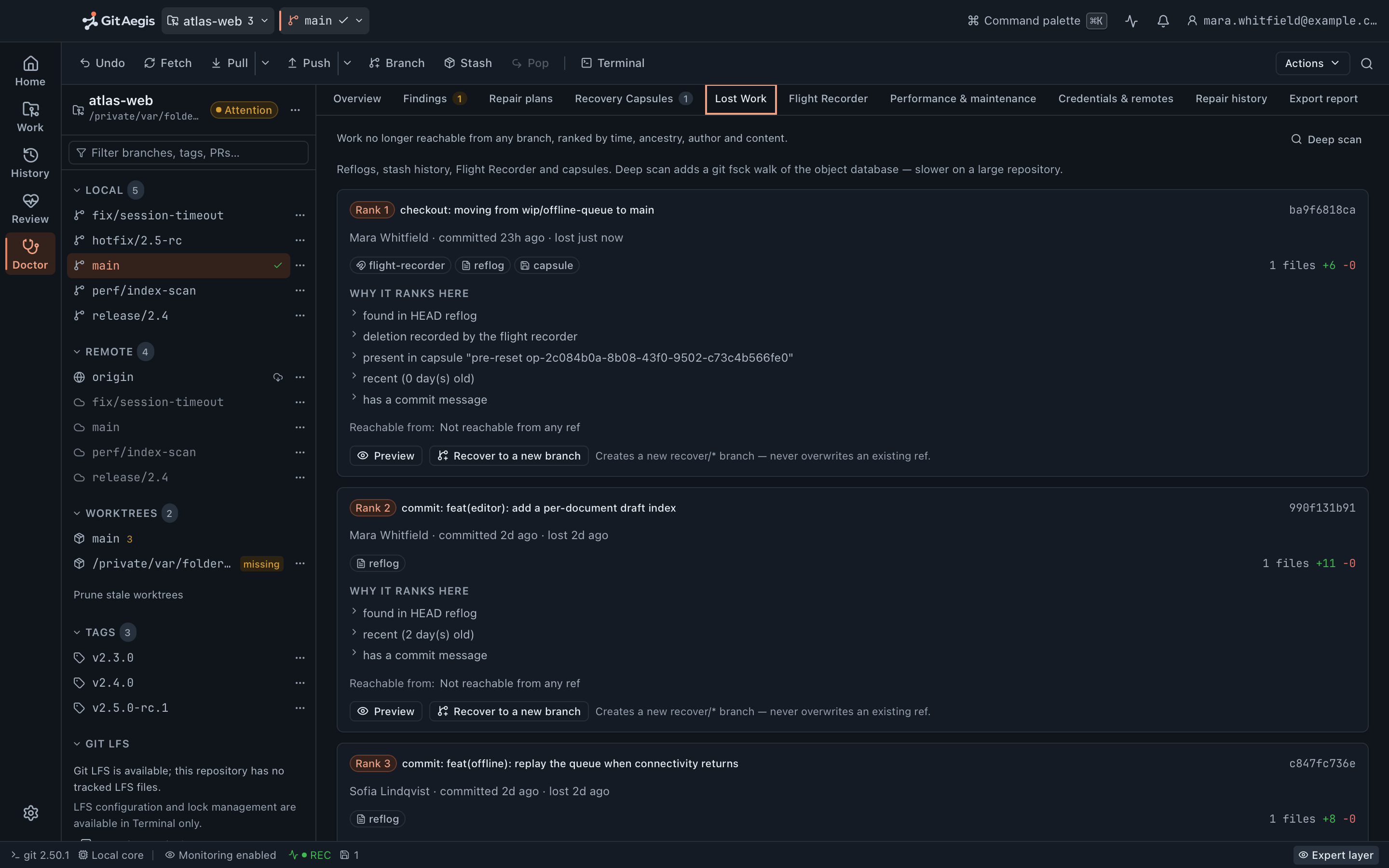
The work is usually still there. It has no name any more.
Git very rarely deletes a commit at the moment you “lose” it. reset --hard, a force push, a discarded rebase, a deleted branch: all of those move or remove a reference. The objects stay in .git/objects until something garbage-collects them.
Which means the recovery problem is almost never “is it gone?” It is “what was its oid?”
The standard answer is to read git reflog and hope the entry is still there and that you can tell which of the eleven HEAD@{n} lines was the one. That works when the loss was recent, on HEAD, in this worktree, and you know roughly what you are looking for. It fails when the branch was deleted and its reflog went with it, when the work was in a sibling worktree, when the commit was only ever referenced by a stash you dropped, or when you do not recognise the subject line at 11pm.
Lost Work is the search you'd run by hand, run properly, over every place an oid could still be written down.
git branch -D wip/invoice-roundingDeleted branch wip/invoice-rounding (was 7d41ba9).# ...that had two hours of work on it.git reflog | grep invoice# nothing: the branch's own reflog went with the branchgit fsck --unreachableChecking object directories: 100% (256/256), done.unreachable blob 3f8c1e2...unreachable blob 91a0dd4...unreachable commit 7d41ba9...unreachable tree c02e17b...# ...and 400 more lines. Which one was it?
Seven sources, one ranked list
Everywhere an oid could still be written down
Lost Work is a read-only scan. It reads refs, reflogs, the worktree list and capsule metadata; it never writes to the object database and never removes anything. Six of the seven sources run the moment you open the panel. The seventh is the one you press.
The HEAD reflog
most recent 40 entries
The stash list
dropped stashes included
Flight Recorder ref movements
most recent 100 events
GitAegis recovery refs
held by real refs
Capsule bundles
five most recent capsules
Sibling worktree tips
every registered tip
- you press this one
A bounded walk of the object database
first 200 commits
A commit found by several sources appears once, badged with each of them. Ranking is by commit date first, with the row’s own reasons breaking ties.
Results you can actually identify
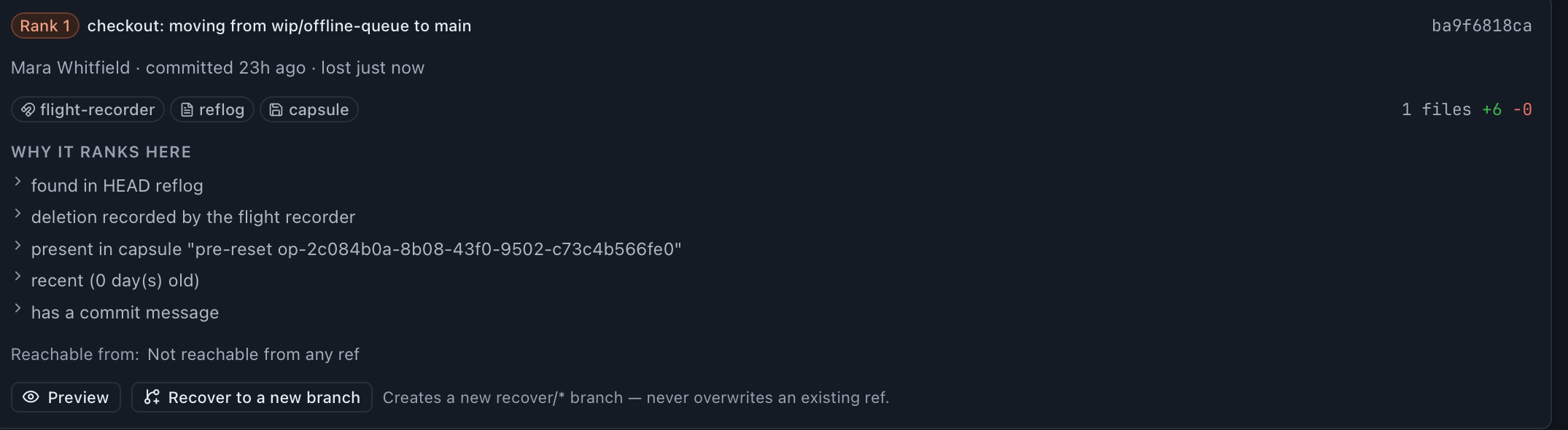
A list of forty oids is not a recovery tool. Every candidate is enriched before it reaches the screen, and the enrichment is read from the commit itself rather than inferred, and where the provenance is thin, it says so instead of guessing.
- Subject, author, and both timestamps
- When the commit was written, and when it was lost. Those are two different numbers, and the gap between them is usually the clue.
- Diffstat
- Files changed, lines added, lines removed: read from the commit itself, so it is true even when nothing else about the commit is known.
- Every source that found it
- One row per commit, badged with each source that produced it. Agreement between sources is a strong signal you have the right thing.
- What still reaches it
- A commit any branch or tag contains is not lost, and never enters the list. Where a
refs/aegis/ref is holding a candidate, the row names that ref. - Why it is ranked where it is
- Not a score, a list of sentences:
found in HEAD reflog,deletion recorded by the flight recorder,recent (2 day(s) old),stash-shaped merge commit (WIP). Ranking is by commit date first, with those reasons breaking ties. - A completeness note when the provenance is thin
- When a dangling object is the only record, the row says so: the author and date come from the object itself, and how it was lost is unknown. A guess would be worse than the admission.
Source by source
Every bound the scan applies is disclosed in the panel itself, because a partial answer presented as a complete one is the failure a recovery scan cannot afford.
- HEAD reflog entries read
- 40
- Flight Recorder events joined
- 100
- capsule bundles read
- 5
- commits in the deep scan
- 200
The HEAD reflog
git reflog: Git's own record of where HEAD has been in this worktree, carrying the reason strings it wrote at the time, such as reset: moving to, rebase (finish) and checkout: moving from. GitAegis reads the most recent 40 entries, which is the window nearly every same-day loss falls inside, and it says so rather than implying it read all of them.
The stash list
git stash list. refs/stash is a reflog, and dropping a stash removes the entry, not the commit. A dropped stash's commit (with its parent, its index tree and its untracked tree intact) is still in the object database. GitAegis never expires it.
Flight Recorder ref movements
Every ref-movement event on the timeline carries the oid the ref pointed at before it moved, including movements GitAegis did not cause. This is the source that covers a reset --hard you ran in your terminal, and it does not depend on Git's own reflog surviving. Lost Work reads the most recent hundred events.
GitAegis recovery refs
GitAegis writes its own refs at the moments a commit is about to stop being reachable: refs/aegis/recover/<branch>-pre-force-push before a force push, and equivalents before Doctor aborts an interrupted merge or rebase. Because these are real refs, the commits they name are reachable: no gc, run by anyone, would have collected them. Each candidate shows the recovery ref that is holding it.
Capsule bundles
Every recovery capsule writes a git bundle of the repository as it stood. Lost Work reads the bundle's ref list from the five most recent capsules and offers those commits, naming the capsule each one came from. It reads the bundle; it does not unbundle anything into your repository, and it will not offer a commit git cat-file cannot resolve here.
Sibling worktree tips
Every linked worktree has its own HEAD. Work left at the tip of a worktree you moved on from is invisible to a scan that only reads the main one. Lost Work walks the registered worktree list and takes every tip no branch and no tag contains.
A bounded walk of the object database
git fsck --unreachable --dangling: the catch-all, for objects nothing above named. This is the one source that does not run on its own: the deep scan is a control you press, because an unbounded fsck walks the whole object database and can take minutes on a large repository. It is bounded by commit count (the first 200 unreachable or dangling commits are examined) and the panel says the deep scan is bounded rather than presenting a partial answer as a complete one.
How a branch is put back
Restoring is a normal GitAegis operation, which means it plans, previews and journals like everything else.
- You choose the candidate and a branch name. GitAegis proposes one from the commit's subject, under
recover/. An existing name is rejected as a failed precondition, not silently overwritten. - The plan is built. Intent: create a new recovery branch at the selected commit. Risk level:
safe, because creating a ref adds a name and removes nothing. Preconditions: the candidate still resolves to a commit, and the branch name is free. The exact command is on screen:git branch <name> <oid>. - No capsule is taken, and the plan says so. A
safeplan readsNo checkpoint (safe operation)where adangerplan would list six captured domains. Nothing is being overwritten, so there is nothing to capture, and a checkpoint the product did not take is not one the plan will claim. - The new ref is verified against the commit you picked. After
git branchreturns, GitAegis re-reads the ref and compares it to the candidate oid. A mismatch fails the operation rather than reporting a recovery that did not happen. - The branch exists, and the operation is journalled. Your working tree and
HEADare untouched; nothing is checked out. The rollback plan is on the entry (delete the new branch) so you can look at the work first and decide what it is worth. Which is the right order, and not what a “recover” button that checks out for you would do.
There is no tag, cherry-pick or export-a-bundle alternative in this version. The one action Lost Work offers is the one it can guarantee: a new branch, verified against the commit you chose.
The whole plan, on one screen
- Intent
- Create a new recovery branch at the selected commit.
- Risk level
- safeCreating a ref adds a name and removes nothing.
- Preconditions
- The candidate still resolves to a commit, and the branch name is free.
- The exact command
git branch <name> <oid>- Checkpoint
No checkpoint (safe operation): nothing is being overwritten, so there is nothing to capture.- Rollback
- Delete the new branch. It is on the journal entry.
Your working tree and HEAD are untouched; nothing is checked out. Look at the work first, then decide what it is worth.
The commitment every source depends on
git gc, git prune and git reflog expire are not implemented. Anywhere.
Every source above depends on something still existing: an object, a reflog entry, a ref. Those three commands are precisely the operations that remove them. None of the three is implemented, not behind a confirmation, not behind an advanced setting, not scheduled in the background, and not among Doctor’s maintenance actions.
This has a real cost. Repositories accumulate loose objects, and packing them is genuinely useful. GitAegis’s answer is that performance work which destroys recoverable history is not the client’s decision to make on your behalf, so where repacking would help, Doctor reports it, explains the tradeoff, and shows you the command instead of offering a button that runs it.
If you run gc yourself, that is your call. Anything a refs/aegis/ ref is holding survives it, because a reachable ref is never collected.
Not implemented, anywhere in the product
git gcdestructivecollects unreachable objectsgit prunedestructivedeletes unreachable objectsgit reflog expiredestructiveexpires reflog entries
The two prune commands that do run
git remote prunedeletes remote-tracking refsgit worktree prunedeletes worktree registrations
Neither of the two deletes an object. The commitment is about the object database, and it is kept there.
Every source is in the free edition
All seven, including the deep fsck, the capsule bundles and the sibling worktree tips. Lost Work is not tiered, and nothing about the scan is held back for a plan: a recovery tool that withholds a source is a recovery tool that loses your work on purpose.
What the GitAegis-specific sources need is not a licence but a history: Flight Recorder movements, refs/aegis/ refs and capsule bundles exist for repositories GitAegis has been managing, because that is when they were written.
What is genuinely unrecoverable
Lost Work searches for references to objects. Where there is no object and no reference, there is nothing to find, and no feature can change that.
Where recovery stops
Content that was never written to disk. An unsaved editor buffer is not a Git object. It is not in the index, not in the object database, not in any reflog. No client can recover it.
Untracked files that no capsule captured. An untracked file is not a Git object either. If a clean or a checkout removed it and no capsule had captured the untracked domain, it is gone as far as Git is concerned. This is the strongest argument there is for letting the capsule be taken. What capsules capture →
Objects a gc removed before GitAegis saw them. If you ran git gc --prune=now, or another tool did, and the objects were unreachable at that moment, they were deleted. A refs/aegis/ ref holding one at the time would have kept it. A reachable ref is never collected. Once the object is gone, no source here produces it: capsule bundles are read for their ref list, not unbundled back into the repository.
Working-tree state with no commit and no capsule. Modifications never committed, never stashed, never captured, and then overwritten. There is no object anywhere that holds them.
History rewritten on a remote you cannot reach. If a force push replaced a remote branch and your local repository never had the old commits, they are in the remote's object database, not yours. GitAegis only searches this machine.
Shallow and partial clones. Objects that were never fetched are not on your disk. A shallow clone's grafted history and a partial clone's promised-but-absent objects have to be fetched; they cannot be recovered locally.
Objects that exist but will not resolve. A candidate is only offered once git cat-file confirms it. An object damaged by a bad disk or an interrupted write is skipped rather than presented as recoverable work, and Doctor reports the same condition with its evidence. Doctor →
Questions about Lost Work
Free edition · No account required
A recovery capsule before every risky Git operation.
You see the exact commands before they run, and the operation is refused if the capsule cannot be written.
Requires Git 2.38.0 or newer, already installed.
Every risky operation, in this order
- Previewthe exact commands, shown before anything runs
- Capsulerefs, index, staged and working changes, untracked files, operation state: written to disk first
- Executethe commands as shown, or not at all
- Journalplan, commands, capsule id, outcome