The recovery layer · No account required
It records what happened. Including what it didn't do.
Local, per repository · Nothing is written into .git/ · No account, no sign-in
"I didn't do that" is usually true
A repository is not a closed system. Your terminal is in it. Your editor is in it. Your build script writes generated files. A Makefile target runs git submodule update. A coding agent in another window is on a branch. pre-commit rewrites files during a commit you thought you understood.
Most Git clients cannot answer that question, because they only know about their own actions. They show you a refreshed view of the current state and leave you to reconstruct the path to it from git reflog and memory.
The honest first question isn't “what did I do?”: it's “what happened here, in order, and which of it came from me?”

One timeline, every hand
The operations GitAegis ran. And the ones it didn’t.
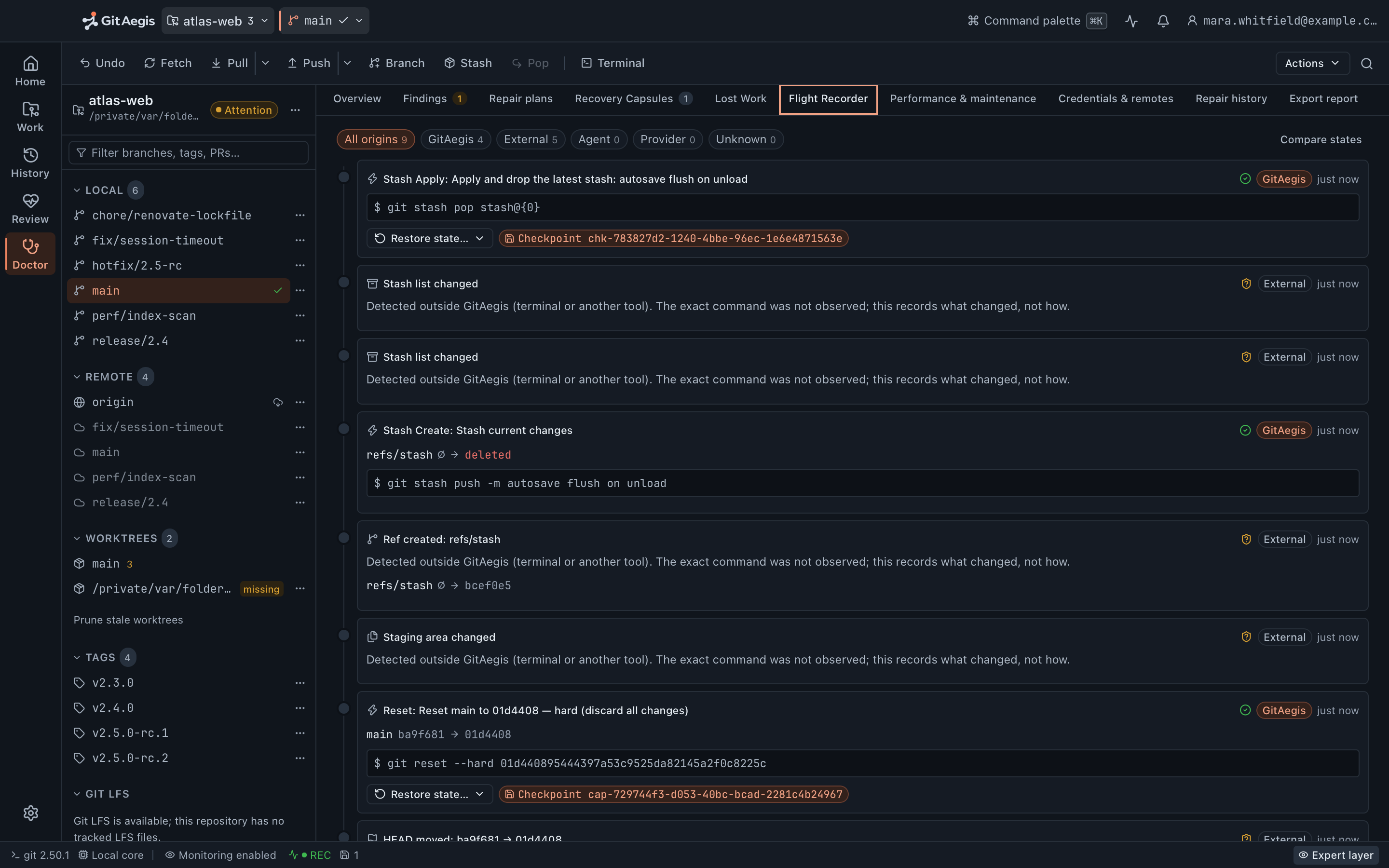
Five consecutive events from a real session, newest first, exactly as the app lists them: GitAegis autosaving and reapplying a stash on its own side of the spine, and the movements it merely detected on the other.
Stash Apply: apply and drop the latest stash
GitAegis$ git stash pop stash@{0}
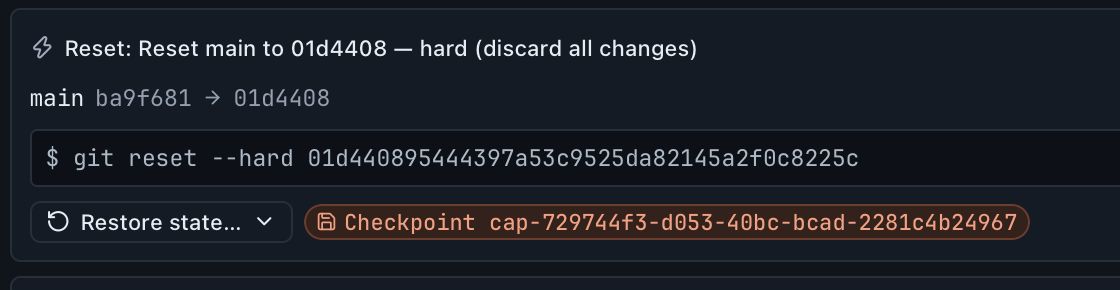
An operation the app ran: the exact command, and the checkpoint it took first, travel with the event.
Stash list changed
ExternalDetected outside GitAegis. The exact command was not observed; this records what changed, not how.
Stash list changed
ExternalDetected outside GitAegis. The exact command was not observed; this records what changed, not how.
Stash Create: stash current changes
GitAegis$ git stash push -m autosave flush on unload
The app's own work again: attributed exactly, because it knew what it was about to do.
Ref created: refs/stash
Externalrefs/stash ∅ → bcef0e5
A ref appeared, recorded with the oid it now names: pointer-level truth, from the watcher.
The origin filter
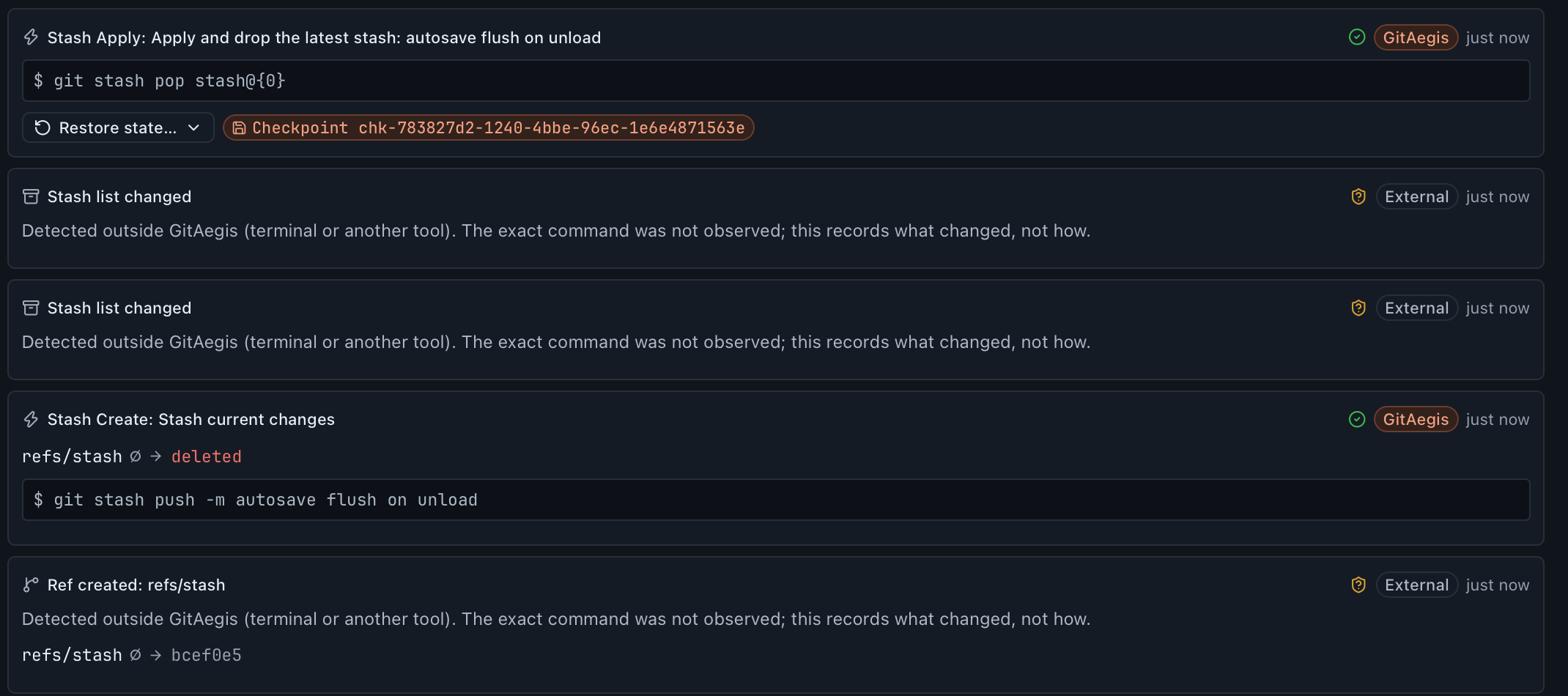
Take GitAegis’s own work off the timeline. What is left is the answer.
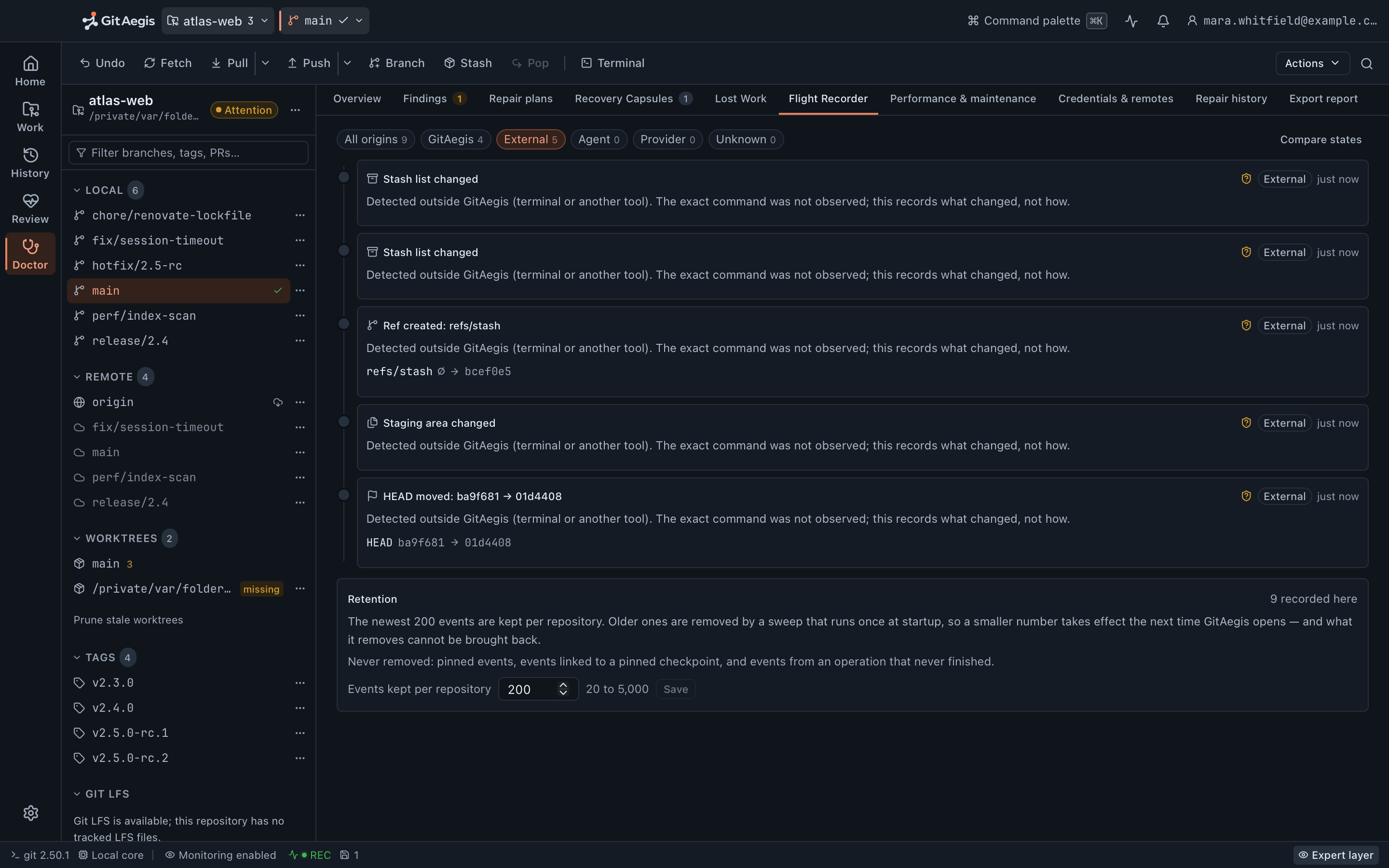
One click on External and the timeline holds only what GitAegis did not cause: the stash list changing under it, refs/stash appearing, the staging area moving, HEAD going from ba9f681 to 01d4408. Every row says so on its face: detected outside GitAegis, exact command not observed.
Six classes, five origins
What lands on the timeline
Six classes of event, all of them pointer-level truth about the repository rather than a log of file writes.
Operations GitAegis ran
Every mutating operation writes an event carrying its intent, its risk level, the exact commands executed, the id of the capsule it took, the state hash before and after, and its outcome. These events have the most context attached, because the app knew what it was about to do.Ref movements
Any change to any ref (branches, tags, remote-tracking refs, HEAD) recorded with the previous oid and the new one. The previous oid is the important half, and it is the reason Lost Work works as well as it does: a commit a branch moved off is still named by the event that moved it.Index changes
The index file changing under the app: a git add in your terminal, a pre-commit hook staging a reformat, a script calling git update-index. The event records that staging changed, not a per-file breakdown of what.Operation-state transitions
A MERGE_HEAD appearing. A rebase directory created or removed. A CHERRY_PICK_HEAD you weren't expecting. This is how you find out that the terminal window you forgot about left a sequencer half-open.Stash and worktree changes
The stash list changing, and worktrees being registered or removed. The git worktree add you ran somewhere else and the stash entry that is no longer where you left it.Watcher overflow
When the operating system's notification queue overflows, GitAegis does not guess. It runs a full reconciliation and writes one coarse event that says the watcher overflowed and the exact commands were not observed. An honest gap beats a confident reconstruction.
The orchestrator
operations GitAegis ran, with the plan, the commands and the capsule id attached
The filesystem watcher
changes it did not cause, noticed live while the app is running
Reconciliation
what changed while the app was closed, found by diffing state against the last anchor
One timeline, in order
- What moved, and the oids it moved between.
- Where it came from: the app, an agent, a provider, outside, or unknown.
- How confidently the cause is known: observed exactly, inferred, or unattributed.
- The capsule and journal entry behind it, when there is one.
Editing a tracked file is deliberately not on that list. The watcher notices that something under the working tree changed and uses it to decide when to re-read state, but it does not keep the paths and it does not write an event per file. Your uncommitted edits are visible in status, and they are captured by a capsule the moment an operation is about to touch them, which is the place they can actually be given back to you.
- classes of event on the timeline
- 6
- origins an event can carry: App, External, Agent, Provider, Unknown
- 5
- events kept per repository by default: adjustable from 20 to 5,000
- 200
- events written when a reconciliation finds the state hashes match
- 0
The filesystem watcher is why external events exist at all.
GitAegis watches the repository directory and .git/ through the platform’s native filesystem notification API. It is not polling on a timer, and it is not a Git feature.
Notifications are debounced and coalesced before anything reaches the timeline, so a branch checkout in your terminal produces one meaningful event naming the refs that moved rather than a burst of low-level file writes. Seven directory names are skipped wherever they appear, node_modules, target, dist, build, .next, .turbo and .cache, both for noise and for the watcher’s own descriptor budget.
Every event records where it came from and how confidently the cause is known. Filtering to the events GitAegis did not cause is the fastest way to answer “what touched this while I was away?”
Something else touches the repository
your terminal moves a ref, a hook rewrites the index, a script leaves a sequencer half-open
The watcher notices
native filesystem notifications, debounced and coalesced: one checkout becomes one event, not a burst of file writes
One event on the timeline
- What moved, and the oids it moved between.
- Source: outside the app: beside the app’s own operations, not in a separate log.
- How confidently the cause is known, stated on the event itself.
What a state hash is, and what it is not.
Every event carries the hash of the repository’s observable state before it and after it. That hash is a digest over HEAD and its symbolic target, every ref and its oid, a checksum of the index, a digest of git status --porcelain=v2, the stash list, registered worktrees, and the operation markers present in .git.
Be precise about what that buys you, because it is easy to over-read. It is not a content hash: it does not digest your file contents, and two states with identical pointers hash identically whatever your editor has been doing. What it gives you is a cheap, deterministic answer to “did anything observable move?”, which is what makes a reconciliation that finds nothing cost nothing, and what makes the timeline able to say a gap exists rather than guessing across it.
Which rows are a way back, and which are a note.
An event that references a capsule can restore from that capsule, per domain, exactly like any other capsule restore: refs on their own, the working tree on its own, any combination.
An event that recorded a ref moving can put those refs back. Pointers only: the branch returns to the oid it was on, and your files are not touched. GitAegis does not describe that as restoring a state, because it isn’t one.
Everything else is a record of something that happened and nothing more, and the timeline marks the difference rather than letting you assume it. Either way the restore is a planned operation: it previews, and it takes a capsule of the current state first, so stepping back is not a trap.
One consequence is worth spelling out, because it is the kind of thing a timeline usually gets wrong. When a capsule is removed by retention, every event that pointed at it has its capsule link cleared and its offered domains emptied: the row degrades to the ref-only restore it can still deliver, instead of continuing to display a button that would fail the moment you pressed it.
Reconciliation: what happened while the app was closed
The watcher only sees what happens while GitAegis is running. Most of the interesting damage happens when it isn't, so GitAegis reconciles: it re-reads the repository, compares it against the last state it recorded, and writes what the difference implies.
Capture the current state.
HEAD and its symbolic target, every ref and its oid, a checksum of the index, a digest of git status --porcelain=v2, the stash list, registered worktrees, and the operation markers present in .git.Hash it, and compare against the anchor.
The last captured state is the anchor. If the two hashes match, nothing happened and no event is written, which is why a reconciliation that finds nothing costs you nothing.Classify the difference.
The two snapshots are diffed into named changes: a ref created, deleted or moved; HEAD moved or retargeted; the index changed; the stash changed; a worktree registered or removed; operation markers changed.Write the events, with the delta as the title.
Each event carries its before and after oids and a title generated from the change itself, "branch updated: main (a3f91c2 → 8e2d011)". GitAegis does not read a reason out of anywhere and does not invent one. It tells you what moved and where from.Reconcile unfinished operations.
If an operation was open when the process died, recover_incomplete moves its journal entry to requires-intervention and the timeline shows the operation starting, the commands that ran, and the fact that it never reported an outcome. The capsule it took is still on disk.
Reconciliation runs when…
The watcher saw Git metadata change
a ref file, HEAD, the index, an operation marker
The app regained focus
you came back to a window that had been sitting there
A status read asked for it
opening the repository, or refreshing it by hand
The watcher's queue overflowed
the operating system dropped notifications, so the fine-grained answer is gone and one coarse event says so
Reconciliation is also how the timeline stays honest about its own gaps. An event GitAegis inferred rather than observed is marked as inferred, and one it cannot attribute at all is marked unattributed. It does not backdate an inference into a live observation, and it does not invent a cause for a change it only saw the result of.
The overflow case is the clearest example. When the operating system drops notifications under load, GitAegis does not reconstruct the sequence it missed. It runs a full reconciliation and writes one coarse event saying the watcher overflowed and the exact commands were not observed.
Resume: picking an interrupted operation back up
When reconciliation finds a repository sitting in an in-progress state (an unfinished merge, a sequencer with a todo list left, a rebase directory present) it does not only report it. It offers the way out.
For a merge, cherry-pick, revert or rebase that means the sequencer controls: continue, skip, abort, with the current conflict set shown and stage 1, 2 and 3 readable for each conflicted path, and the capsule taken before the operation started still there if you would rather go back to before all of it.
Resume is a planned operation. It previews, it checkpoints and it is journalled, the same as if you had started it fresh.
Finding the moment it went wrong
The timeline filters by where an event came from (the app, an agent, a provider, outside the app, or unknown) and by event type, ref, and time. Filter to one branch to see everything that ever moved it.
Each event links out to the rest of the system: to the operation’s journal entry, to the capsule it took, and to the commits it moved between. When an event’s “before” oid is no longer reachable, that is the handoff into Lost Work.
Retention
Retention never costs you a commit.
Timeline events expire on a retention sweep, trimmed newest-first to a budget. Three kinds of event are exempt from it: one you pinned, one linked to a capsule you pinned, and one linked to a transaction that never finished.
What matters more is what expiry does not do. Expiring a timeline event never deletes a Git object and never runs gc. An expired event stops being a row you can read; the commit it referenced is still in the repository, and Lost Work’s other sources (the reflog, refs/aegis/ refs, capsule bundles) still name it.

What the Flight Recorder does not do
This one has more edges than the rest of the recovery layer, because it depends on an operating-system facility that is allowed to drop things. Pretending otherwise would make the timeline worse than useless. You would trust it.
The boundary, in full
- It cannot record what happened before it was installed.The timeline starts when GitAegis first opens the repository. The first capture seeds the baseline silently rather than inventing a history for the years before it.
- Working-tree file edits are not timeline events.The timeline records pointer-level truth: refs, HEAD, the index, the stash, worktree registration, operation markers. Editing a tracked file does not produce an event; that change is visible in status, and it is captured by a capsule when an operation is about to touch it. The watcher notices that something under the working tree changed and uses it to decide when to reconcile, but it does not keep the paths.
- Not every event is a way back.An event that references a capsule can restore from that capsule, per domain. An event that recorded a ref moving can put those refs back: pointers only, never file content. Everything else is a record of something that happened and nothing more, and the timeline marks the difference rather than letting you assume it.
- The watcher can miss events.Filesystem notification APIs drop events under load, and network filesystems, some container bind mounts and certain virtualised paths deliver them unreliably or not at all. An overflow becomes a full reconciliation and one honest coarse event. The timeline is not a substitute for the reflog; it is a source alongside it.
- bisect and a conflicted stash apply have no generic resume.Both are recorded, and both are recoverable through their capsules. Neither is covered by the sequencer resume path that handles merge, rebase, cherry-pick and revert, because Git does not expose a state either of them can be generically resumed from.
- External events are observed, not explained.GitAegis can tell you a ref moved outside the app, and where it moved from and to. It does not attribute that to a person, a process or a tool, and an event it did not observe directly is marked unattributed rather than guessed at.
- It records; it doesn't prevent.The Flight Recorder has no veto over anything that happens outside GitAegis. Preventing damage is the operation model's job, and only for the operations GitAegis runs.
Questions about the timeline
Free edition · No account required
A recovery capsule before every risky Git operation.
You see the exact commands before they run, and the operation is refused if the capsule cannot be written.
Requires Git 2.38.0 or newer, already installed.
Every risky operation, in this order
- Previewthe exact commands, shown before anything runs
- Capsulerefs, index, staged and working changes, untracked files, operation state: written to disk first
- Executethe commands as shown, or not at all
- Journalplan, commands, capsule id, outcome