The recovery layer · No account required
The snapshot is taken before the operation. Or the operation doesn't run.
git command executes. Restore all six, or one. If the capsule cannot be written, GitAegis blocks the operation rather than proceeding with a warning.Capsules are written to your own machine · Nothing is uploaded · All six domains, in the edition you can download
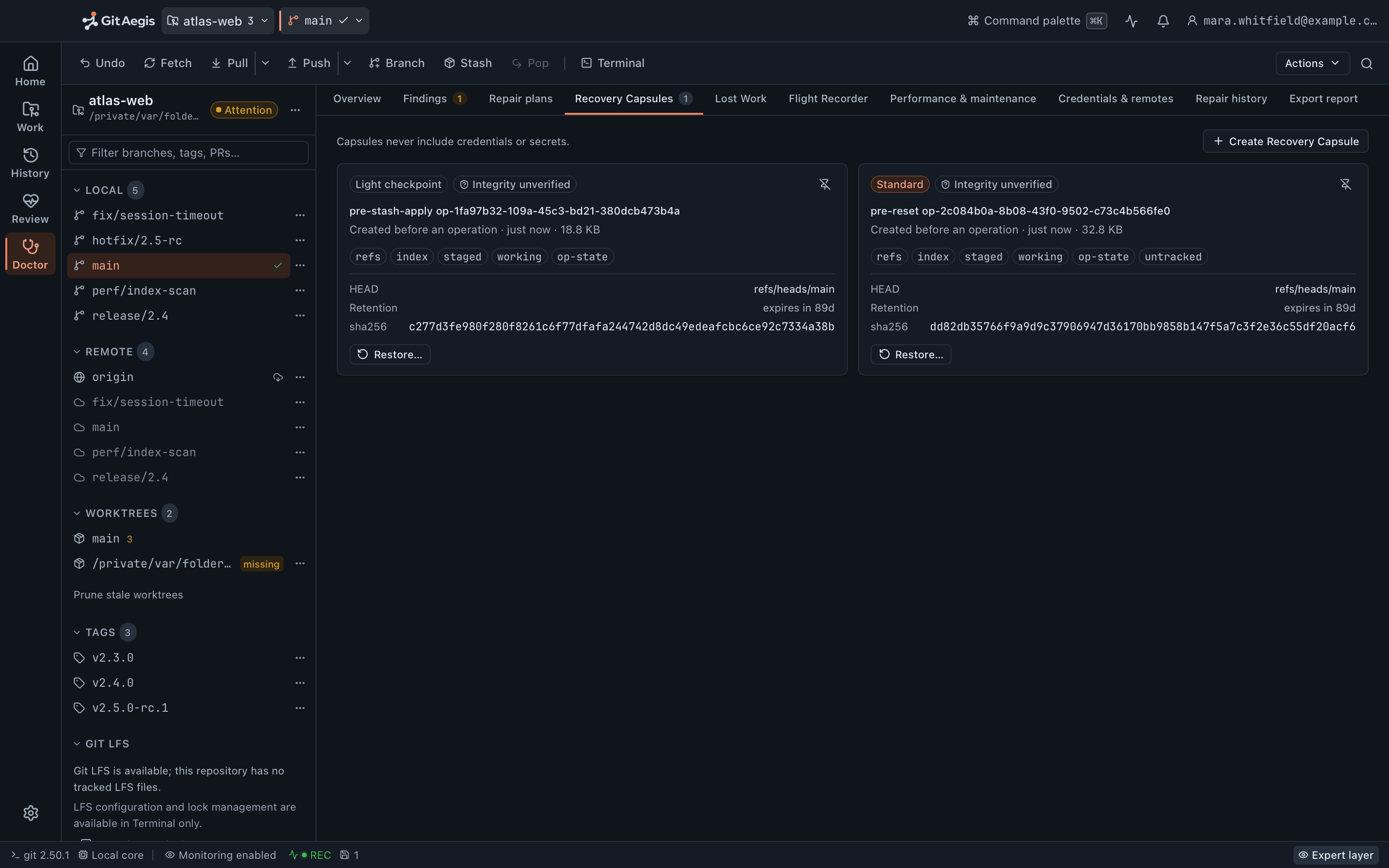
"Undo" in most Git clients means "search the reflog and hope"
Here is what a reflog actually contains: commits that HEAD or a ref pointed at. That is the whole list.
It does not contain your staged-but-uncommitted hunks. It does not contain your working-tree edits. It does not contain the untracked files you hadn’t added yet: the .env you spent twenty minutes reconstructing, the scratch script, the fixture you generated. It does not contain the state of a rebase that was halfway through.
So when a client offers to “undo” your reset --hard, what it means is that it will try to move a ref back. Everything else was never captured, and cannot be returned, because nothing wrote it down.
The problem isn't the undo. The problem is that nothing was saved before the thing happened.
git status --shortM src/billing/retry.rs^ stagedM src/billing/mod.rs^ unstaged?? src/billing/fixtures/late.json^ untracked, 300 lines, generatedgit reset --hard HEAD~2HEAD is now at 4c1e88a Add retry backoffgit status --short# all three are gone
4c1e88a and the commit you left. It will never show you late.json, and no amount of Git knowledge will bring it back, because it was never an object.The capture
What a capsule captures
Six domains. Each one is captured independently, and each one can be restored independently.
Refs
Every ref in the repository at capture time with its oid (local branches, remote-tracking branches, tags, notes, and GitAegis's own refs/aegis/ namespace) copied as the ref tree, packed-refs and the reflogs themselves. Plus HEAD: its symbolic target if attached, its oid if detached. This is the domain that puts a branch back where it was.Index
The index file itself, byte for byte, including the stage entries of a conflicted merge: stage 1 (base), stage 2 (ours), stage 3 (theirs). An interrupted conflict resolution comes back to the state you were resolving from rather than to a re-run of the merge.Staged changes
What was staged, captured as a binary patch against HEAD rather than as a summary of which files changed. Restoring the domain re-applies that patch.Working changes
Modifications to tracked files that hadn't been staged, captured the same way. The half-finished refactor. The debugging println! you were about to remove.Untracked files
Files Git doesn't know about yet, archived whole and bounded by size. This is the domain no reflog-based recovery can offer, and in practice it is the one people are most relieved to have.Operation state
What Git was in the middle of: MERGE_HEAD, CHERRY_PICK_HEAD, REVERT_HEAD, ORIG_HEAD, FETCH_HEAD, MERGE_MSG, BISECT_LOG, and a marker recording that a rebase directory was present. Captured as evidence. Read the limits below before you rely on this one. A rebase is recorded, not replayed.
- Refs
ref tree, packed-refs, reflogs, HEAD - Index
index.original, conflict stages included - Staged changes
staged.patch - Working changes
unstaged.patch - Untracked files
untracked-files.tar - Operation state
operation-state/
The untracked lane is the one no reflog has ever held.
One capsule directory, on your own disk
Written before the first git command of the operation runs, with a manifest recording per-domain status and a checksum for every entry.
- domains, captured and restored independently
- 6
- capsule kinds: light and standard
- 2
- single-file bound in the untracked archive
- 32 MiB
- where the archive stops. Anything skipped is named in the manifest
- 128 MiB
The refusal
If the capsule cannot be written, the operation does not run.
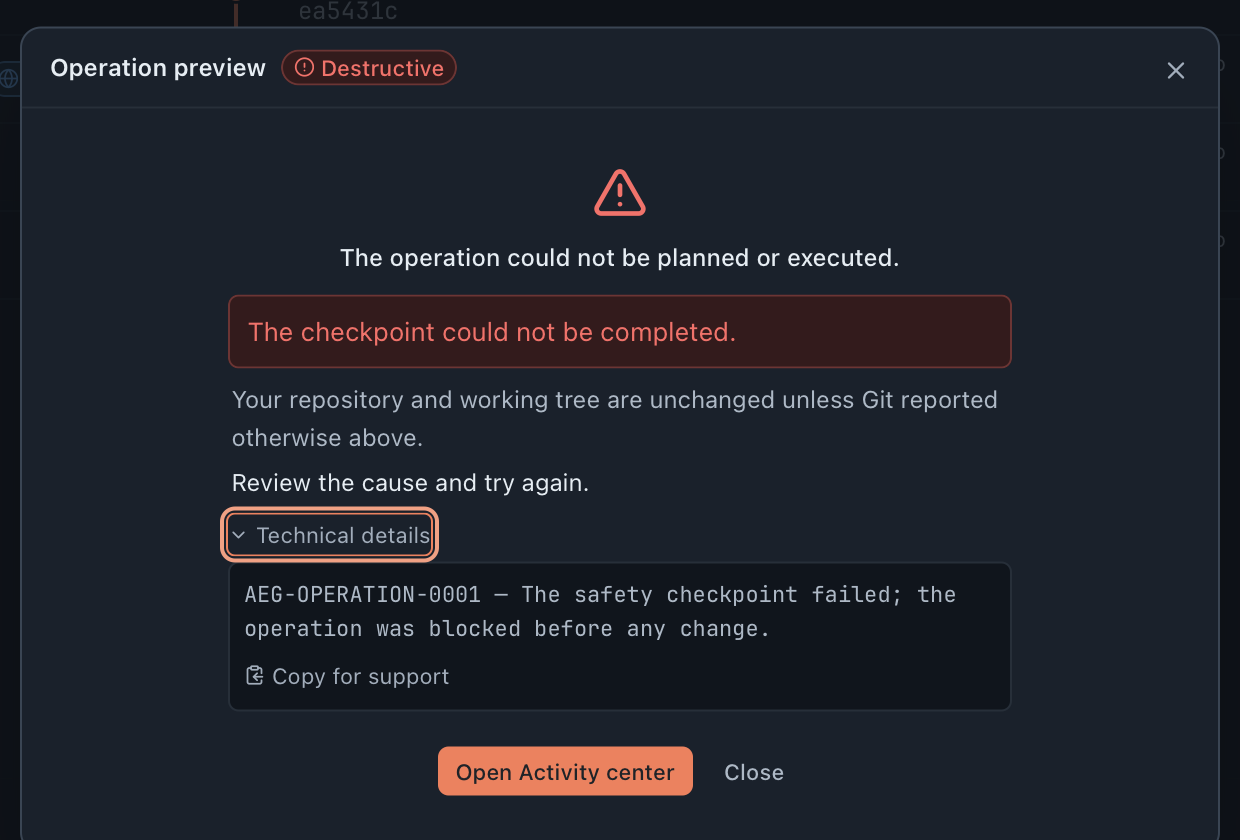
Disk full. Permission denied on the capsule directory. A working-tree path the process can’t read. In each case GitAegis stops before the first command: what you see below is a real refusal, captured from the app after its capsule directory was made unwritable.
The risk was declared first
The preview carries the plan’s destructive badge before anything runs. This was a plan that could destroy work, which is exactly why it needed the capsule.
The reason, not a warning
“The checkpoint could not be completed.” There is no proceed-anyway checkbox under it, and no advanced setting that adds one: no control in the shipped interface can waive the capture.
The state, guaranteed
“Your repository and working tree are unchanged.” The refusal happened before the first
gitcommand, so there is nothing to undo.The code you can cite
AEG-OPERATION-0001: the safety checkpoint failed; the operation was blocked before any change. The operating system’s own error is one click away in the Activity center, ready to copy for support.
This is a deliberate decision and it will occasionally be inconvenient. It is inconvenient in exactly the situation where proceeding would be worst: a machine that can’t write a snapshot is a machine already having a bad day. Fix the condition, and try again.
Taken before, not after.
The ordering is the entire claim, so it is worth being unambiguous about it. The capsule is written before the first command of the operation runs. Not concurrently. Not on a timer. Not after a successful dry run.
The capsule id is recorded on the transaction the moment the capture returns, and only then does the first command go out. A snapshot taken after the fact is a snapshot of the damage. That is what “undo almost anything” tends to mean in practice, and it is why it arrives with the word “almost” attached.
Build the plan
intent, risk level, the exact commands
Check preconditions
any failure stops the plan here
Write the capsule
six domains, to your own disk: the capsule id lands on the transaction the moment the capture returns
Rehearse
the plan run against a copy first
Execute
only now does the first git command go out
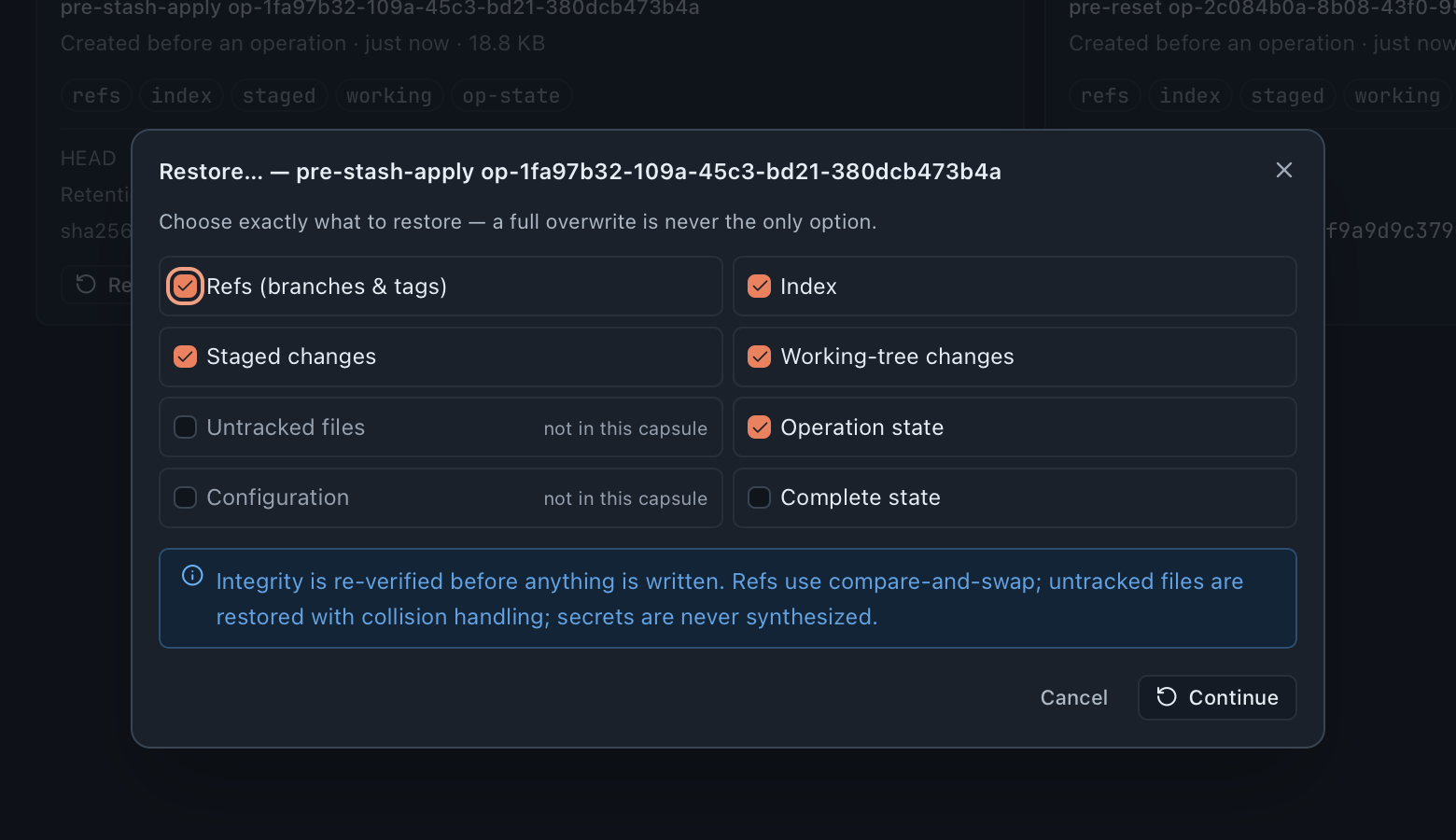
Restore per domain, not all-or-nothing.
After a bad rebase you often want your branch pointer back but not your working tree: you have since fixed three of the four things that went wrong and you’d rather keep those.
So restore is a per-domain choice. Refs only. Working changes only. Untracked files only. Any combination. Refs restore compare-and-swap and untracked files restore with collision handling, so a restore that cannot complete cleanly lands in requires-intervention with the conflict list rather than ending silently half-applied.
The restore is an operation like any other, which means it plans, previews and takes its own capsule of the current state first. Restoring is reversible too.
Two kinds · one rule
Light and standard capsules
Not every operation needs a full capture, and forcing one on every fetch would make the app annoying enough that people would turn it off. So there are two shapes, and one rule that chooses between them: the plan's risk level decides, and nothing else does.
No capsule
A plan the orchestrator rates safe has nothing to undo.
Light capsule
Pointer-level capture: fast enough that you won't notice it.
Standard capsule
All six domains, including the untracked archive and the bundle.
There is no heuristic guess at your intent and no inspection of your working tree feeding that decision, which is worth knowing precisely, because it means a cautious plan run over a dirty tree still takes the light capsule.
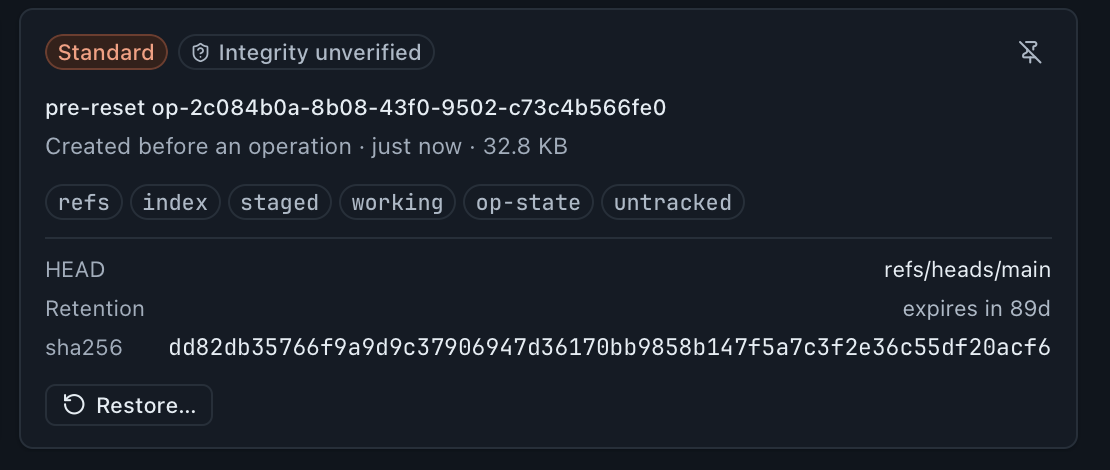
All six domains, including the untracked archive and the repository bundle. Taken for every destructive operation: reset, checkout and restore over a dirty tree, merge, rebase, cherry-pick, revert, stash operations, clean, and every force-push variant.
- refs
- index
- staged
- working
- op-state
- untracked
The untracked chip is the one no reflog-based recovery has ever offered.
- A plan the orchestrator rates safe takes no capsule. There is nothing for it to undo.
- Removing a worktree, updating a submodule and fetching LFS objects take no capsule at any risk level, because a capsule of the primary worktree could not put those back and the journal will not advertise a checkpoint the executor would have to omit.
Where capsules live on disk
Capsules are written under GitAegis's application support directory, outside your repository. They are never written into .git/, so they don't travel with a clone, don't confuse other Git tools, and don't end up in a git clean.
~/Library/Application Support/<GitAegis application id>/aegis/capsules/<repo-id>/<capsule-id>/<repo-id> is derived from the repository’s absolute path, so moving a repository creates a new id rather than silently orphaning the old capsules. Lost Work still reads them if you point it at the old location.
repository.bundle is a real git bundle. If GitAegis is not installed on the machine you are recovering on, that bundle and the refs copied beside it are enough to do the recovery by hand. That is deliberate: a recovery format you can’t open without the product isn’t much of a recovery format.
- manifest.json
capsule id, repo id, operation id, timestamp, git version, kind, per-domain status, and any capture notes
- checksums.json
a digest per entry: what a later verification is checked against
- HEAD
the HEAD file as it stood
- refs/
the loose ref tree, copied
- packed-refs
when the repository has one
- reflogs/
a copy of .git/logs: Git's own record of where refs have been
- index.original
the index file, byte for byte, conflict stages included
- index-metadata.json
whether an index was present at all
- staged.patch
git diff --cached --binary
- unstaged.patch
git diff --binary
- operation-state/
one file per marker found (MERGE_HEAD, CHERRY_PICK_HEAD, REVERT_HEAD, ORIG_HEAD, FETCH_HEAD, MERGE_MSG, BISECT_LOG) or a single none entry
- config.sanitized
the config with credentials stripped, captured as evidence and never written back
- untracked-files.tar
untracked content, size-bounded, with anything skipped named in the manifest
- repository.bundle
git bundle create --all: a real bundle of every ref, readable by Git with GitAegis nowhere in sight
Retention, and the two things it will never remove
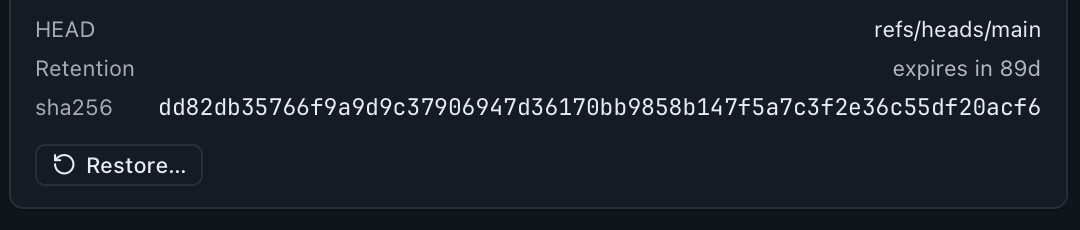
Capsules accumulate and disk is not free, so retention is explicit rather than a silent background sweep. Each capsule carries an expiry recorded when it was written, and the sweep removes expired ones.
Two rules hold regardless. A capsule referenced by an operation that is still open, or by a journal entry in requires-intervention, is never expired. And expiring a capsule never runs gc. The objects it referenced stay in the repository, which is exactly why Lost Work can still find them afterwards.
Capsules are also pinnable, and a pinned capsule is exempt from retention entirely until you unpin it. Pin the one from the day before the migration.
Capsules and the Operation Journal
Every capsule is bound to the operation that caused it, and the journal entry records the capsule id. That binding is what makes “roll that back” a sentence with a mechanism behind it instead of the start of a search.
Open the journal, find the operation (by repository, by risk level, by outcome, by time) and the rollback is right there, with the capsule it will restore from and the domains that capsule actually contains.
If GitAegis was killed mid-operation, recover_incomplete runs on the next launch, finds the open transaction and reconciles it to requires-intervention. The capsule is still on disk. The journal tells you the operation didn’t finish, which commands had run, and offers the restore.
A capsule on the same laptop protects you from Git, not from the laptop
Capsules are local, and that is the whole reason capture never fails for a reason outside your machine: no network is involved in taking one, verifying one or restoring from one.
It is also the limit. A capsule sitting beside the repository it protects survives a bad reset --hard; it does not survive the disk. Keep your actual backups.
What a capsule does not do
Every one of these is a real boundary in the shipping build, stated here rather than discovered later.
The boundary, in full
- An interrupted rebase is recorded, not replayed.When a rebase is in progress the capsule records that fact and nothing more, not the rebase directory, not the sequencer todo list. Restoring the operation-state domain puts back MERGE_HEAD, CHERRY_PICK_HEAD, REVERT_HEAD, ORIG_HEAD and MERGE_MSG; it does not put back a rebase, and BISECT_LOG is captured but not restored either. After a restore you continue, skip or abort through the sequencer yourself. Treat rebase state as evidence, not as a resumable process.
- Config is captured as evidence and never written back.config.sanitized exists so you can see exactly what your config looked like before the operation and diff it against now. Restoring it automatically would be a good way to silently undo an unrelated change you made on purpose, which would be worse than not doing it.
- .gitattributes content filters cannot be wholesale disabled.If your repository defines a filter driver (LFS, a smudge/clean pair, a custom formatter) Git applies it when GitAegis writes working-tree content, including during a restore. GitAegis pins GIT_CONFIG_* and blocks hooks in Safe Mode, but attribute-driven filters are Git's own path and are not something a client can switch off globally. If a filter is lossy, a restore inherits that.
- Untracked capture respects .gitignore, and it is bounded.The archive is built from git ls-files --others --exclude-standard, so anything your .gitignore excludes is not in it. On top of that, a single untracked file over 32 MiB is skipped, and the archive stops at 128 MiB in total. Those caps are fixed in the build rather than configurable per repository. Every path left out is named in the capsule's manifest, so what was skipped is a fact you can read rather than something you find out later.
- A capsule is a repository snapshot, not a filesystem snapshot.It covers the repository's working tree and Git state. It does not cover files outside the repository, other repositories, or whatever your build system wrote elsewhere.
- Unsaved editor buffers are not recoverable.If it wasn't on disk when the capsule was written, it isn't in the capsule. No Git tool can help with that one.
- On a damaged repository, a domain can be present but empty.If a patch cannot be computed (a corrupt index entry pointing at a missing blob, the case Doctor exists for) the capsule writes an empty patch and records the reason in its manifest rather than failing the whole capture. Refs, HEAD, the index file and the untracked archive still protect you. Read the manifest note before assuming that domain has content in it.
- Nothing here is a backup.Capsules protect you from operations. They do not protect you from a failed disk, an rm -rf, or a stolen laptop. Keep your actual backups.
The recoverability boundary, stated exactly
This is on this page, in the FAQ and in the EULA, and it does not change between them.
What GitAegis can put back
- If a recovery capsule was taken, you can roll the operation back.
- If a Flight Recorder event captured a state hash, you can roll back to that state.
- If any reflog entry, ref, branch, stash, or capsule references a commit, Lost Work can recover it.
- Outside those, it cannot, and GitAegis says so instead of pretending otherwise.
Why gc, prune and reflog expiry are not implemented
Every clause of that promise depends on objects still existing. git gc, git prune and git reflog expire are the operations that make objects stop existing.
They are not in GitAegis. Not behind a confirmation, not behind an advanced setting, not in a maintenance schedule. Doctor’s maintenance actions are limited to things that do not delete objects.
One precision, because you will see the word in the journal: git remote prune and git worktree prune do run. The first deletes remote-tracking refs, the second deletes stale worktree registrations. Neither deletes a single object.
If you choose to run gc yourself in your terminal, that is your call, and the timeline will show you that the repository changed. GitAegis will not be the thing that collected the commit you needed.
There is no “guaranteed recovery” claim in this product and there will not be one. A shield you can see the edges of is more useful than one that claims to have none.
Questions about capsules
Free edition · No account required
A recovery capsule before every risky Git operation.
You see the exact commands before they run, and the operation is refused if the capsule cannot be written.
Requires Git 2.38.0 or newer, already installed.
Every risky operation, in this order
- Previewthe exact commands, shown before anything runs
- Capsulerefs, index, staged and working changes, untracked files, operation state: written to disk first
- Executethe commands as shown, or not at all
- Journalplan, commands, capsule id, outcome