Support · Fahid Digital Ventures LLC
Support
Most problems with a Git client are one of four things: a Git version below the floor, credentials that are not where the app expects them, a repository in a state Git itself considers broken, or an operation that did something you did not intend. This page is ordered by how quickly each of those gets solved.
If you have lost work right now, stop and read this first. Do not run git gc, do not run git prune, do not expire your reflog, and do not delete the repository and re-clone. Open GitAegis, switch to Doctor, and run Lost Work. Nothing on that path mutates your repository without taking a capsule first.
Support bundles are written to your own disk and reviewed by you before they are sent
Start here: self-serve
Four out of five support messages are answered by one of these, and answered immediately.
Documentation
Install, the first repository, the five modes, and every recovery surface.
Read moreFAQ
Specific answers, including the recoverability boundary and every stated limit.
Read moreSystem requirements
macOS 12 or later, and the Git 2.38.0 floor GitAegis checks at launch.
Read moreChangelog
Every release in full, fixes included. Worth reading before reporting a bug.
Read moreLost Work
What to check, in order, when work has gone missing, and what never to run.
Read moreDoctor
How findings are evidenced, and why every proposed repair takes a capsule first.
Read moreHow to get help
Reproduce it once more, and note the exact operation.
GitAegis records every mutating operation in the Operation Journal with its intent, its exact commands, its checkpoint and its outcome. Find the entry. Its identifier is the single most useful thing you can send.Generate a support bundle.
In GitAegis: Doctor → Export → generate a support bundle. It writes to your own disk and lists the files it wrote. Read it. Turn path redaction on first if you would rather your directory layout did not travel.Email support@gitaegis.com with the bug report block.
Version, macOS version, Git version, repository shape, what you did, what you expected, what happened, bundle attached or not. The block is on the contact page ready to paste.Keep one thread.
Reply to the existing thread rather than opening a second one. Two threads about one problem halve the speed of both.If it involves data loss, say so in the subject line.
Those are read before anything else, and the first reply tells you what not to run while it is being looked at.
Support bundles: what they are, and what they are not
A diagnostic archive GitAegis assembles about a problem. Three properties matter, and all three are enforced by the application rather than promised by us.
It is written locally, and it stays there until you send it.
The bundle is generated on your machine and saved to disk, and GitAegis does not transmit it. There is no “send diagnostics” button that fires in the background. You attach it to an email, or you do not.
It is scanned for secrets first. Every part of the bundle passes a secret scanner before it is written, and the manifest records how many secret-shaped values were replaced, so a token that leaked into a remote URL, a config value or an error string is caught rather than quietly shipped to a stranger.
Path redaction is a switch, and it is off unless you set it. Turn it on and repository paths become stable placeholders and your home directory becomes ~; leave it off and absolute paths appear, because environment.json exists to answer which Git binary ran. Check which of the two you generated before attaching it: the manifest says so.
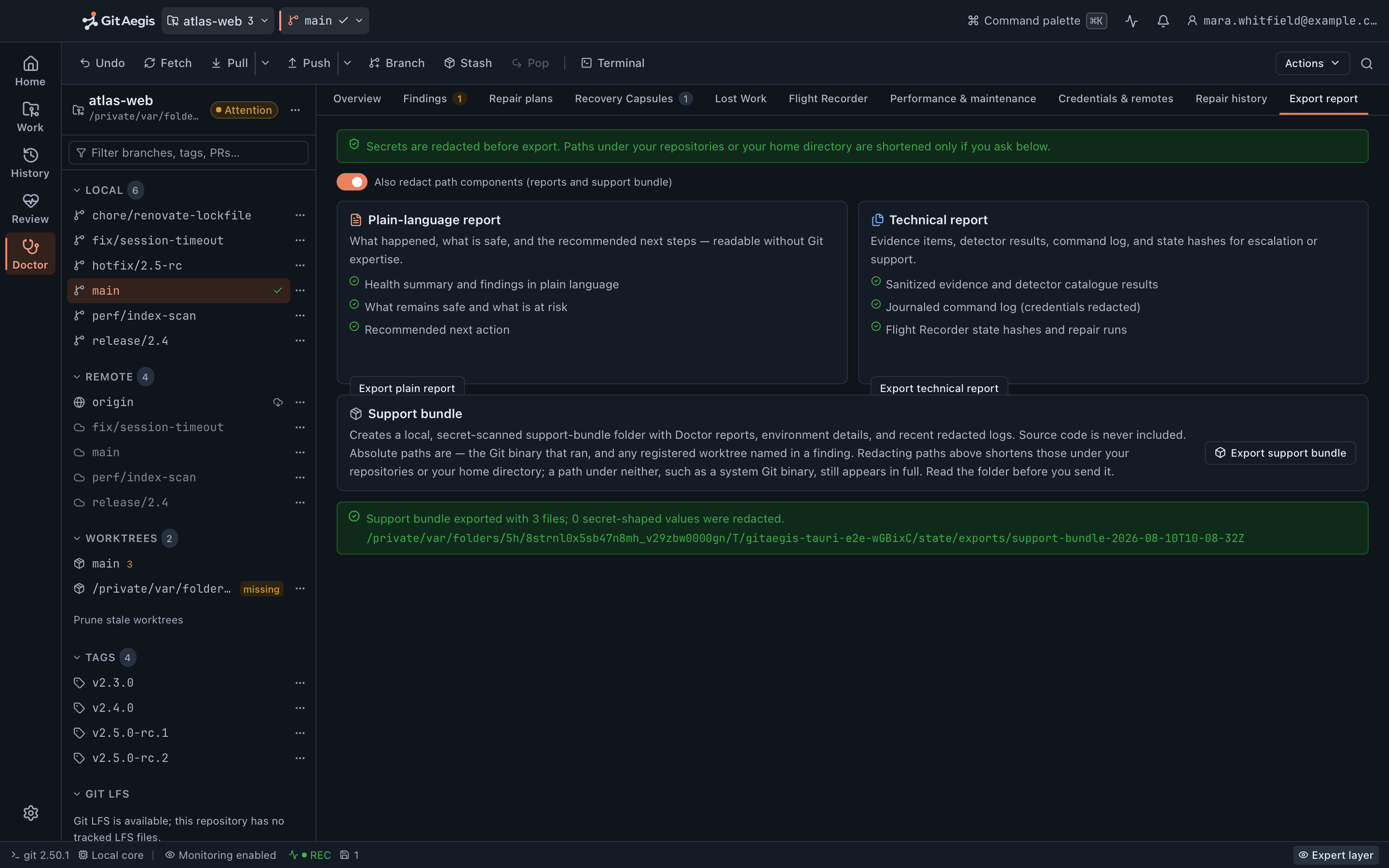
What is in a bundle
Four things, and this is the whole list.
| File | What it holds |
|---|---|
| manifest.json | What the bundle is and when it was made, how many secret-shaped values the scanner replaced, and whether path redaction was on. |
| environment.json | The GitAegis version, the operating system, and the Git runtime that was resolved: its version and the path it was found at. |
| doctor-report.json | The most recent Doctor report for each repository in your catalogue. |
| logs/ | Up to three recent session log files, each secret-scanned before it is copied. |
Never inside a bundle
- Source code, diffs, patches, or file contents of any kind.
- The contents of a recovery capsule.
- Credentials, tokens, and SSH keys: the scanner runs over every part before it is written.
Which means a bundle is usually enough to reproduce a problem without anyone ever seeing your code.
In scope and out of scope
Being specific about this is faster for everyone than discovering it three emails in.
| Request | In scope |
|---|---|
| GitAegis will not install, launch, or open a repository | Full support |
| GitAegis cannot find your Git, or your Git is below 2.38.0 | Full support |
| An operation behaved differently from its Operation Preview | Full support |
| A capsule did not restore what you expected it to restore | Full support |
| Lost Work did not surface a commit you believe is recoverable | Full support |
| A Doctor finding you do not understand, or a repair that failed | Full support |
| Crashes, hangs, and transactions left unfinished after one | Full support |
| Safe Mode engaging when you believe the repository is sound | Full support |
| Accessibility defects: keyboard traps, contrast, screen-reader labels | Full support |
| Documentation or a page on this site that is wrong or missing | Full support |
| Repairing a repository that was already damaged before GitAegis saw it | Partial or limited support |
| A Git installed somewhere GitAegis does not look: a version manager, a custom prefix | Partial or limited support |
| Teaching Git itself: what a rebase is, which branching model to adopt | Not offered |
| Recovering work that was never a Git object and was never captured | Not offered |
| Your Git host's outage, rate limit, or permission model | Not offered |
| Your CI pipeline, build system, or deployment | Not offered |
| Custom development, bespoke integrations, or feature work on request | Not offered |
| Third-party diff and merge tools: GitAegis never runs them, in any mode | Not offered |
| Windows, Linux, and macOS 11 or earlier: there is no build for them | Not offered |
| Accounts, billing, and cloud services: none of them are running | Not offered |
Full supportPartial or limited supportNot offered
◐ means best effort with an honest answer about what is possible, rather than a promise dressed as one.
What GitAegis can put back
- If a recovery capsule was taken, you can roll the operation back.
- If a Flight Recorder event captured a state hash, you can roll back to that state.
- If any reflog entry, ref, branch, stash, or capsule references a commit, Lost Work can recover it.
- Outside those, it cannot, and GitAegis says so instead of pretending otherwise.
On the recovery rows, precisely: we will still look. If a bounded git fsck --unreachable --dangling or a sibling worktree HEAD can reach your commit, Lost Work will find it and we will help you put a branch back on it.
If nothing anywhere references it and nothing wrote it down, no support engineer at any company can produce it, and you will hear that on the first reply rather than the fourth.
Known limits worth knowing before you write
Stating these here saves you a round trip.
What GitAegis will not do for you
- Rebase state is not restored from a capsule. The capsule records that a rebase was in progress and what the refs looked like; it does not rehydrate
.git/rebase-merge. Recovery from a broken rebase is ref-based. - Config is captured as evidence, not restored. A capsule stores your config so you can see what it was at the time. Putting it back is your decision, made by hand.
.gitattributescontent filters cannot be wholesale disabled. If a filter mangles content on checkout, that is a property of the repository’s attributes, and GitAegis will not silently bypass it.- Bisect and a conflicted
stash applyhave no generic resume. Both leave a state GitAegis can describe precisely but cannot generically continue. Doctor will tell you what state you are in and what your options are. - External diff and merge tools are never run, in any mode. Not a setting. Conflict resolution happens inside GitAegis with stage-1/2/3 read.
git gc,git pruneandgit reflog expireare not implemented. If a support answer would require one of them, the answer will be something else.- Git is resolved from standard locations, not from your PATH. A Git installed only by a version manager or under a custom prefix may not be found, and there is no setting in the app to point at it. Write in if that is your setup. It is a gap, and it is recorded as one.
How to escalate
There is one queue, so escalation is a matter of routing rather than of tiers.
Say so in the thread.
Reply with a sentence on why: the impact, the deadline, or the fact that the answer has not moved. It is routed the same day it is read.For a security issue, leave support entirely.
Write to security@gitaegis.com. Do not post details in a public tracker while the issue is open.If you think we got something wrong, say that directly.
A wrong answer, an unhelpful reply, an unacceptable wait: write it in the thread. There is no separate complaints address, and there is no one it would be routed past.
Free edition · No account required
A recovery capsule before every risky Git operation.
You see the exact commands before they run, and the operation is refused if the capsule cannot be written.
Requires Git 2.38.0 or newer, already installed.
Every risky operation, in this order
- Previewthe exact commands, shown before anything runs
- Capsulerefs, index, staged and working changes, untracked files, operation state: written to disk first
- Executethe commands as shown, or not at all
- Journalplan, commands, capsule id, outcome