Native desktop · macOS · Local-first
Git, with a working undo.
Free edition · macOS 12+ · Signed · Account optional · No telemetry · Requires Git 2.38.0+
The undo you think you have isn't one.
You’ve done this. A force push over the wrong branch. A reset --hard one commit too far. A rebase that quietly rewrote six commits. A stash drop on the wrong entry.
And then the recovery: dig through git reflog, hope the object hasn’t been collected, paste a SHA you’re not certain about, and find out whether you got lucky.
That is not undo. That is forensics.
git push --force origin main+ a3f91c2...8e2d011 main -> main (forced update)# ...that was the wrong branch.git reflog8e2d011 HEAD@{0}: commit: wipa3f91c2 HEAD@{1}: checkout: moving from main to feature# which one was the remote on? was it even in the reflog?
What GitAegis does instead
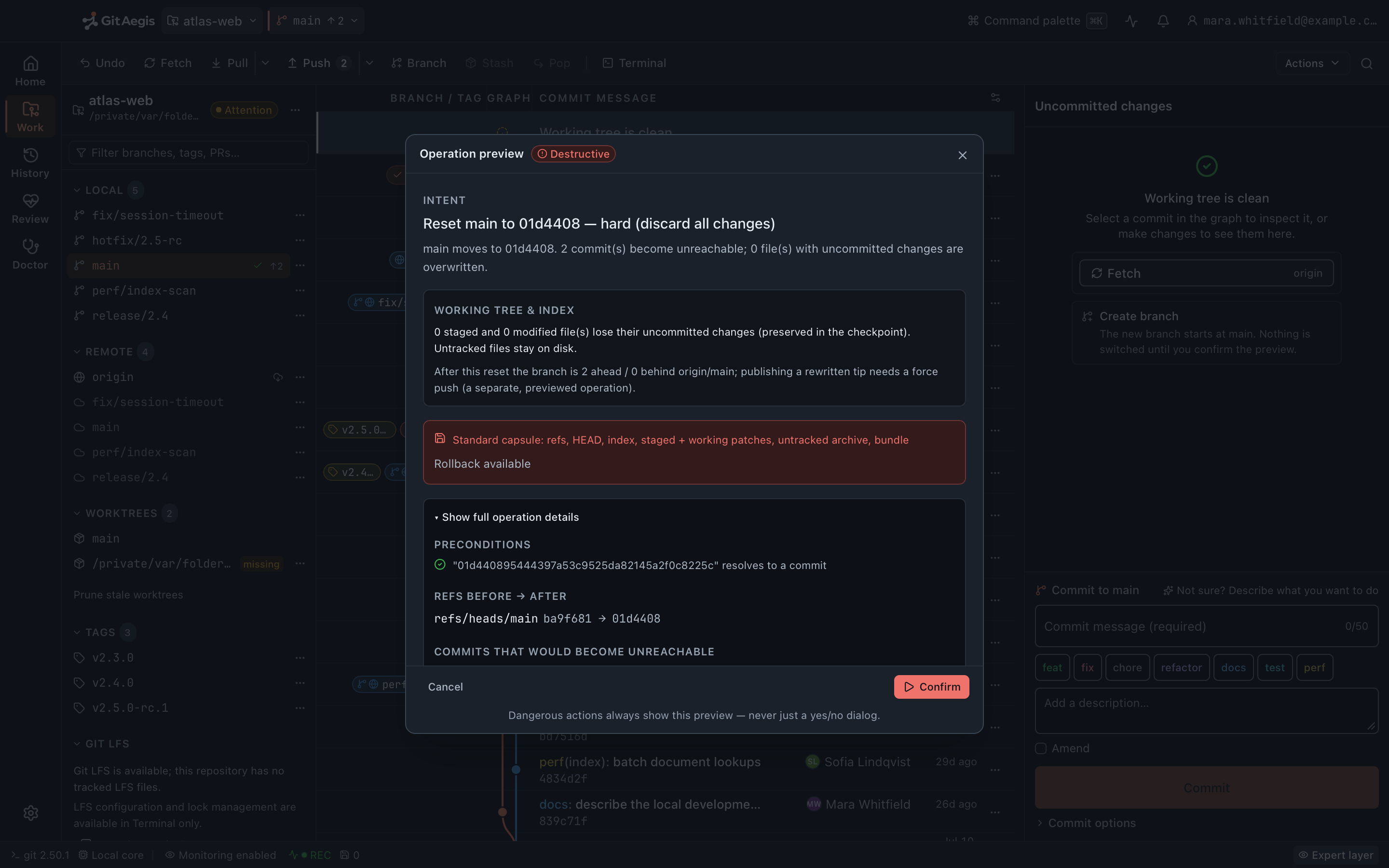
It plans the operation.
Before anything runs, GitAegis produces a plan: the intent, the risk level, the preconditions it checked, the exact commands it will execute, the checkpoint it will take, and the rollback path. Dangerous actions open the Operation Preview drawer. Never a bare “Are you sure?”.It takes the capsule.
A recovery capsule captures six domains: refs, index, staged changes, working changes, untracked files, and operation state. It is written to disk before the first command runs.
- saferemoves nothing: no capsule taken
- cautionreversible with conditions: a light checkpoint
- destructiveremoves or rewrites work: the full six-domain capsule
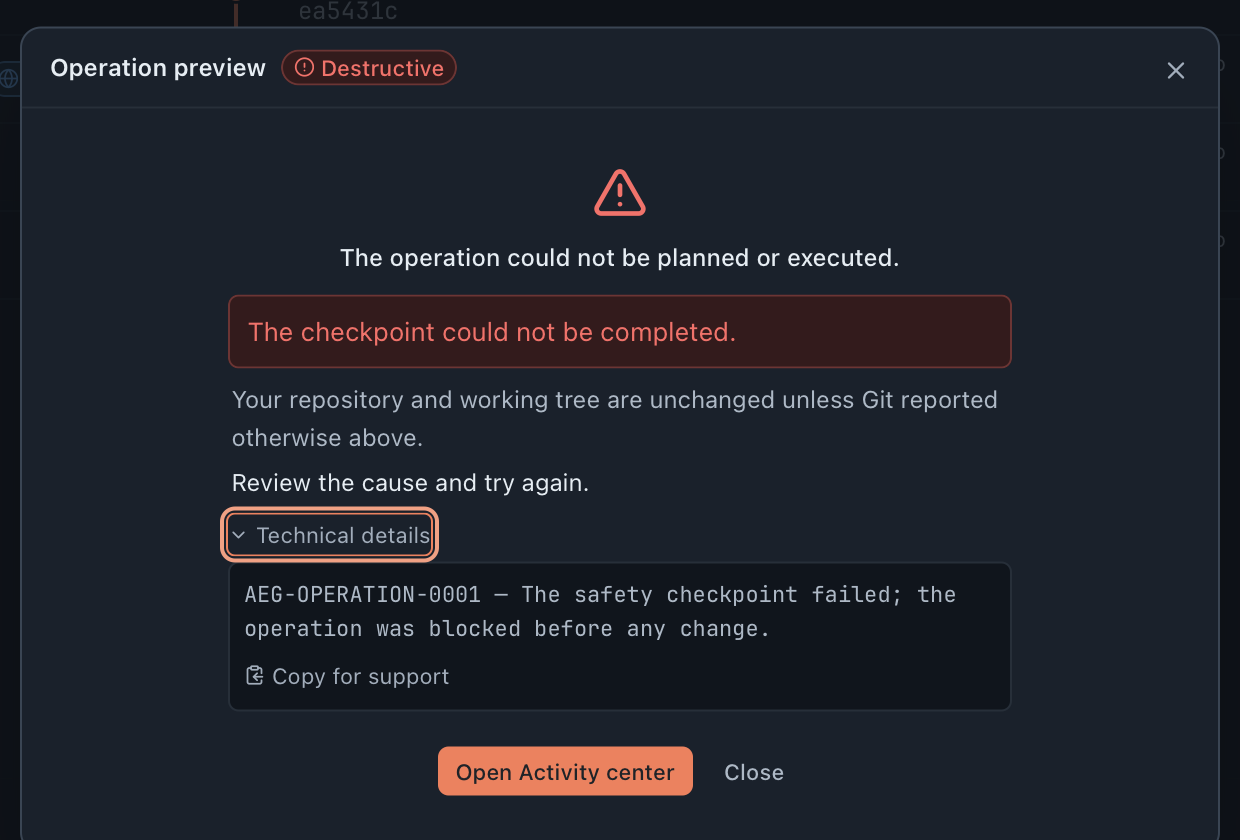
If the capsule fails, the operation doesn't run.
This is the part no other client does. A snapshot that can't be taken means the operation is blocked, not proceeded-with-a-warning.It records what happened, including what it didn't cause.
A filesystem watcher feeds the Flight Recorder, so changes made by your terminal, your editor, or another tool land on the same timeline.It can put it back.
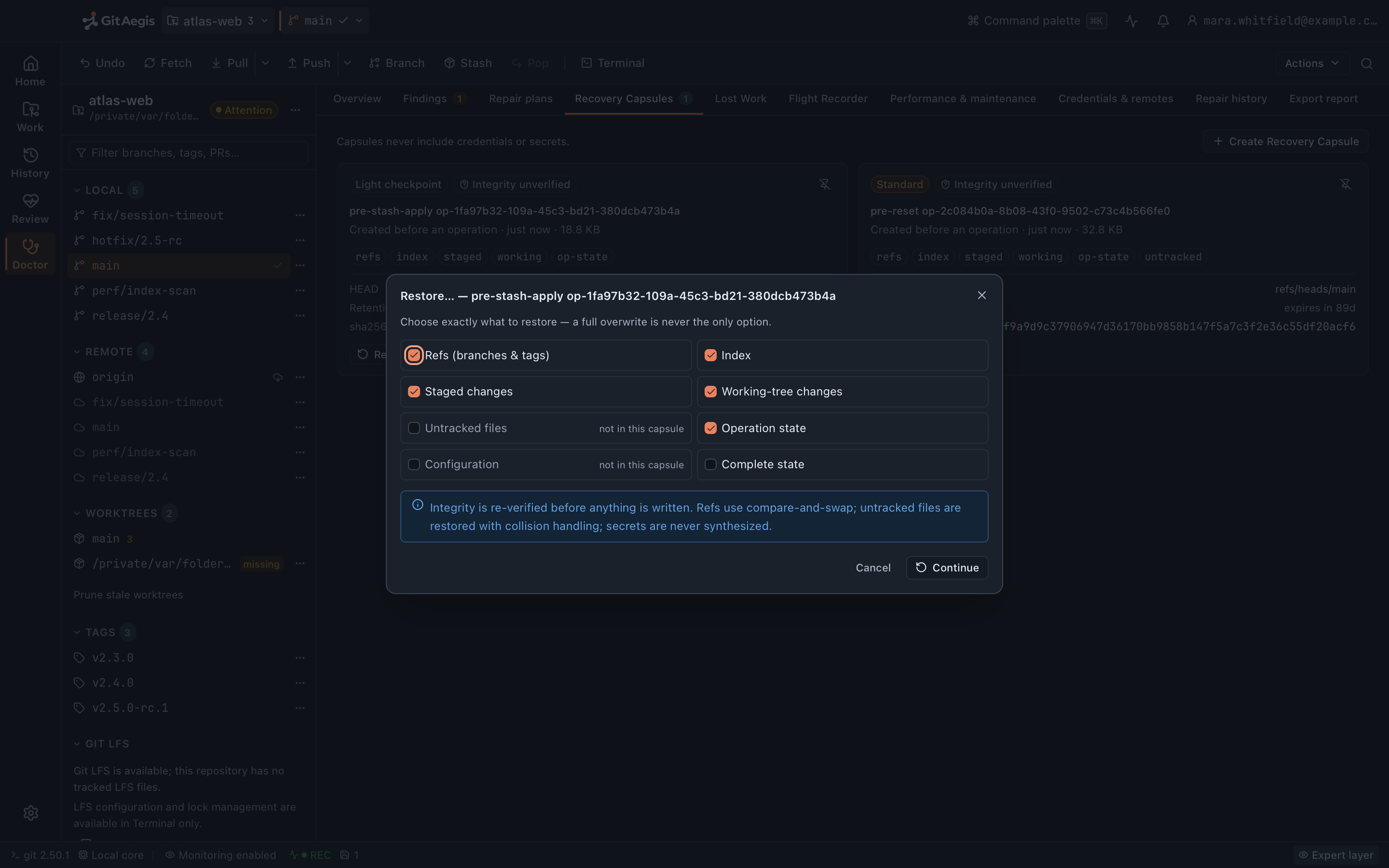
Restore per domain. Refs only. Or the working tree only. Or all of it.
The part no other client does
If the capsule fails, the operation doesn’t run.
Not a warning you can click past: a refusal. Shown here for real: a reviewed reset --hard whose checkpoint could not be written. GitAegis failed the operation before running a single Git command, and the repository is unchanged.
A real capture of the shipping build, down to its error code AEG-OPERATION-0001.
The recovery layer
Recovery Capsules
A six-domain snapshot taken before every risky operation. Restore all of it, or just the part you need.
Read moreFlight Recorder
A timeline of everything that happened to the repository, including the changes GitAegis didn't make.
Read moreLost Work
Finds commits nothing points at any more, across the reflog, stashes, recovery refs, capsule bundles, sibling worktrees, and a bounded fsck. Then offers to put a branch back on them.
Read moreSafe Mode
When the index or HEAD can't be trusted, mutating controls lock out instead of letting you make it worse.
Read moreDoctor
Scans for real damage, shows the evidence, and proposes repairs that take a capsule first.
Read moreOperation Journal
Every mutating operation, with its plan, its commands, its checkpoint, and its outcome. Searchable.
Read moreIt never runs `gc`, `prune`, or reflog expiry.
Most “repository cleanup” tools reach for garbage collection. Those are precisely the operations that destroy recoverable work.
They are not in GitAegis’s repertoire at all. Not behind a confirmation, not behind an advanced toggle: they aren’t implemented.
The three commands that turn a recoverable commit into an unrecoverable one:
git gcnot implementedgit prunenot implementedgit reflog expirenot implemented
It runs your Git, and shows you what it ran.
GitAegis is not a reimplementation of Git. It executes the Git already installed on your machine, with your SSH keys and your keychain credentials, and every command it runs is visible to you.
Subprocesses pin GIT_CONFIG_* and GIT_TERMINAL_PROMPT=0, so a hostile core.fsmonitor in a cloned .git/config can’t execute, and Git can never silently block on a hidden password prompt.
There is no demonstration mode.
If the desktop core is unavailable, the interface says so and stops. It does not fall back to fixture data, and it does not show a surface that isn’t wired to anything.
That principle is enforced in the release gate, not just in the design review.
And everything you'd expect from a daily driver
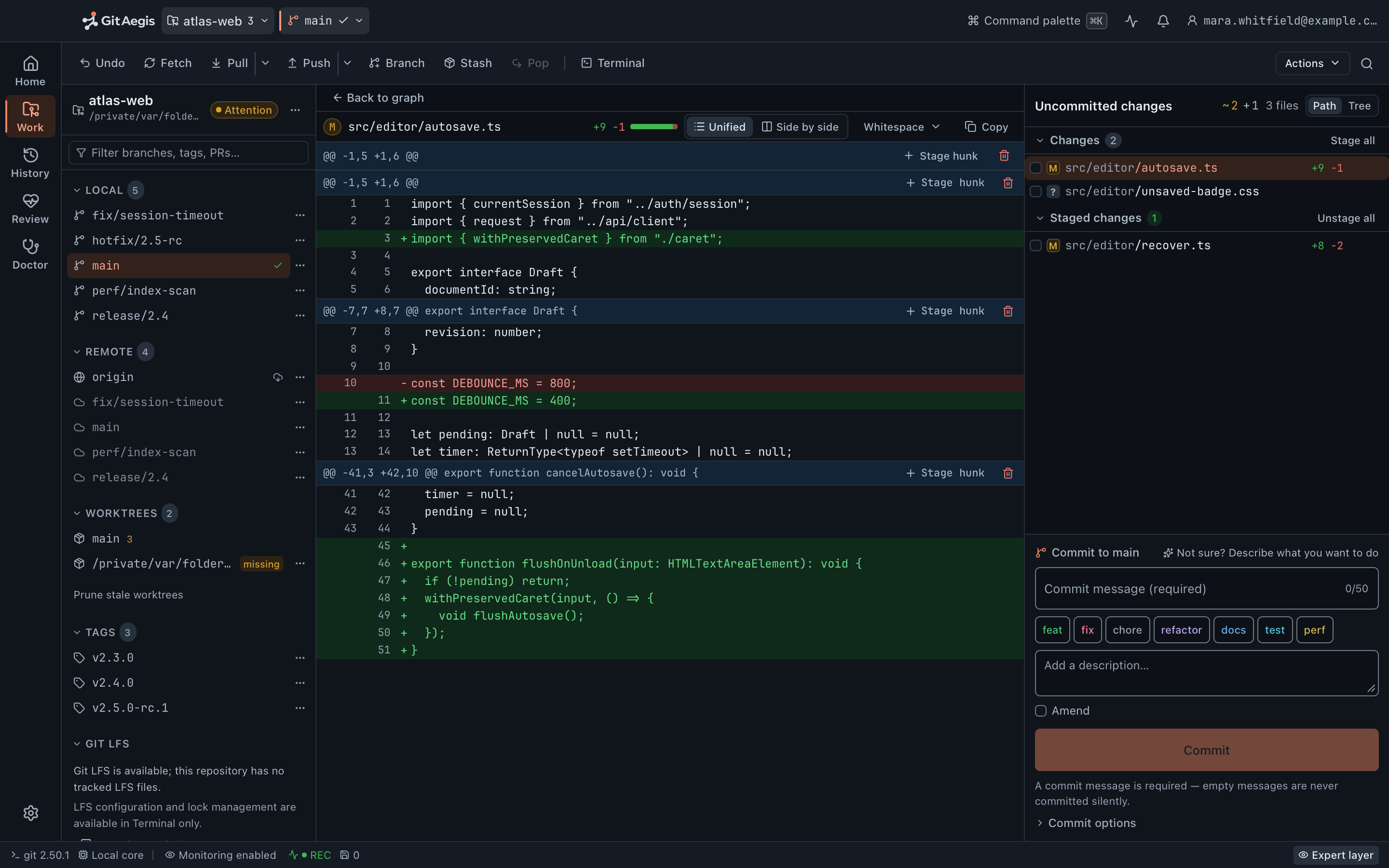
Staging
Hunk-level and line-level, with real diffs.
Branches, tags, remotes, refs
Plus reflog, file history, and blame.
Fetch, pull, push
Including force-push-with-lease, publish, and prune.
Merge, rebase, cherry-pick, revert
Plus reset, restore and clean: each one planned, checkpointed, and rehearsed before it runs.
Conflicts
Detection, stage-1/2/3 read, resolution, and sequencer continue / skip / abort.
Worktrees, stashes, submodules, LFS
Create, lock, prune, apply, init, sync, and LFS status with missing-object accounting.
History
Commit graph, compare, search, and bisect.
Command palette
⌘K over real intents, not a fuzzy list of menu labels.
How it compares
| Capability | GitAegis | Tower | GitKraken | Fork | Sourcetree |
|---|---|---|---|---|---|
| Snapshot taken before the operation | Full support | Not offered | Not offered | Not offered | Not offered |
| Operation blocked if the snapshot fails | Full support | Not offered | Not offered | Not offered | Not offered |
| Restore by domain (refs / index / working / untracked) | Full support | Not offered | Not offered | Not offered | Not offered |
| Timeline of changes made outside the client | Full support | Not offered | Not offered | Not offered | Not offered |
| Dangling-commit discovery tool | Full support | Partial or limited support | Partial or limited support | Not offered | Not offered |
| Locks controls when the index is damaged | Full support | Not offered | Not offered | Not offered | Not offered |
| Published commitment never to run gc / prune / reflog expiry | Full support | Not offered | Not offered | Not offered | Not offered |
| Exact commands shown before execution | Full support | Partial or limited support | Not offered | Partial or limited support | Not offered |
| Native (not Electron)1 | Full support | Full support | Not offered | Full support | Full support |
| Works with no account | Full support | Not offered | Partial or limited support | Full support | Full support |
| Windows | Not offered | Full support | Full support | Full support | Full support |
| Linux | Not offered | Not offered | Full support | Not offered | Not offered |
Full supportPartial or limited supportNot offered
1 Sourcetree is natively built, not Electron; its performance issues are unrelated to Electron.
GitAegis ships for macOS today. Windows and Linux are not offered, and this table records that rather than claiming them. Competitor rows reflect published behaviour as of 9 August 2026.
What GitAegis will not claim
Recovery has a boundary, and pretending otherwise would make the whole product untrustworthy. So, precisely:
What GitAegis can put back
- If a recovery capsule was taken, you can roll the operation back.
- If a Flight Recorder event captured a state hash, you can roll back to that state.
- If any reflog entry, ref, branch, stash, or capsule references a commit, Lost Work can recover it.
- Outside those, it cannot, and GitAegis says so instead of pretending otherwise.
And one thing we will never say
There is no “guaranteed recovery” claim anywhere in this product, and there never will be.
Free edition · No account required
A recovery capsule before every risky Git operation.
You see the exact commands before they run, and the operation is refused if the capsule cannot be written.
Requires Git 2.38.0 or newer, already installed.
Every risky operation, in this order
- Previewthe exact commands, shown before anything runs
- Capsulerefs, index, staged and working changes, untracked files, operation state: written to disk first
- Executethe commands as shown, or not at all
- Journalplan, commands, capsule id, outcome