The recovery layer · Doctor mode ⌘5 · Local edition, no account required
Findings with evidence. Repairs that checkpoint first.
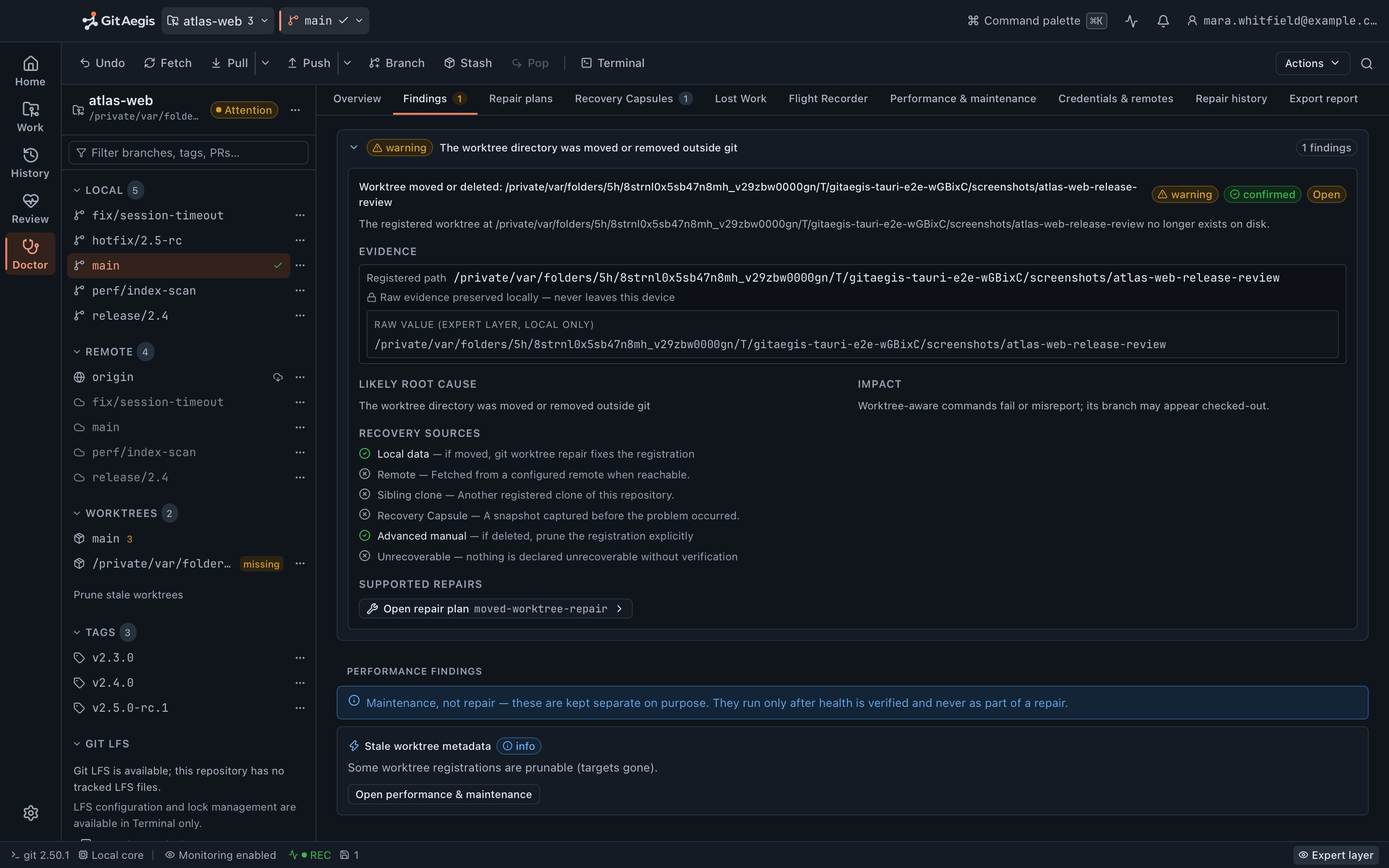
HEAD, an abandoned sequencer, a stale lock, broken submodule wiring) and shows you the evidence behind each finding. Every repair it proposes takes a recovery capsule before it touches anything, and none of them run gc.Read-only scan · Repairs checkpoint first · Never runs git gc, git prune or git reflog expire
Most “repository health” tools are opinions with a cleanup button
There is a pattern in Git tooling: scan the repository, produce a list of things that could be tidier, and offer one button that runs git gc --aggressive --prune=now and calls it maintenance.
Doctor is built the other way round. It reports things that are actually wrong, not style preferences, not “you have a lot of branches”. Every finding carries the evidence that produced it, so you can verify the diagnosis instead of trusting it, and disagree with it where you know better. And the repairs are narrow, checkpointed, and never delete an object.
That button is the single most destructive action available in Git tooling, and it usually has the friendliest label.
# [ Optimise repository ] ← one button, one tooltipgit gc --aggressive --prune=nowEnumerating objects: 41029, done.Counting objects: 100% (41029/41029), done.# every unreachable commit in this repository is now gone.# so is every stash you dropped.
What the scan looks for
Ten detector families, not a sequence: they read files and run read-only Git commands. On a healthy repository the scan is a strict no-op: the report is written into GitAegis's own store, and nothing at all is written into yours.
- detector families in the scan
- 10
- repair recipes in the catalogue
- 8
- severities, separate from confidence
- 4
- bound on the deep connectivity check
- 30 s
Index integrity
Does .git/index carry a valid signature and checksum, is it truncated, what version is it, how many entries parsed, and did git status return an error reading it. Separately: conflict-stage entries left behind with no merge or rebase in progress, which blocks committing until someone resolves it. A failed index parse is one of the two conditions that engages Safe Mode.
HEAD and ref integrity
Does HEAD resolve at all. Are there refs whose files are malformed. Is HEAD detached over commits nothing else holds. Work that would go quiet the moment you switch branches.
Object integrity, bounded
Every ref tip and HEAD is probed with git cat-file -t, which answers presence and type in one read: a ref pointing at a blob or a tree instead of a commit is caught here, as is a ref pointing at an object that is not there at all. A deep scan adds git fsck --connectivity-only under a thirty-second bound, and a failure is recorded as a probe failure that lowers the confidence the report claims for itself. Unreachable and dangling commits are not reported here as problems to clean up. They are usually the work you are about to want back, and they belong to Lost Work.
Operation state
A MERGE_HEAD, CHERRY_PICK_HEAD or REVERT_HEAD still sitting there. A rebase directory, with the sequencer's step count where Git recorded one: step 3 of 11 is a different problem from step 1 of 2. A bisect left running. Each names the operations that are risky or refused while the state persists, and lists the conflicted paths.
Lock files, decided by process evidence
A .lock file is reported against a scan of running processes, never against its age. With a live git process on the machine the lock may be legitimately held, so the finding says so and nothing is touched. With no live git process the lock is an error with a repair attached, because that is the case where age would have been a guess and evidence is not.
Worktrees
Registrations whose directory no longer exists on disk, and two-way .git links that are broken in one direction: the case where Git hides the worktree entirely and your branch state looks inconsistent for no visible reason.
Remotes and upstreams
Remote URLs that will not parse, reported with the URL itself redacted. Branches configured to track an upstream that does not resolve, because the remote ref was deleted or the remote was reconfigured underneath them.
Submodules and LFS
A .gitmodules that does not parse cleanly, with the specific complaint. LFS pointer files whose object is not in .git/lfs and cannot be materialised locally, and pointers that look like pointers but do not parse. LFS locks are read and never taken or broken.
Configuration that executes programs
core.fsmonitor, core.pager, core.sshCommand, diff.*.textconv, credential.helper, core.hooksPath: every config entry in this repository that makes Git run an external program, listed with its value. GitAegis's own subprocesses already refuse to honour them; the finding exists because your terminal will not.
GitAegis's own record
Branches the Flight Recorder saw deleted whose tip is still in the object store and whose name has not come back, joined against the refs that exist now. Plus the capsule position for this repository: how many there are, how much disk they hold, and when the last one was taken, which is the number that decides what any of the rest of this is recoverable from.
Performance signals are kept out of the integrity verdict.
Loose object counts, a missing commit-graph, an untracked cache that is switched off, prunable worktree metadata: all real, all worth knowing, none of them damage. They are reported at info and they are excluded from the repository’s health status, so a slow repository never presents itself as a broken one and a broken one is never softened by a tidy score.
The case file
One finding, read as Doctor filed it
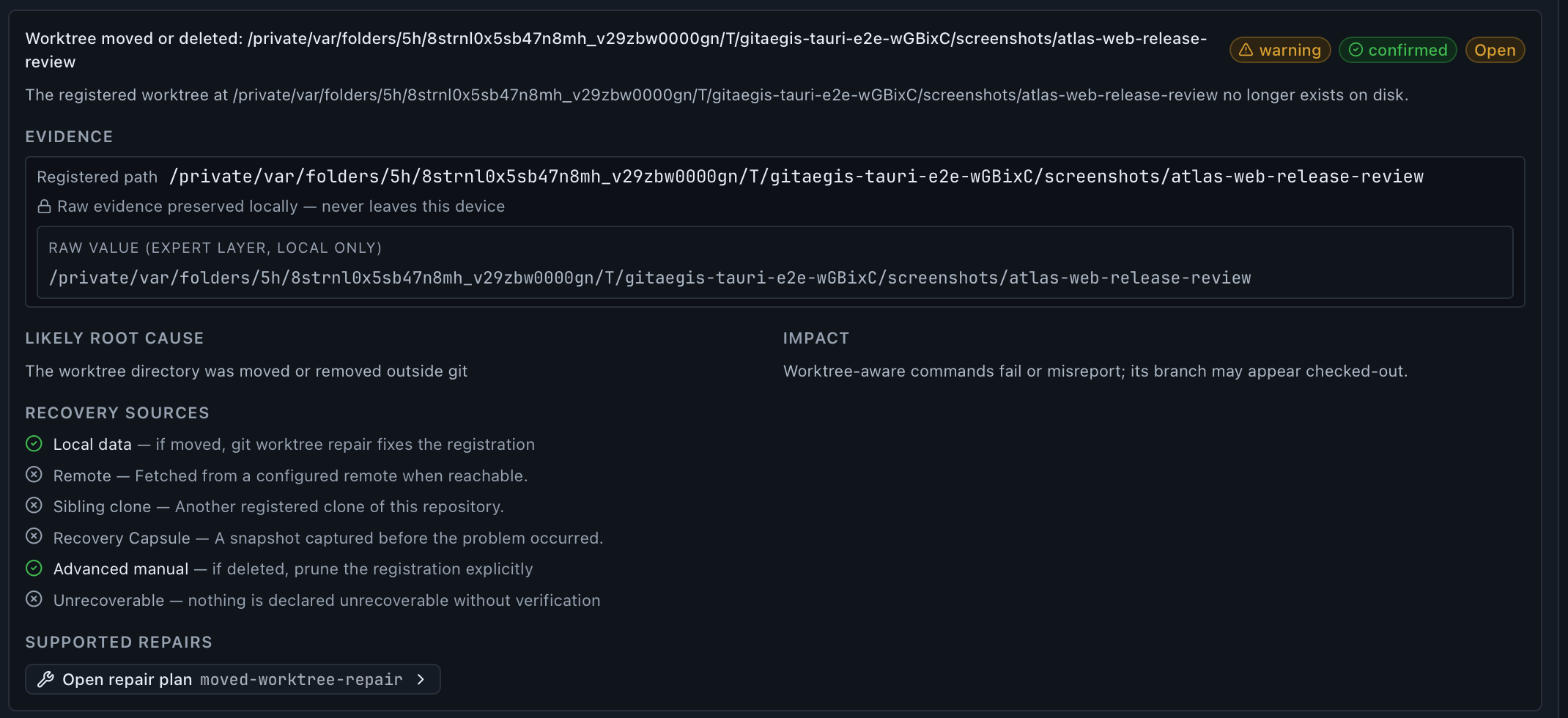
A finding that says “your index may be corrupt” is not useful. A finding that names the exact values it read is something you can act on, and, more importantly, something you can disagree with. Below: a real finding, produced by deleting a registered worktree’s folder outside Git.
The finding
warningconfirmedWhat was checked and what it found, in one sentence: no hedging, no catastrophising, and no “may be corrupt”. Severity and confidence ride on the title, and they are separate on purpose.
The evidence
The raw values that produced the verdict: labelled, in the mono face, copyable, never summarised into prose. Here: the registered worktree path that no longer exists on disk, preserved locally and never leaving the device.
The repair
light capsuleWhere a safe recipe exists it is named from the catalogue: here
moved-worktree-repair, and opens as a plan in the Operation Preview, with a capsule taken before it touches anything.
What every finding carries
- What was checked, and what it found
- A title and one sentence of summary. No hedging, no catastrophising, and no “may be corrupt”.
- The raw evidence
- Labelled values in the mono face and copyable: the index version and entry count, the exact
git statuserror, the lock path with its age and the process evidence behind the verdict, the captured tip oid, the config key with its value. Never summarised into prose. - A severity and a confidence
- Severity is
info,warning,errororcritical. Confidence islow,medium,highorconfirmed, and it is separate on purpose. A serious problem the scanner is not certain about should not be dressed as a certain one. - The likely root cause, and what it implies
- Stated plainly: a crashed Git process left its lock behind; the upstream ref was deleted; config copied from another machine, or planted. Then what it costs you: which operations are blocked, refused or risky while it holds.
- The work at risk
- The specific paths and refs this finding puts in danger, rather than a general warning. A corrupt index lists the staged paths whose intent is still readable out of it.
- Where recovery could come from
- Local data, the remote, a sibling clone, a capsule, an advanced manual route: each marked available or not for this repository, with a note on what that route would actually do. A capsule source is unavailable if no capsule exists, and says so.
- A repair recipe, where a safe one exists
- Named, from the catalogue below. Where none exists the finding says so and points at the manual route instead of inventing a button.
Findings that share a root cause are grouped, so one crashed process does not present as five separate problems. The report carries its own confidence and, when a probe failed, says which one.
Repairs take a capsule first
Every repair is a normal GitAegis operation, so it inherits the whole model: intent, risk level, preconditions, exact commands, checkpoint, rehearsal, rollback plan, journal entry. The repair opens in the Operation Preview showing exactly what it will run, and the capsule is written before the first command. If the capsule cannot be written, the repair does not run: the same rule as everywhere else, and it matters more here, because a repair operates on a repository that is already damaged.
Each recipe publishes what it will do, what has to be true first, what must be true afterwards, how to roll it back, and (unusually) its own known limitations. There are eight, and there is no “fix everything” button:
Rebuild a corrupt index, preserving staged intent
standard capsuleRead the staged path list out of the damaged file, quarantine it, rebuild the index from HEAD, and re-stage every path that was staged before. The working tree is never touched, and the recipe's own limitation is published with it: an entry whose blob content was also lost cannot be re-staged, and is listed in the report.
Quarantine a stale lock file
light capsuleMove a .lock file into quarantine so Git works again. Only after the process scan shows no live git process. Quarantined, not deleted: moving it back is the rollback, and there is no data loss either way.
Recover from an interrupted merge
standard capsuleAnchor the current tip under a recovery ref, abort the merge cleanly, and verify the repository returned to its pre-merge state.
Recover from an interrupted rebase
standard capsulePreserve the current state, abort the rebase, and verify HEAD is back at the pre-rebase tip Git itself recorded.
Recover a deleted local branch
light capsuleRecreate the branch at its last recorded tip (from the reflog head or from the Flight Recorder's capture) with the object verified by hash first, and never overwriting an existing ref.
Preserve work on a detached HEAD
light capsuleAnchor the detached tip under a branch so its commits stay reachable, before anything else is allowed to move HEAD.
Repair a moved linked worktree
light capsuleRun git worktree repair after the worktree's path changed on disk, restoring the registration in both directions.
Repair an invalid upstream mapping
light capsuleClear the upstream configuration pointing at a ref that no longer exists, or re-point it at one that does.
- Build the commit-graph
git maintenance run --task=commit-graph. A derived cache that speeds up every history walk. No object data is touched.- Pack refs
git maintenance run --task=pack-refs. Many loose refs slow ref iteration; packing them changes no value.- Prune stale worktree registrations
git maintenance run --task=worktree-prune. Registration metadata for worktrees that no longer exist on disk. Registrations, not repository content: this is the one place the wordpruneappears in a command GitAegis runs, and it is worth knowing exactly what it removes.- Loose objectsguidance only
- Reported with an estimate and left there. Full repacking is
gc, which is not offered. The description says so rather than hiding behind a missing button. There is no action here in this version. - The untracked cacheguidance only
core.untrackedCacheoff meansgit statusrescans the whole worktree every time. Doctor shows thegit configline and leaves it to you, because it is a change to your configuration and not a repair.
Maintenance, and what is not in it
Doctor has a maintenance section. It is deliberately short, everything in it shares one property, it does not delete objects, and the three runnable tasks are gated three ways: the last scan must have come back healthy, the repository must not be in Safe Mode, and a fresh checkpoint is taken before the task runs. Each one is journalled like any other operation.
git gc, git prune and git reflog expire are not here, and are not implemented anywhere in the product. Where a repository would genuinely benefit from repacking, Doctor reports it, explains the tradeoff, and stops. Deciding to make your history unrecoverable in exchange for speed is a decision you make, in your terminal, on purpose.
Doctor export
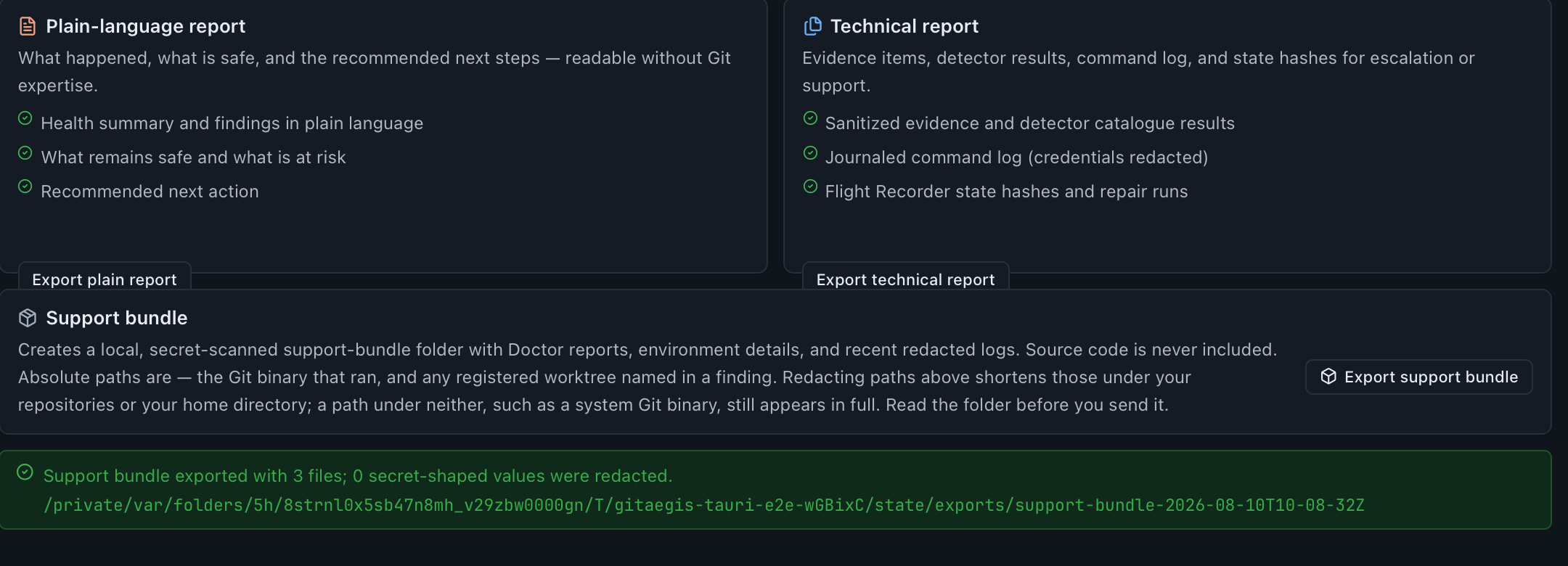
You will eventually need to show this to someone else: a colleague, a platform team, or GitAegis support. Export produces a file you can read before you send it.
Choose the report style.
The
plainreport is written for someone who is not deep in Git internals: what was found, what it means, what to do. Thetechnicalreport carries the raw evidence: the labelled values, the errors, the oids, the config values, the repair runs, and the environment the scan ran in.Choose whether paths are redacted.
Off by default, because absolute paths are frequently the payload: a worktree finding whose entire content is a path says nothing once the path is gone, and
environment.jsonexists to answer which Git binary ran. Turn it on and paths are replaced consistently across the whole report, so the structure and the relationships between paths survive.Secrets are redacted either way.
That one is not a toggle. Every value written is scanned for credential shapes (tokens, keys,
Authorizationheaders, connection strings,.netrc-shaped lines) and matches are replaced before the file is written. The count of redactions is reported back to you with the file, so the number is a fact you can check rather than a reassurance.It is written to a file, and nothing is transmitted.
The export lands on your disk and GitAegis hands you the path and a preview of what it wrote. Sending it anywhere is your action, in your own mail client or ticket system.
Support bundles
A support bundle is the larger version, for when GitAegis itself is the problem: the Doctor report, a record of the environment (application version, OS, the Git it resolved and its version) and copies of the recent application logs.
Every part of it goes through the same secret scan before it is written, the log copies included, and the bundle reports how many redactions it made. Path redaction applies here too, on the same switch. No source code, no diffs, no patches, no file contents, and no capsule contents: the bundle describes the repository’s condition, not its contents.
It is generated to a directory on your disk. GitAegis never transmits one. You attach it to an email to support@gitaegis.com if and when you decide to.
What Doctor does not do
A diagnostic tool that overstates what it can fix is worse than no diagnostic tool, because you stop looking.
Where Doctor stops
It does not repair object corruption. If an object will not resolve, the bytes are damaged. Doctor reports it with the failing probe and points at recovery: a capsule, a refs/aegis/ ref, another clone, or the remote. It will not fabricate a replacement.
It does not delete objects, ever. No git gc, no git prune, no git reflog expire, in any repair or any maintenance action. The repairs that remove something remove a registration or quarantine a lock file, and quarantine means the file is moved, not destroyed.
It does not rewrite history. No repair rebases, squashes, filters or amends. If a finding's only real fix is a history rewrite, Doctor says so and leaves both the decision and the operation to you.
It does not touch the remote. Every repair is local. Doctor never pushes, never deletes a remote ref, and never force-updates anything upstream. In Safe Mode it runs no network step at all.
A clean scan is not a warranty. Doctor checks the conditions it knows how to check, and it publishes its own confidence in the answer: a scan whose probes partly failed says so rather than reporting health. “No findings” means no findings, not “verified healthy”.
Findings cannot be dismissed in this version. There is no per-repository dismissal, no filter by severity or group, and no suppression of a finding you have decided is expected in your setup. Findings are grouped by root cause, and that is the whole of the triage available today.
The object scan is bounded, and says so. Ref tips are probed for the first two hundred refs, and the deep connectivity check runs under a thirty-second bound. A bound that was reached lowers the confidence stated on the report instead of being quietly dropped.
Questions about Doctor
Free edition · No account required
A recovery capsule before every risky Git operation.
You see the exact commands before they run, and the operation is refused if the capsule cannot be written.
Requires Git 2.38.0 or newer, already installed.
Every risky operation, in this order
- Previewthe exact commands, shown before anything runs
- Capsulerefs, index, staged and working changes, untracked files, operation state: written to disk first
- Executethe commands as shown, or not at all
- Journalplan, commands, capsule id, outcome