The recovery layer · Local edition, no account required
You approve a plan, not a dialog.
Runs your system Git · Exact commands always visible · Hooks blocked in Safe Mode · No account required
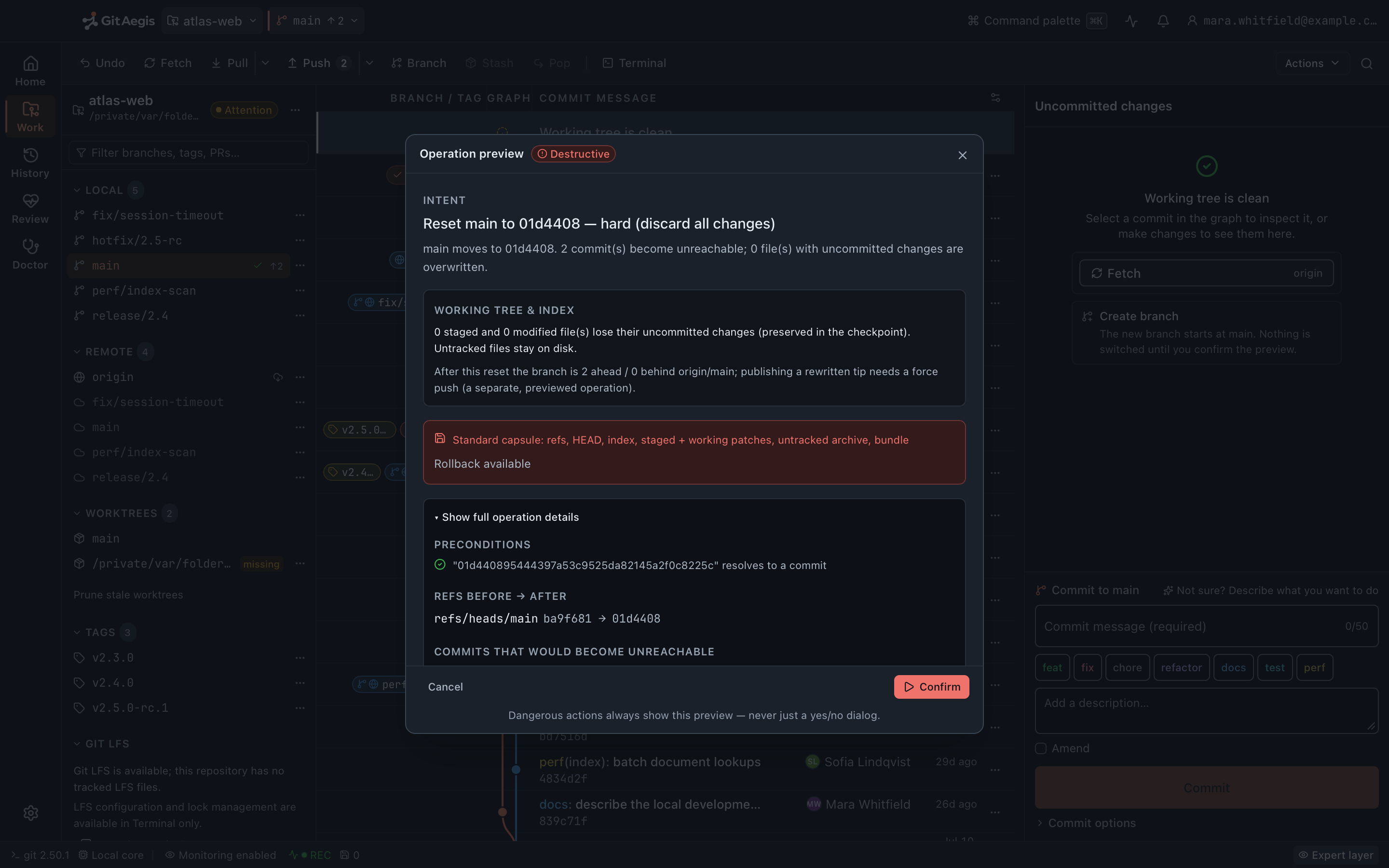
“Are you sure?” is not a safety feature
The modal dialog that asks whether you are sure has three problems, and every developer already knows all of them.
It does not tell you what will run. “Discard changes?” covers git checkout -- ., git restore, git clean -fd, and combinations of them. Which one is it? Which files? Including untracked?
It does not tell you what will be saved. In most clients: nothing.
And it trains you to dismiss it. A dialog you click through forty times a day is not a check, it is a keystroke. The one time it mattered, your hand had already moved.
A plan is different from a prompt, because a plan contains the information you'd need to decline.
# Discard changes? [ Cancel ] [ Discard ]## ...which of these did it mean?git checkout -- .git restore --staged --worktree src/git clean -fd# and which files? including untracked? including ignored?
The operation transaction
Seven stages, one gate, two honest exits
Every mutation (from a fetch to a history rewrite) goes through the same seven-stage orchestrator. Nothing in the app writes to a repository outside it.
- stages in every transaction
- 7
- risk levels a plan can carry
- 5
- terminal states in the journal
- 7
- env vars that survive env_clear
- 4
Intent
Not a command, but a statement of what you are trying to achieve: rebase
feature/payment-retryontoorigin/main, discard working changes insrc/billing/, force-pushrelease/2.4with a lease. The intent is what is journalled, what the preview leads with, and what every stage below is derived from. It is also what the⌘Kpalette searches.Risk level
Every plan is classified before anything else happens, and the classification decides the checkpoint the operation takes and whether the preview must be confirmed. There are five levels, and only one of them earns the danger treatment.
- informational
- Reads the repository and changes nothing.
- safe
- Adds a name or fetches data. Removes nothing, so no capsule is taken.
- caution
- Reversible, but with conditions. Takes a light checkpoint.
- destructive
- Removes or rewrites work. Takes a standard six-domain capsule, and will not run without one.
- blocked
- The plan cannot proceed. It is shown with the reason, not executed and not queued.
Preconditions
Checks that must hold before anything is written: is the ref still at the oid the plan assumed, is the branch name free, does the upstream resolve, is a sequencer already in progress, is the candidate still a commit. Each one is listed in the preview with its result, and the failing ones are pulled to the top rather than buried. A failure stops the plan here, before the checkpoint and before any command.
Exact commands
The literal
gitinvocations, in order, with their real arguments, in the mono face and copyable. Not a paraphrase and not a category. If the plan runsgit push --force-with-lease=refs/heads/release/2.4:8e2d011 origin release/2.4, that string is what you read, and the journal records the same argv the preview showed.
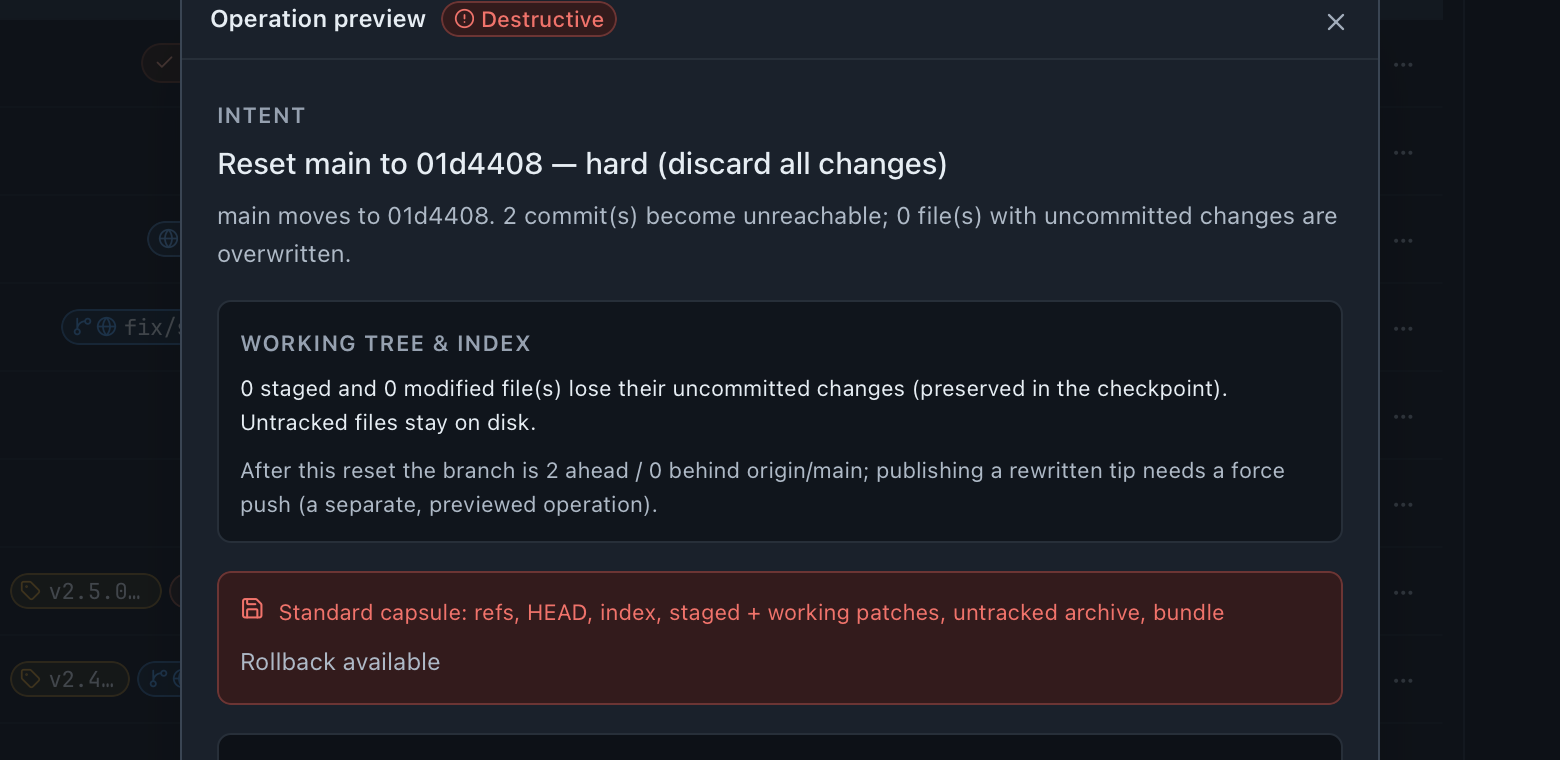
The danger treatment belongs to destructive and to nothing else, in the product and on this site. A colour that gets used for emphasis stops meaning anything, and this one has to keep meaning something.
Checkpoint: no capsule, no operation
The recovery capsule, written to disk before the first command runs. A destructive plan takes a standard capsule across all six restorable domains; a caution plan takes a light checkpoint: refs, HEAD, index metadata, staged and working patches, and Git operation markers. If the capsule cannot be written, the operation is not executed: the journal entry ends in failed, the error names the checkpoint as the cause, and no Git command ran. No control in the interface waives that.
The capsule is written
Six domains on a destructive plan, a light checkpoint on caution, on your own disk, before the first command. The transaction continues.
Rehearsal
Where Git offers a way to find out without committing, GitAegis uses it first, and the preview grades the answer rather than presenting all rehearsals as equal:
deterministicwhen the outcome is computed,highwhen a remote's own hooks or policies could still differ,advisorywhen the prediction is a guess with a reason, andunavailablewhen the operation cannot be rehearsed at all. An empty pass is never shown in place of the last one.Rollback plan
Written before execution, not derived afterwards: which capsule to restore, whether a rollback is available at all, how long the capsule will be kept, and the steps the rollback itself would run. It is on screen while you decide, because “can I undo this?” should be answered before you press the button rather than after.
Execute: the exact commands, as shown
Then the orchestrator re-reads the repository and records whether the plan’s claim came true. The recovery branch points at the commit you picked, the remote branch is gone, the ref moved where the plan said it would. Those validation results are part of the journal entry, so a command that exited
0without achieving what it was for is visible rather than counted as a success.
The capsule cannot be writtenoperation refused
The journal entry ends in failed, the error names the checkpoint as the cause, and no Git command ran. No control in the interface waives that.
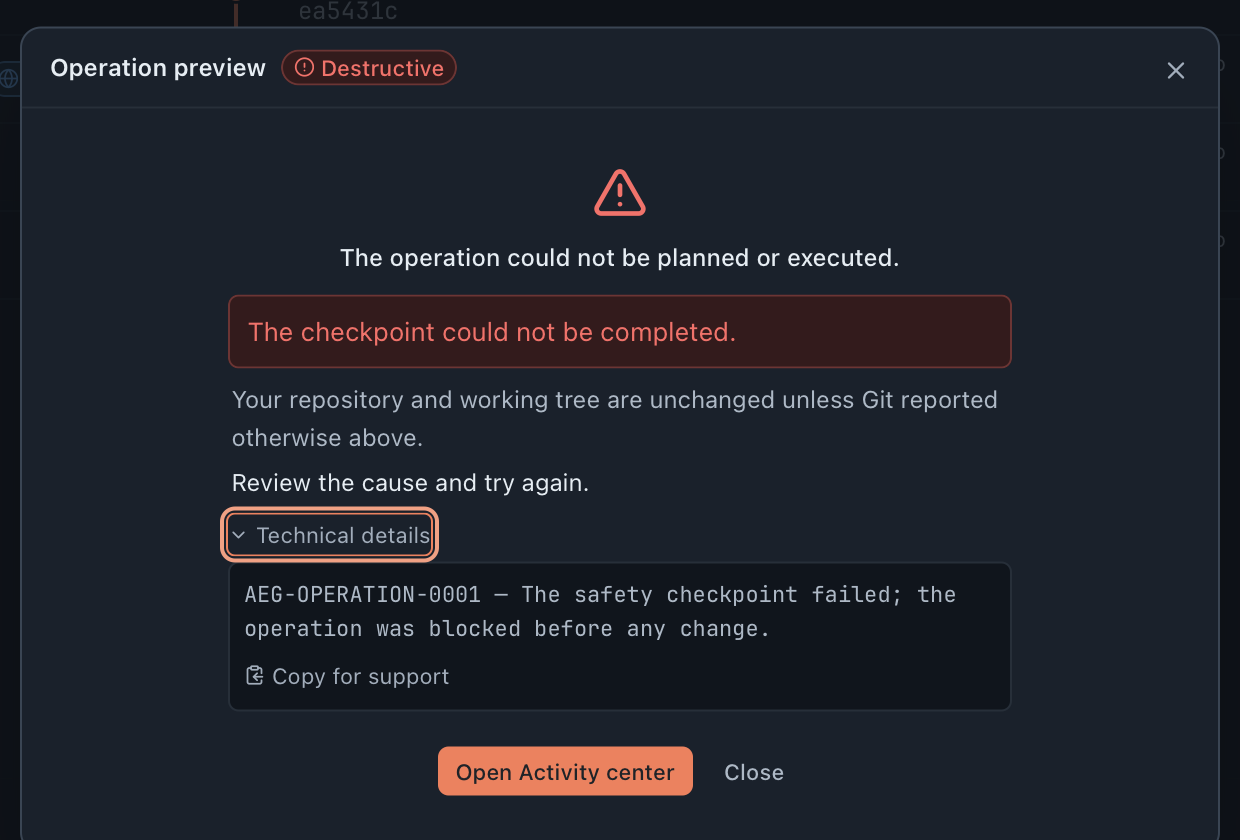
Dead end, by design. Nothing ran, so there is nothing to undo.
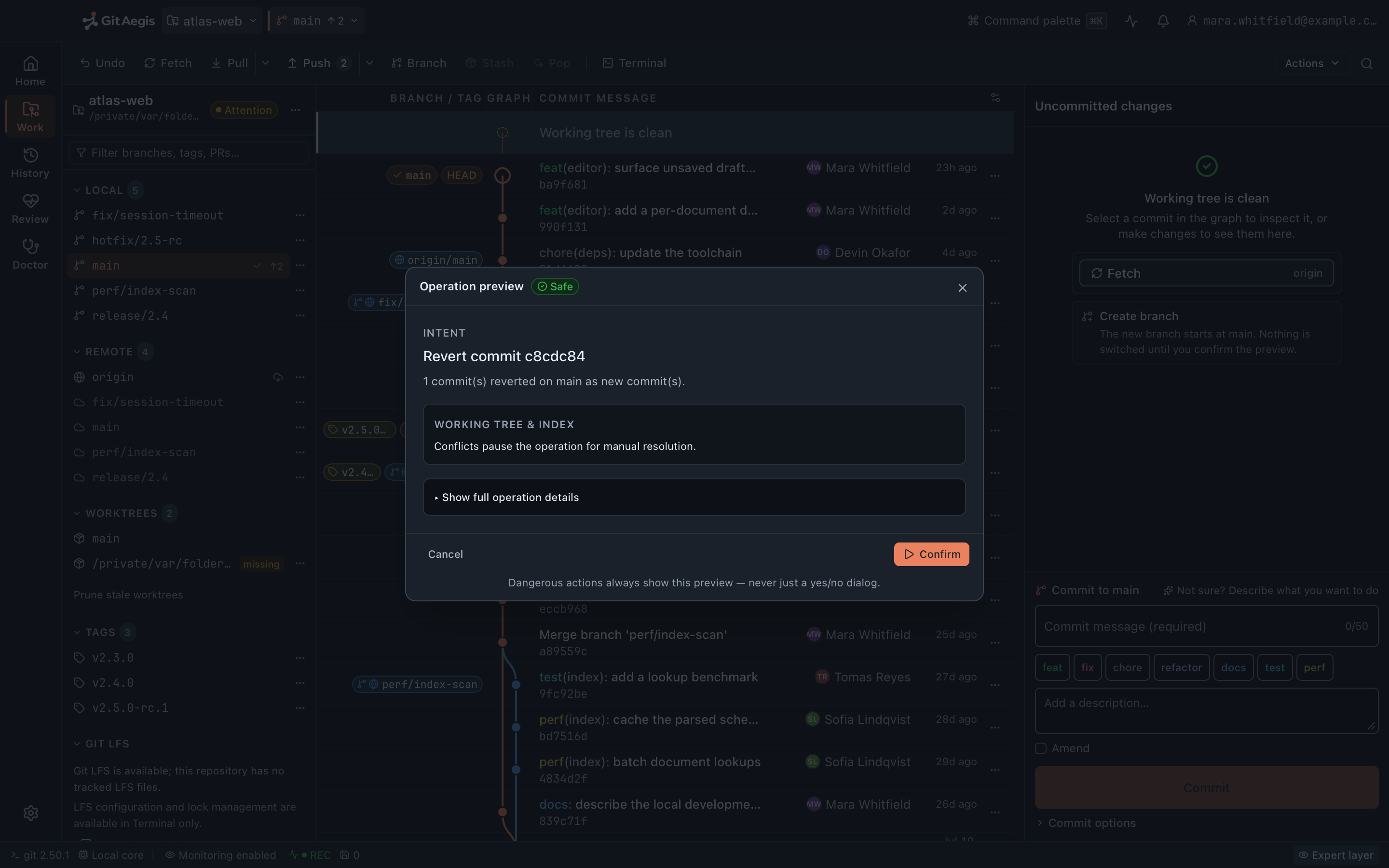
The Operation Preview
It leads with the intent in one sentence and the planner’s plain-language summary, then the working-tree implication and the remote implication, in that order, because that is the order you decide in.
Below it: the files this operation would overwrite, delete or leave conflicted, each set listed and scrollable rather than counted; the checkpoint scope, coloured by risk; whether a rollback will be available and until when; and every failing precondition pulled up where you cannot miss it.
Everything else is one disclosure away and is genuinely everything: all the preconditions with their results, the refs with their before and after oids, the commits this would make unreachable (flagged where they are reachable from somewhere else) the commits it would rewrite, the rollback steps, the alternatives the planner considered, the rehearsal grade with its limitations, and the exact commands with a copy control.
Cancelling leaves the repository untouched, because nothing has run.
The Operation Journal
Every mutating operation is recorded: the intent, the risk level, the steps with their individual status, the exact commands, the validation results, the capsule id, the timestamps, the refs before and after, and the outcome. Seven outcomes are possible, and they are distinct on purpose.
Its most useful state is the boring one: three weeks later, when a colleague asks what happened to release/2.4, the answer is a journal entry with the commands in it, not a memory.
The journal lists per repository. There is no filter by risk, outcome, ref or time range in this version, and no free-text search across entries.
The seven terminal states
succeeded- Every command ran and every post-check passed.
partially-succeeded- Some commands ran, some did not, and the entry records which is which.
failed- The operation stopped. The exit code and the redacted error are on the entry.
rolled-back- The capsule was restored and the repository is back where it started.
compensated- The effect was reversed by a compensating operation rather than a restore.
requires-intervention- Nobody can safely decide this automatically. Every in-flight entry becomes one of these after a crash.
cancelled- You stopped it, at a point where stopping was safe.
Crash reconciliation
A process can die mid-transaction. The laptop sleeps and the connection drops during a push. The app is force-quit. The OS kills it under memory pressure.
The journal entry is written before execution begins, so on the next launch every entry still sitting in an in-flight state (ready, checkpointing, simulating, executing, validating) is reconciled to requires-intervention, with the sentence the journal writes onto it: the app stopped while this operation was in flight, its steps up to the last journalled command completed, and anything after that did not run.
GitAegis will not guess. It does not auto-roll-back, because a partially applied operation whose second half you already fixed by hand is a state only you can classify. It surfaces the fact, with the capsule still on disk and the commands it managed to record.
A journal entry still in flight when the app stopped…
readycheckpointingsimulatingexecutingvalidating
…is reconciled to requires-intervention on the next launch
With the sentence the journal writes onto it: the app stopped while this operation was in flight, its steps up to the last journalled command completed, and anything after that did not run. The capsule is still on disk, with the commands it managed to record.
Safe Mode
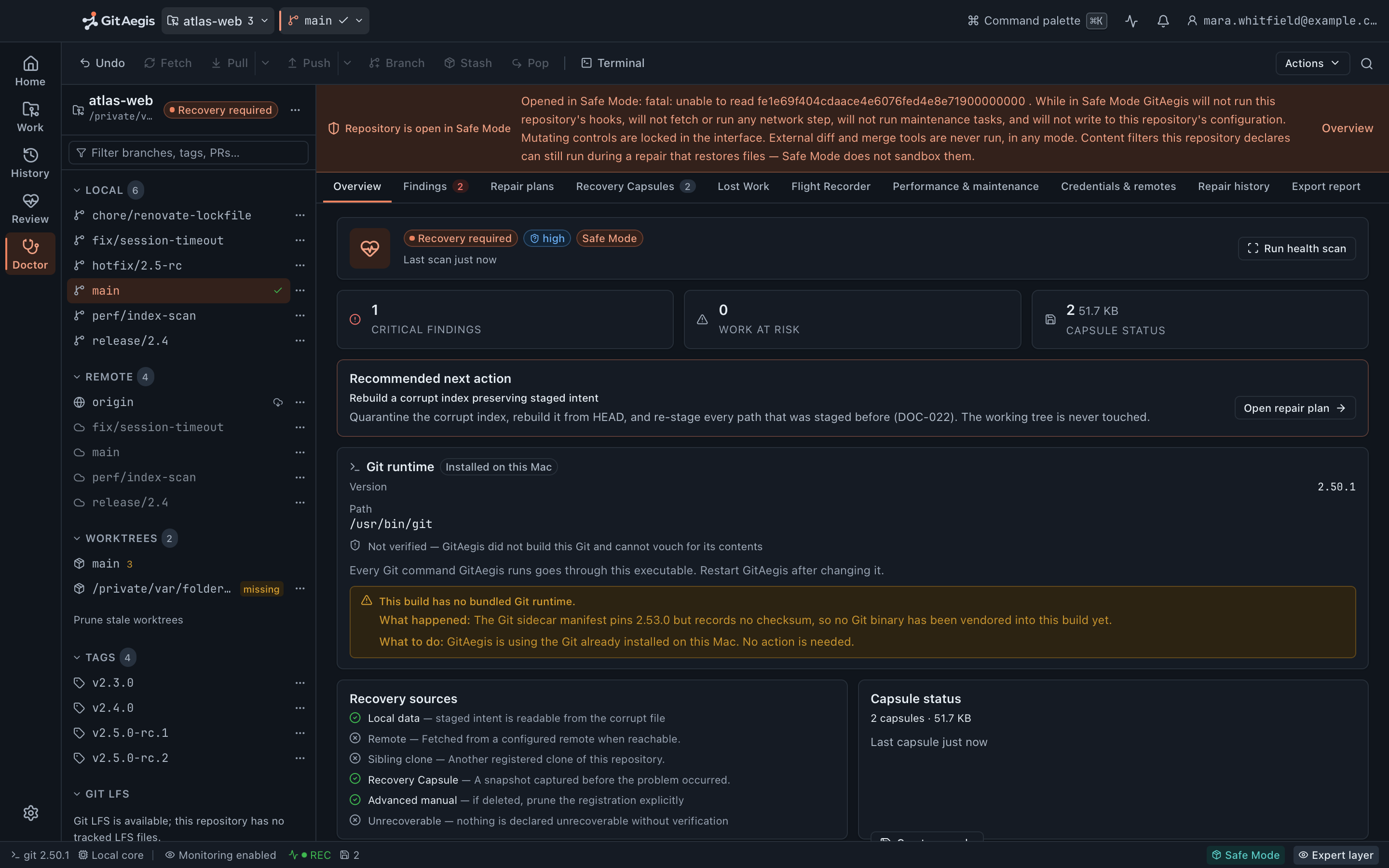
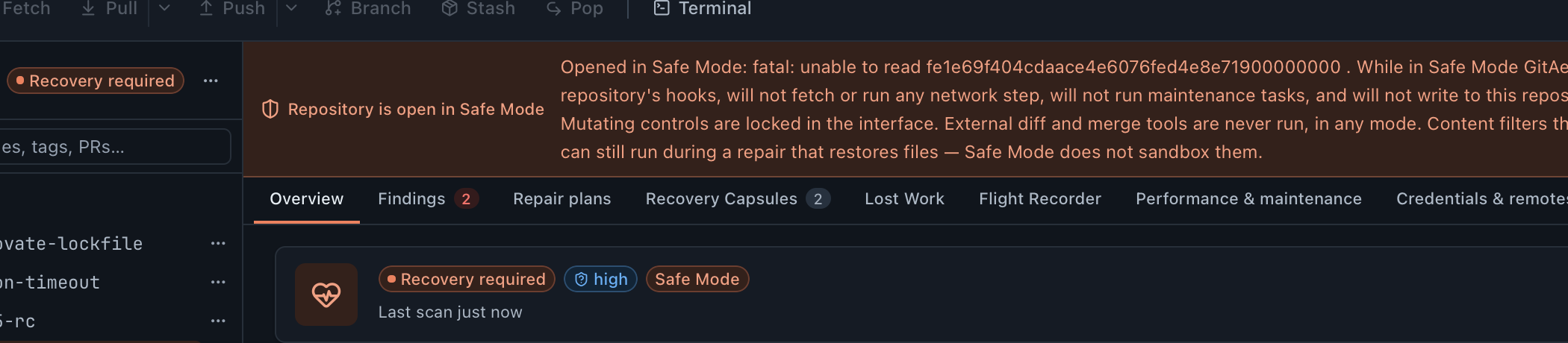
When the index or HEAD cannot be trusted, the correct behaviour is to stop letting people operate. Safe Mode engages when the index fails its signature or checksum, is truncated, or cannot be read at all, or when HEAD is missing or will not resolve. The banner states which of those it was, in the words of the error itself.
- Mutating controls lock out in the interface. Commit, stage, merge, rebase, reset, clean, push and branch operations stop being offered.
- This repository's hooks do not run:
core.hooksPathis pinned to/dev/nullon every subprocess, not just the read-only ones. - No network step runs. No fetch, no push, no remote probe.
- No maintenance task runs, and nothing is written to the repository's configuration.
- Read paths stay open. History, diffs, refs and the Flight Recorder are all still readable, because diagnosis needs reading and reading cannot make it worse.
- Recovery stays available. Capsule restore and Lost Work both work in Safe Mode; they are the reason it exists.
Safe Mode is not a preference and there is no switch, not even a disabled one. A permanently greyed-out toggle would still advertise a capability the product does not have. You clear the condition, and Doctor is how.
One thing it does not do, stated because the app states it: a content filter this repository declares in .gitattributes can still run during a repair that restores files. The filter set cannot be enumerated before the command, and pinned config can set a value but never unset one. Safe Mode does not sandbox that, and does not claim to.
How subprocesses are hardened
GitAegis runs your system Git (the copy you installed) rather than reimplementing it or bundling one. That is a deliberate trust decision: your Git, your keys, your keychain. It also means the subprocess environment is part of the security model, so every invocation is built rather than inherited.
# Every git subprocess GitAegis starts, in every mode.
env_clear()                            the child inherits no environment at all
PATH · HOME · TMPDIR · SSH_AUTH_SOCK   re-added, and nothing else
LC_ALL                               = C
GIT_TERMINAL_PROMPT                  = 0

# Config pinned through GIT_CONFIG_COUNT / GIT_CONFIG_KEY_n / GIT_CONFIG_VALUE_n.
# Highest precedence: a repository's own config cannot override these.
core.fsmonitor                       = false
core.pager                           = cat
protocol.ext.allow                   = never
core.hooksPath                       = /dev/null   in Safe Mode, and on read-only
                                                   subcommands in every mode

# Appended after the subcommand, because these are per-command options and
# have no environment equivalent.
git diff … --no-textconv --no-ext-diff
Why the environment is cleared rather than filtered. Git reads a long list of variables, and an allowlist of four is auditable in a way that a denylist never is. PATH, HOME, TMPDIR and SSH_AUTH_SOCK go through because credentials and transport need them. Nothing else does, which also means no GIT_CONFIG_* the parent process happened to be carrying can reach the child.
Why config is pinned. Git config can execute programs. core.fsmonitor, core.pager, diff.*.textconv, core.sshCommand and the credential.helper chain all name commands Git will run. A .git/config that arrived with a clone from a repository you do not control should not be able to execute code because you opened it in a GUI. The pins go in at the highest precedence Git offers, so the repository cannot override them, and they go in through the environment rather than as -c arguments, because the argv the preview showed you has to be the argv that ran.
Why GIT_TERMINAL_PROMPT=0. Git has no terminal here. Without it, an authentication path that wants a password blocks forever on a prompt nobody can see, and the operation appears to hang. With it, Git fails immediately with a real error and GitAegis shows you an authentication failure instead of a spinner.
Why hooks are treated by mode. A hook is arbitrary code running inside your Git operations. On read-only commands there is no reason to run one, so core.hooksPath is pinned to /dev/null for them in every mode. In Safe Mode it is pinned for everything, including the write commands a repair issues, because a repository in an unknown state is not a repository whose hooks should be running.
External diff and merge tools are never launched, in any mode. --no-textconv and --no-ext-diff go on every diff porcelain command, and protocol.ext.allow=never closes the ext:: transport. GitAegis renders diffs and drives conflict resolution itself, and never hands your repository to a program named by a config value.
Every command is visible. Not a subset, not the interesting ones. The plan shows what will run; the journal shows what did run, with its status and its output. If GitAegis executed it, you can read it.
What the operation model does not do
The model is worth exactly as much as the boundary around it is honest, so here is the boundary.
Where the model stops
It only governs operations GitAegis runs. A git reset --hard in your terminal does not go through the orchestrator, takes no capsule, and is subject to no precondition. The Flight Recorder will record that the refs moved; nothing could have stopped it. Flight Recorder →
Not every operation can be rehearsed. Git offers a dry run for some commands and nothing for others. Where a rehearsal is impossible the preview grades it unavailable and says why, rather than showing a pass you would read as a guarantee.
A rehearsal is a prediction, not a promise. It runs against the repository as it is at that moment. If a concurrent process or a remote moves between the rehearsal and the run, the result can differ, which is why the rehearsal that involves a remote is graded high rather than deterministic.
The capsule is verified when you restore from it, not when it is taken. Capture writes the capsule and its checksums.json; the integrity check that reads those checksums back runs on the restore path. A capsule that could not be written blocks the operation. A capsule that was written but is later found damaged is caught at the moment you need it, and reported then. How capsules work →
Some operations take no capsule at all, by design. A safe plan takes none, because it removes nothing. Worktree removal, submodule update and LFS fetch take none at any risk level, because a capsule taken through the primary worktree could not restore a linked worktree's files or an LFS object cache, and a checkpoint the plan cannot honour is worse than no checkpoint, so the plan says “none” instead.
Rollback is bounded by what the capsule holds. Restoring puts back refs, HEAD, the index, the staged and working patches, and the untracked archive. Rebase state is recorded as evidence and not replayed (the restore says so in its own notes) and the captured config is never written back over yours.
A push cannot be rolled back locally. A capsule restores your local refs. It cannot un-push. Force pushes default to --force-with-lease, the lease value is in the plan, and GitAegis writes refs/aegis/recover/<branch>-pre-force-push at the previous remote tip, so pushing the old state back is possible, but it is a new operation with its own plan, and it depends on the remote still having the objects.
Safe Mode cannot be switched off. By design. If you need to operate on a repository GitAegis considers untrustworthy, the path is a Doctor repair or your own terminal, and GitAegis will not pretend it can vouch for the result of the second one.
Questions about the operation model
Free edition · No account required
A recovery capsule before every risky Git operation.
You see the exact commands before they run, and the operation is refused if the capsule cannot be written.
Requires Git 2.38.0 or newer, already installed.
Every risky operation, in this order
- Previewthe exact commands, shown before anything runs
- Capsulerefs, index, staged and working changes, untracked files, operation state: written to disk first
- Executethe commands as shown, or not at all
- Journalplan, commands, capsule id, outcome