For solo developers, freelancers, contractors and open-source contributors
When it goes wrong, you are the incident response team.
Free edition · No account · macOS 12+ · Uses the Git 2.38.0+, SSH keys and keychain you already have
The failure mode isn't the mistake. It's being alone with it.
Working on your own doesn’t make you worse at Git. It removes the two things that usually rescue people: someone to ask, and a copy of the work on somebody else’s machine.
So the same incident plays out differently. A rebase goes sideways at 1am. On a team, someone else still has the branch. On your own, the reflog is the whole search party, and you’re reading it in the state where you are least able to reason about SHAs.
Nothing is pushed yet. The work that matters most is usually the work that only exists locally: three days of staged changes, a scratch file that isn’t tracked, a rebase that’s half-done. None of it is in the reflog, and none of it is on a remote.
Your machine is the only copy. Backups run nightly, if they run. A repository restored from a nightly backup is a repository as of last night.
Work is spread across machines. A laptop, a desktop, a machine at a client site. The place your history lives depends on where you were sitting.
The reflog will tell you where you have been. It will not tell you what was in your index.
git rebase --onto main feature/api-keys~3 feature/api-keysAuto-merging src/auth/session.rsCONFLICT (content): Merge conflict in src/auth/session.rsgit rebase --aborterror: could not read '.git/rebase-merge/head-name': No such file or directorygit statusHEAD detached at 4c1e8b9
What GitAegis does with the same rebase
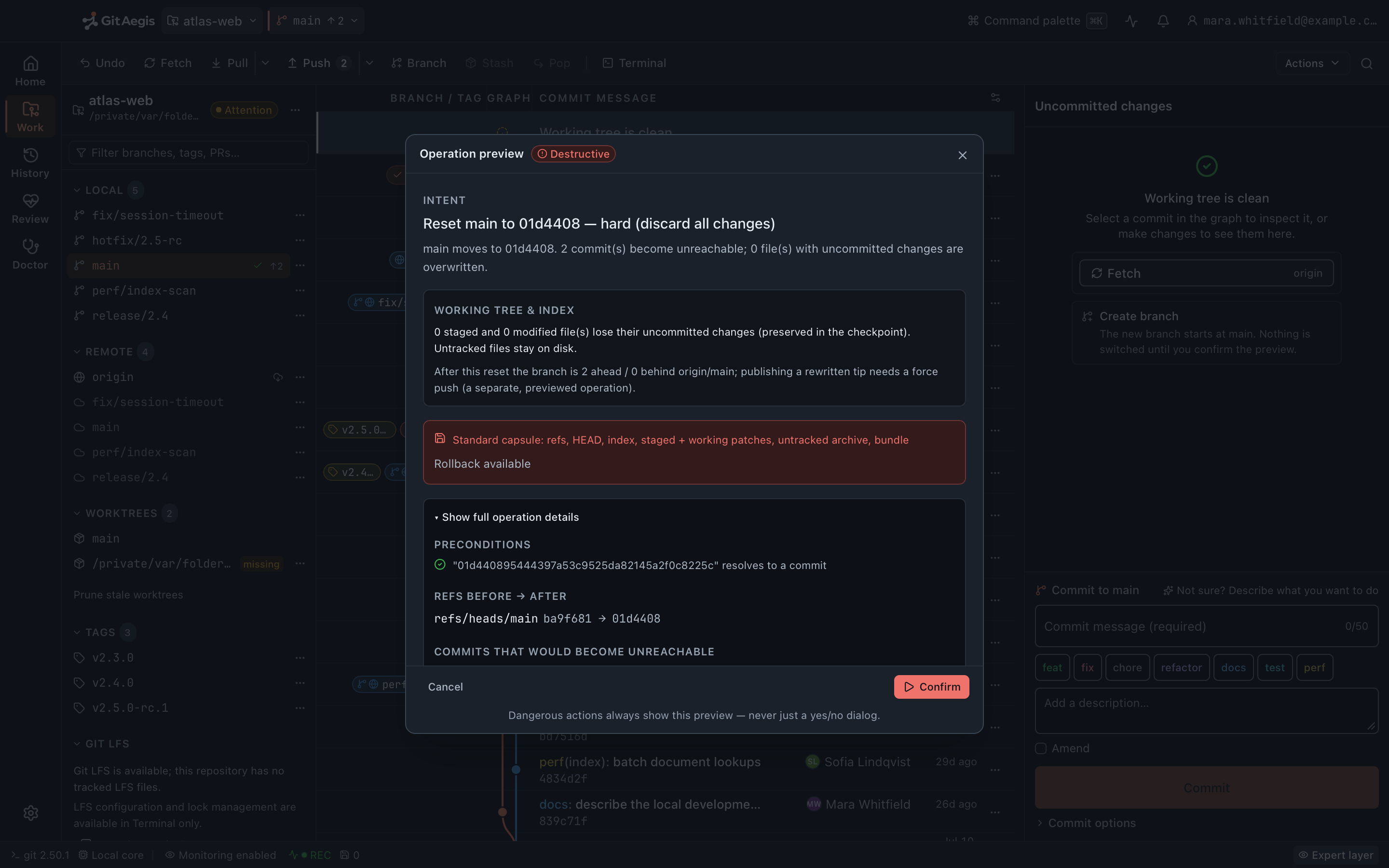
It shows you the plan before it starts.
Intent, risk level, the preconditions it checked, the exactgitcommands it will run, the checkpoint it will take, and the rollback path. A destructive operation opens the Operation Preview drawer. There is no bare confirmation dialog anywhere in the product.It takes the capsule first.
Six domains, written to disk before the first command executes: refs, index, staged changes, working changes, untracked files, operation state.If the capsule can't be written, nothing runs.
Not a warning you can dismiss. The operation is blocked, and no control in the interface waives it. You get the reason, the domain that failed, and the chance to fix the condition and try again.It records what happened, including what it didn't cause.
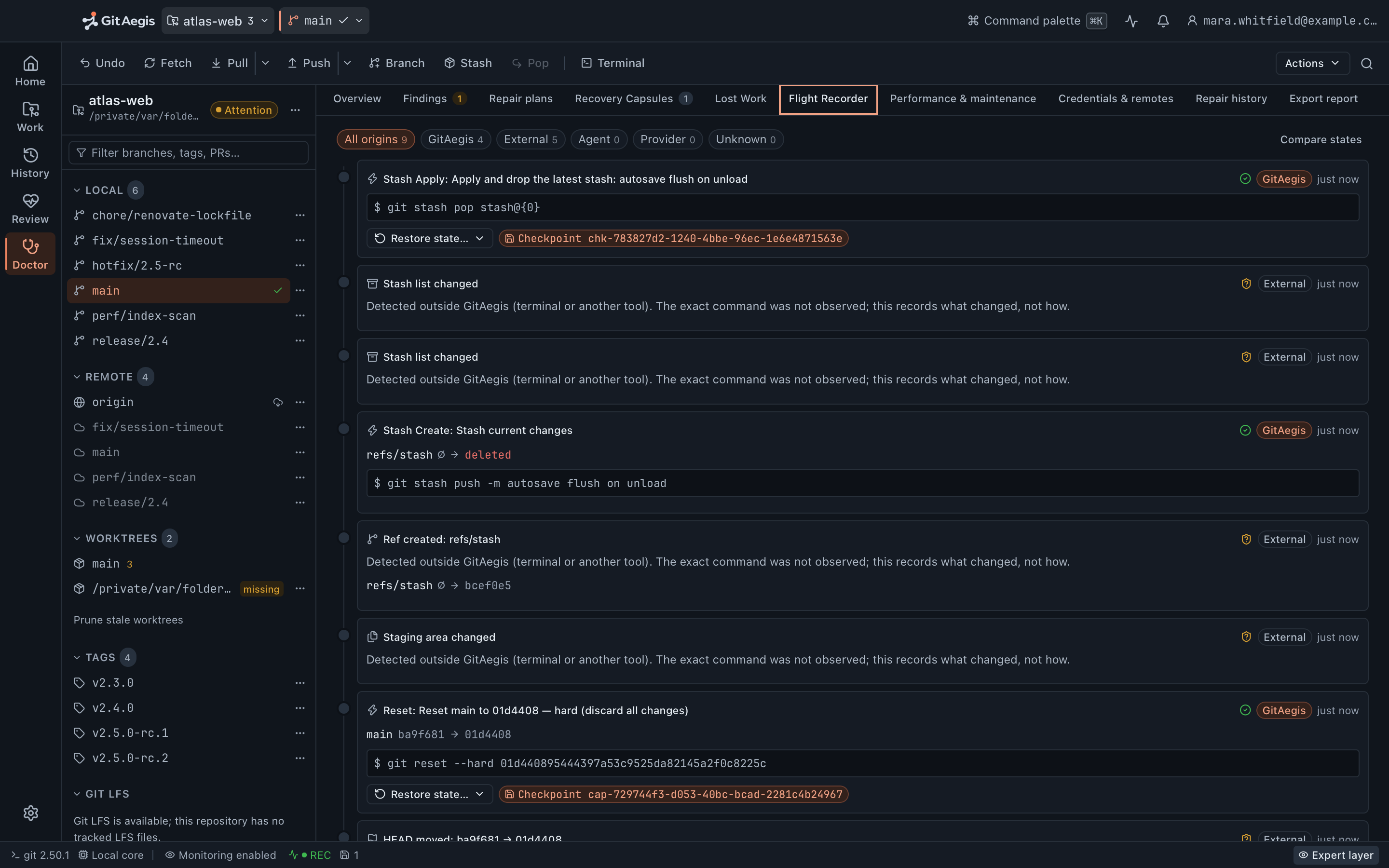
A watcher feeds the Flight Recorder, so the branch you moved from your terminal, the stash you dropped, the index another tool rewrote and the worktree you added all land on the same timeline as GitAegis’s own operations. The timeline records pointer-level truth: editing a file in your editor is a change you see instatus, not a timeline event.You restore what you need, not all of it.
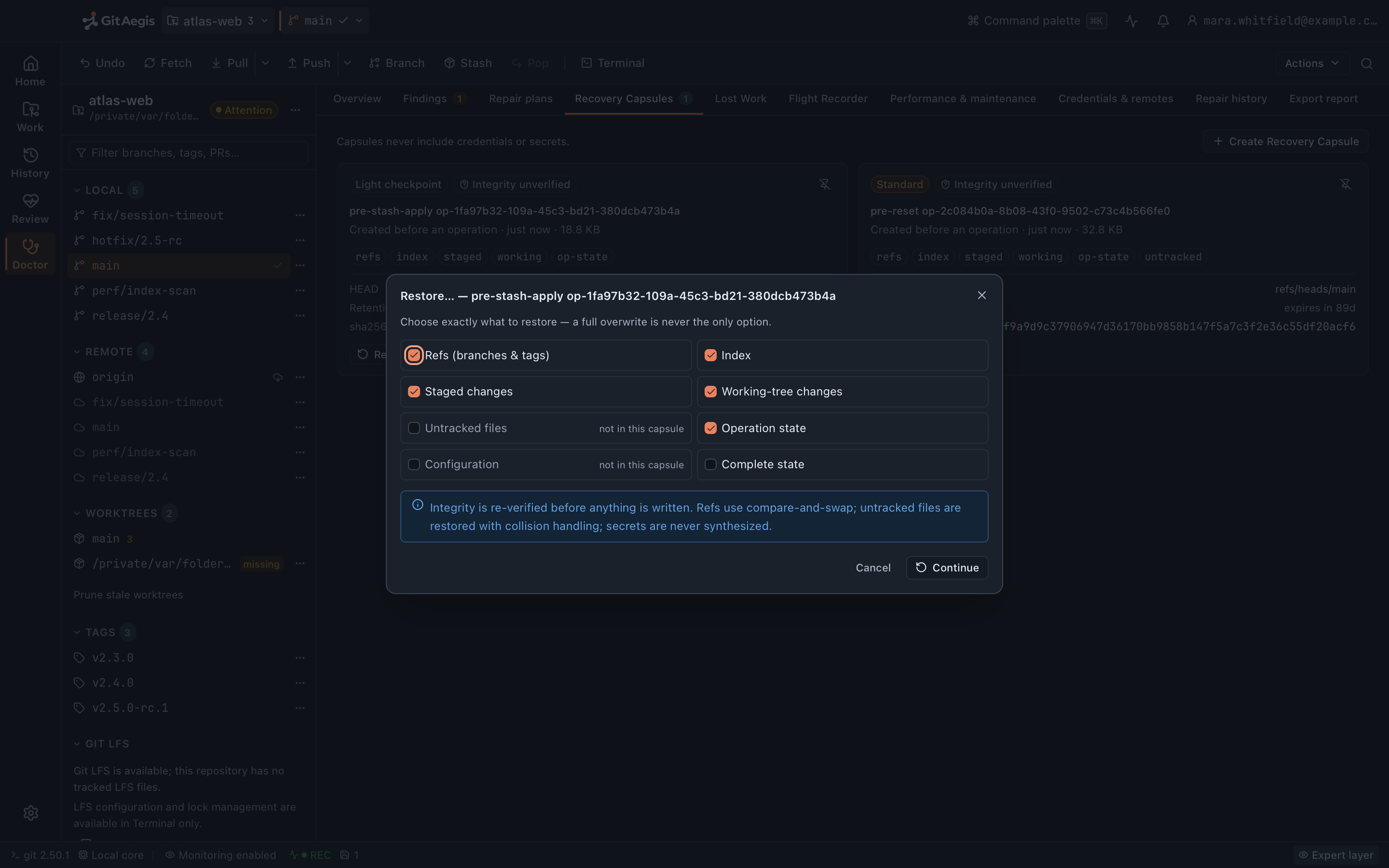
Refs only. Or the working tree only. Or the untracked files only. Or everything.
You have no ops team, so the diagnostics have to be in the product
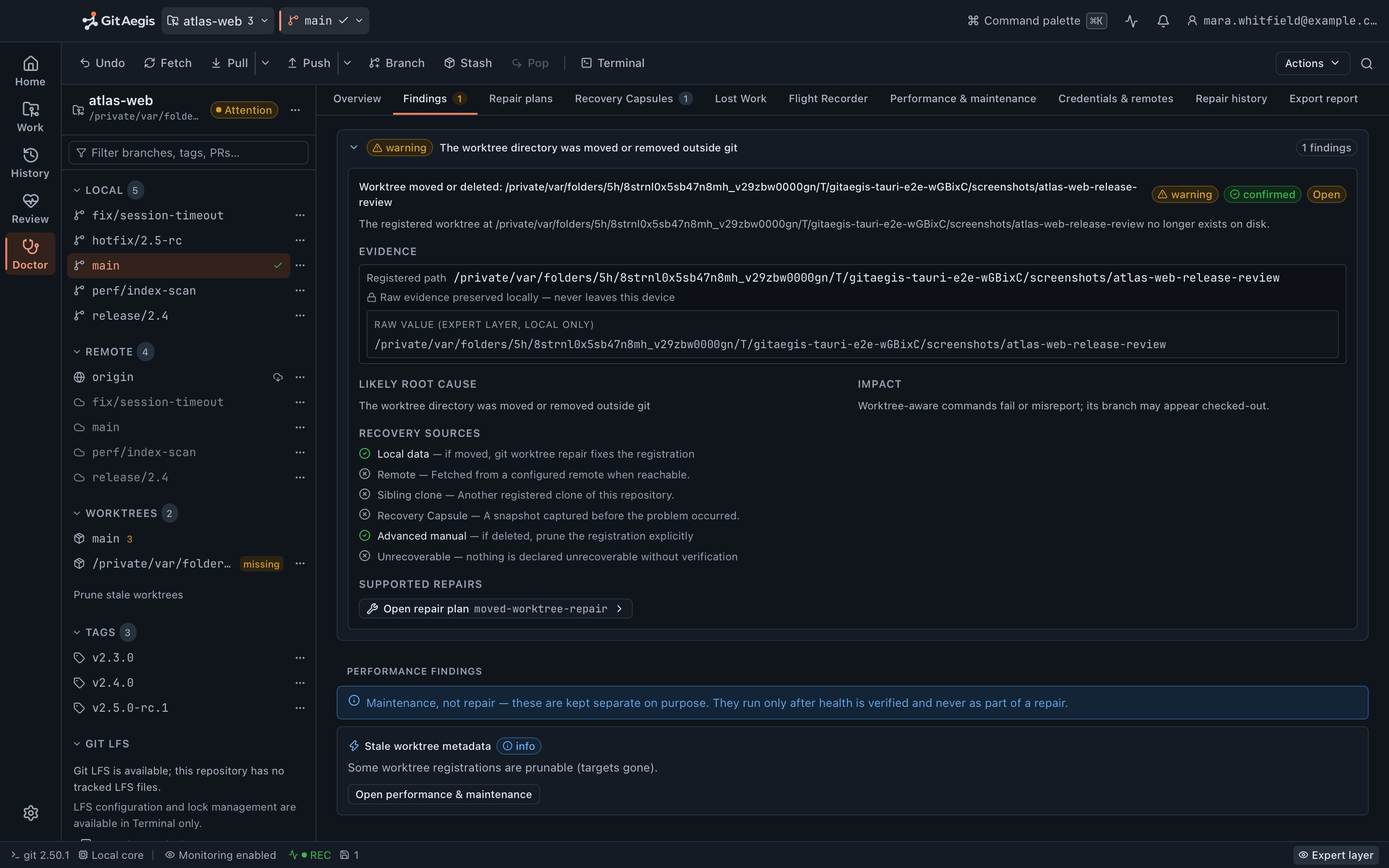
Doctor scans the repository for real damage (not style opinions) and shows the evidence it found before it proposes anything. Every repair it offers takes a capsule first, so a repair that turns out to be the wrong call is itself reversible.
When the index or HEAD can’t be trusted, Safe Mode locks the mutating controls rather than letting you make the situation worse while you work out what happened. It also pins core.hooksPath=/dev/null, so a hook in a repository you cloned an hour ago doesn’t run while you’re diagnosing.
If you do need a second pair of eyes, the report Doctor produces can have its paths redacted before you hand it to anyone.
The work that isn't pushed is the work worth protecting
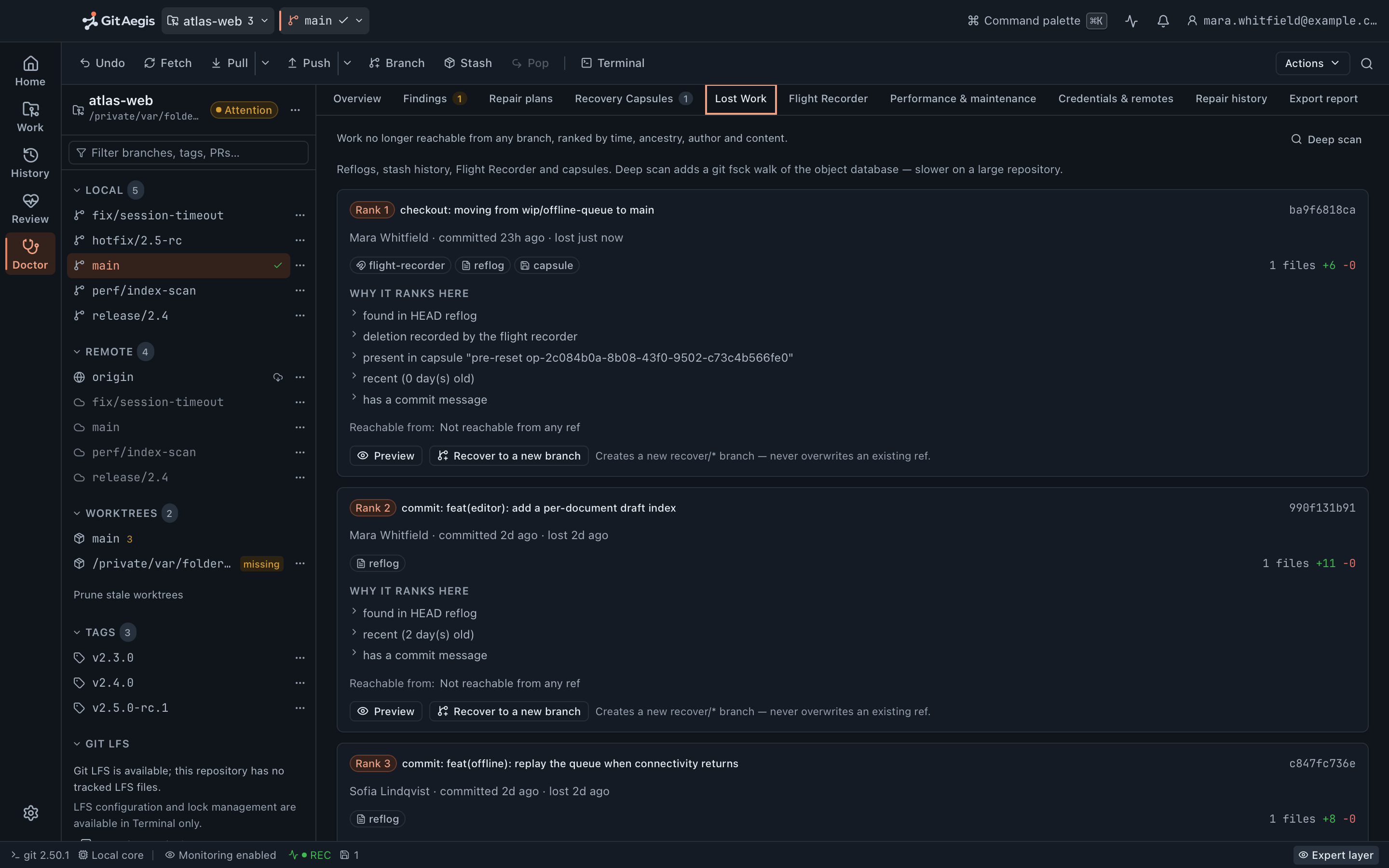
Lost Work searches for commits that nothing points at any more, across seven sources: the HEAD reflog, the stash reflog, Flight Recorder “before” oids, refs/aegis/ recovery refs, capsule bundles, sibling worktree HEADs, and a deep scan bounded by a fixed commit budget. It then offers to put a branch back on what it found.
And GitAegis never runs git gc, git prune or git reflog expire. Not behind a confirmation, not behind an advanced setting: they are not implemented. The objects that make solo recovery possible stay on disk.
Your machine holds the only copy of the work, and no code leaves it
GitAegis local Git work needs no account and no service, and nothing in the Git path waits on a network. Your Git traffic goes directly to the remotes you configured, with your own credentials.
For contract work that is not a preference, it is the answer to the question in the NDA. Your file contents are not transmitted by anything in this product: there is no upload path for a repository, a capsule or a diff. The one feature that sends anything about a repository at all is the AI commit report, which needs an account, needs you to allow it, needs you to press a button, and sends commit metadata and changed file paths rather than code. Never press it and nothing about that client leaves the machine.
The client-work problem: proving what you did
Freelance and contract work has a second requirement: showing your working. The Operation Journal records every mutating operation with its intent, its risk level, the exact commands, its checkpoint and its outcome, and it is searchable. The Flight Recorder timeline covers the repository’s ref, index and stash movements, including the ones you made from a terminal.
For an invoicing conversation or a handover document, that is a factual record rather than a reconstruction from commit timestamps.
What you get without an account, without paying, and without a network connection
Full local Git
Repository catalogue, hunk- and line-level staging, branches, tags, remotes, refs, reflog, file history, blame, merge, rebase, cherry-pick, revert, reset, restore, clean, worktrees, stashes, submodules, LFS, bisect, compare and search.
Read moreOperation Preview
Every destructive action planned and shown before it runs, with the exact commands it will execute.
Read moreRecovery capsules
Six domains, captured before the operation and restorable one domain at a time.
Read moreFlight Recorder
Repository activity as a timeline, including the ref, index and stash changes GitAegis didn't cause.
Read moreDoctor
A damage scan that shows its evidence, and repairs that take a capsule before they run.
Read moreLost Work
Seven sources searched for commits nothing points at any more, and a branch put back on the one you want.
Read moreYour code is not transmitted
No upload path exists for a repository, a capsule or a diff. The daily update check carries no identifier, and the one feature that sends anything about a repository is the AI commit report, which sends metadata when you press its button.
No account for any of this
There is no licence check and no activation step. Install it and it works. Signing in is optional and unlocks exactly one feature.
What this does not do
Recovery has a boundary, and a product called an aegis has to state it plainly.
What GitAegis can put back
- If a recovery capsule was taken, you can roll the operation back.
- If a Flight Recorder event captured a state hash, you can roll back to that state.
- If any reflog entry, ref, branch, stash, or capsule references a commit, Lost Work can recover it.
- Outside those, it cannot, and GitAegis says so instead of pretending otherwise.
Specific limits worth knowing before you rely on any of it
- Rebase state is not restored from a capsule. The capsule records that an operation was in progress; it does not resume it. Your refs, index, working changes and untracked files come back. The sequencer does not.
- Config is not restored from a capsule. It is captured as evidence so you can see what changed, and you put it back yourself.
- Not every operation takes one. Capsules are taken before caution-level and destructive operations. An operation classified safe takes none, and neither do removing a worktree, updating a submodule or fetching LFS objects.
.gitattributescontent filters cannot be wholesale disabled, so a filter that mangles a file on checkout is outside GitAegis’s control.bisectand a conflictedstash applyhave no generic resume.- GitAegis does not bundle Git. It requires Git 2.38.0or newer, already installed. On macOS 12, Apple’s Command Line Tools ship 2.37.1, which is below the floor: install a newer one with Homebrew.
There is no “guaranteed recovery” claim in this product, and there won’t be one.
Free edition · No account required
A recovery capsule before every risky Git operation.
You see the exact commands before they run, and the operation is refused if the capsule cannot be written.
Requires Git 2.38.0 or newer, already installed.
Every risky operation, in this order
- Previewthe exact commands, shown before anything runs
- Capsulerefs, index, staged and working changes, untracked files, operation state: written to disk first
- Executethe commands as shown, or not at all
- Journalplan, commands, capsule id, outcome