GitAegis Team and Enterprise · Requires an account
Rules that hold, and the evidence that they held.
Policy verified on device · Last known-good stays in force on failure · Audit with per-entry attribution · No SOC 2, ISO or GDPR certification claimed
An owner publishes the policy
A versioned document with a scope and a set of rules, signed with the organisation's key.
Devices pull it and verify it
The client recomputes the signature and checks the document belongs to the organisation the device is bound to.
Verifies → applies as preconditions
A rule stops a plan before the capsule is taken and before any command runs, naming itself.
Fails → rejected
The failure is reported and the last known-good policy stays in force. No unverified document takes effect.
A policy a member can edit is a suggestion
The usual shape of “policy” in a desktop tool is a settings file, or a config value, or a managed preference a determined user can change and the tool has no way to check.
That is fine as a default. It is not a control, and describing it as one is how an organisation ends up believing something is enforced when it is not.
GitAegis publishes policy centrally and verifies it on the device before applying it. What that verification is currently worth is set out in the next section: precisely, because the difference between an integrity check and a trust boundary is the whole subject of this page.
A control you cannot verify is a default with better marketing.
How the policy document reaches a device
An owner publishes it.
A policy is a versioned document with a scope and a set of rules, published for the organisation from the account.It is signed with the organisation's key.
The service computes a signature over the document with the organisation’s key and stamps the key id it used.Devices pull it, with a version check.
Distribution is pull-based, so a device that has been offline picks up the current version on reconnect rather than running on a stale copy indefinitely.The device verifies it before it applies.
The client recomputes the signature and checks the document belongs to the organisation the device is bound to. A document that fails is rejected, the failure is reported, and the last known-good policy stays in force. There is no path where an unverified document takes effect.What that signature is, exactly.
It is an Ed25519 signature. The organisation signs with a private key that never leaves the service, and a member receives only the public key that verifies it. So a tampered, corrupted or misdirected document is rejected, and a member of your own organisation cannot produce one that verifies. What is still missing before this is a trust boundary is proof of enforcement: nothing yet records that a device applied the policy it was given.Rules apply as preconditions.
A policy check sits in the operation plan alongside a dirty working tree or a held branch lease, and stops the plan before the capsule is taken and before any command runs, naming the rule that blocked it.
The organisation’s key
An Ed25519 keypair. The private half signs here and never leaves; members receive the public half.
1 · Signs the document
The service computes the signature when an owner publishes, and stamps the key id it used.
2 · Verifies the document
Every device recomputes the signature with the same key before the policy applies.
3 · Returned to any member who asks
The API hands the organisation’s key to any member of the organisation.
Same key, three holders → an integrity check, not a trust boundary
The check detects a tampered, corrupted or misdirected document. It does not stop a member of your own organisation from producing one that verifies.
What the signature is worth
An integrity check, not a trust boundary.
And GitAegis will not describe it as the second thing while it is the first.
The rule ledger
What a policy document can say
One rule class, described accurately rather than as a category heading over a list of ambitions, and beside it, every rule an organisation asks for that this document cannot express.
Locked settings
The organisation pins the value of a client setting, and the device refuses a write that would change it. The member sees which settings are pinned and which document pinned them, so “why can I not change this” has an answer on screen rather than in a support ticket.
That is the rule class the document carries, and it applies as a precondition, so a rule that blocks stops the plan before the capsule is taken and before any command runs.
- No rule for protected ref patterns
- No rule separating
--forcefrom--force-with-lease - No approval-count requirement
- No rule that raises an operation's capsule kind
- No control over cloud capsule backup
- No rule that turns the AI commit report on or off
- No integration allowlist
- No telemetry rule
- No device-condition rule
Every one is a reasonable thing for an organisation to want. None of them is a rule this policy document can express, and listing them as if they were is how a compliance conversation goes wrong six months later.
Overrides, and their evidence
A blanket block on every risky operation gets worked around outside the tool, which is worse than a rule that can be broken visibly. So where a rule permits an override, the path is explicit: the member sees which rule they are overriding and what it was protecting, a typed justification is required where the rule demands one, and the override is recorded.
Where that record lives matters. It is recorded by the policy engine on the device. It is not a filterable class in the organisation’s audit trail, and there is no notification to an owner when one happens, so “show me every override this quarter” is not a query an owner can run today.
Rules that do not permit an override block. The plan fails its precondition, names the rule, and stops. There is no elevated mode a member can enter.
What an override record holds
- Actor
- the member who overrode it
- Operation
- what they were doing
- Rule
- which rule was overridden
- Justification
- typed, where the rule demands one
- Time
- when it happened
Held by the policy engine on the device that recorded it.
Where a rule lands
In the plan, before anything runs
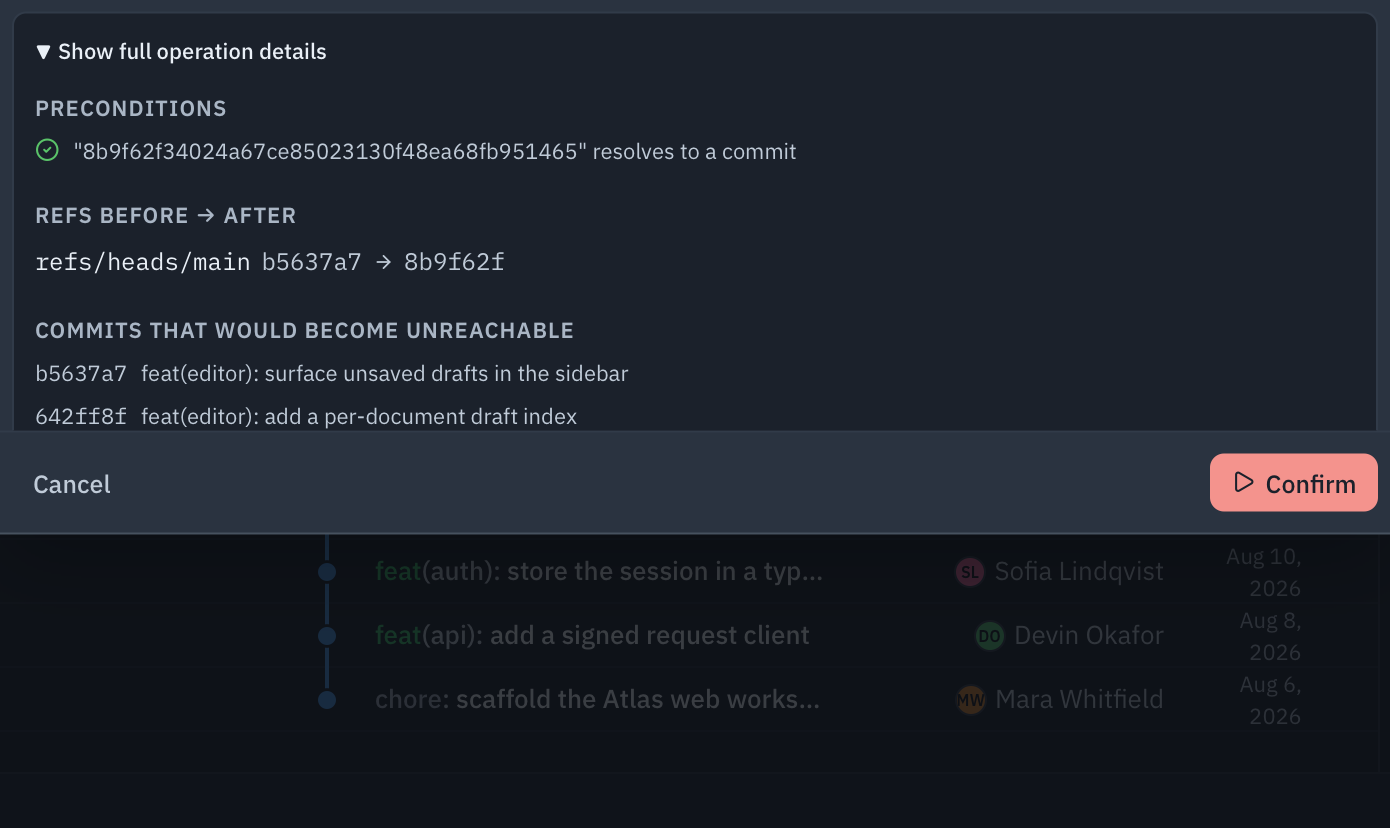
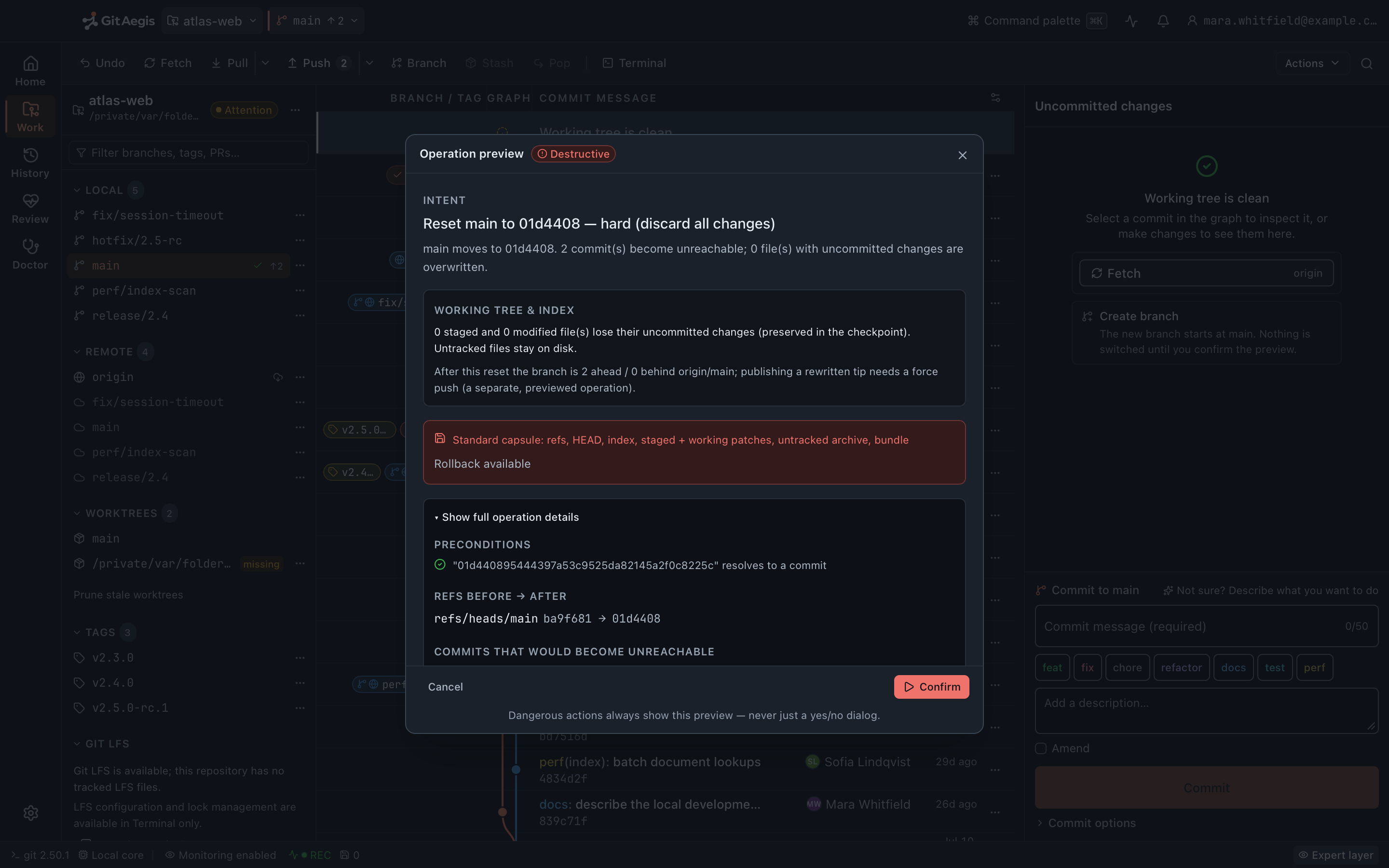
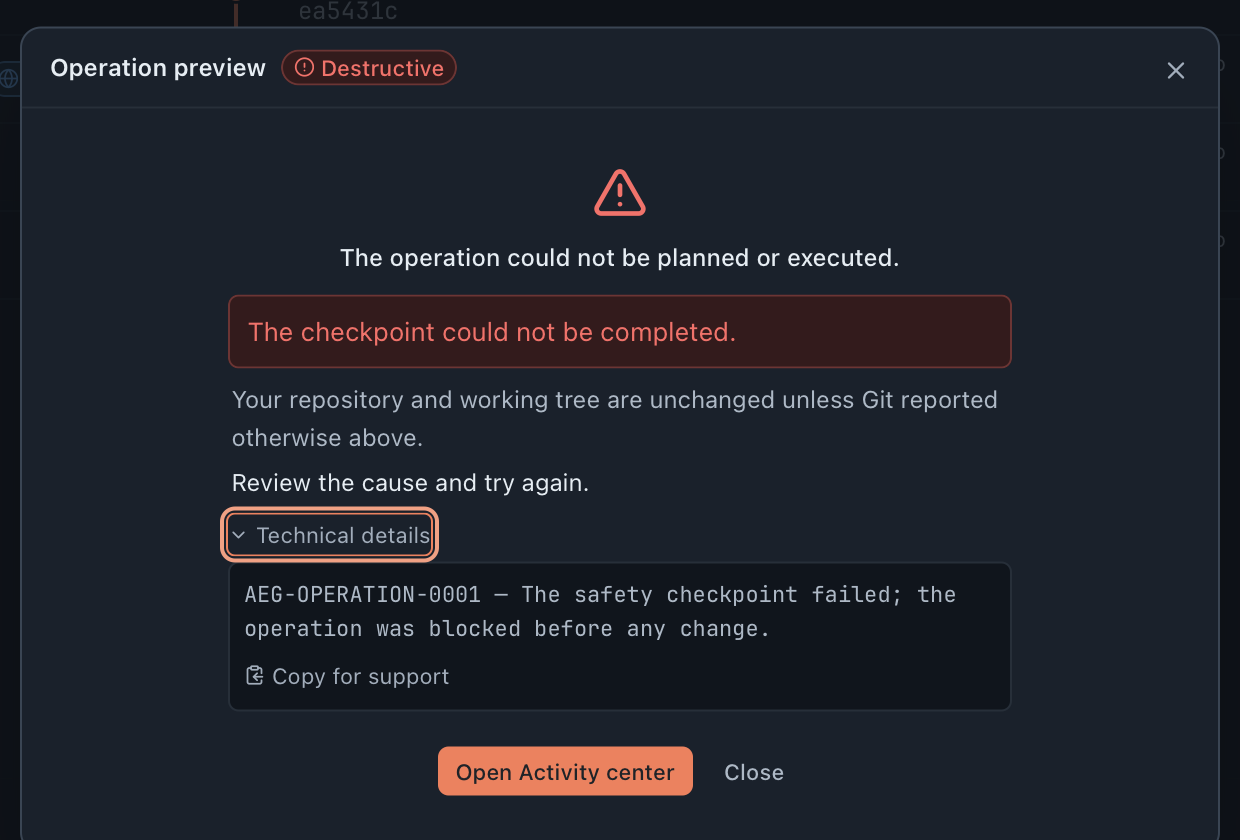
A policy check is a precondition in the operation plan: the planning and refusal machinery it joins is in the shipping desktop app today, and these captures are that machinery.
The plan a rule stops
destructiveEvery mutating operation is planned first: an intent, a risk level, preconditions, the exact commands. A policy check sits in those preconditions alongside a dirty working tree or a held branch lease, and a rule that blocks fails the plan there, before the capsule is taken.
The stop it delivers
blockedA plan that fails is refused and states that the repository is unchanged. A rule that blocks names itself, so “why not” has an answer on screen rather than in a support ticket.
Numbers this page will defend
- entries per audit read, at most, and that capped read to a JSON file is the whole export path
- 500
- certifications claimed: no SOC 2, ISO 27001 or GDPR certification until one exists and can be evidenced
- 0
The audit trail
What it records, how it is attributed, and where its edges are: all three, because the third one is the part an organisation needs before it depends on this.
What is recorded, and how it is attributed
Administrative actions (a member added or removed, a role changed, a policy published, a device bound or revoked) and operational events in scope, including Change Set activity, branch lease transitions and integrations being bound.
Attribution on every entry. The organisation, the repository where one applies, the actor, the device, the action, and a UTC timestamp. Where an operation is involved, the entry carries enough to point back at it.
Nothing edits or deletes an entry. There is no route that does. Be precise about what that is worth: it is the absence of a delete path, not a storage-level guarantee, and the word “append-only” is being withheld until the storage enforces it.
One audit entry
- Organisation
- the organisation the entry belongs to
- Repository
- where one applies
- Actor
- the member behind the action
- Device
- the machine it came from
- Action
- what happened: administrative, or an operational event in scope
- Timestamp
- UTC
Nothing edits or deletes an entry
The absence of a delete path, not a storage-level guarantee: the word “append-only” is being withheld until the storage enforces it.
Getting the data out, and what you cannot get
The desktop reads an organisation’s most recent audit entries and writes them to a JSON file on your machine. That is the export.
The bounds are worth knowing before anyone plans around them: the read returns at most 500 entries, there is no CSV, there is no date-range or scope selection, the export is not itself recorded as an audit event, and an organisation with more history than that cannot currently retrieve all of it.
There is no retention configuration and no legal hold. No owner-set retention window, no deletion job, no hold object, and nothing that exempts entries from one. An organisation with a retention obligation should treat that as unmet here rather than assume a default.
One export, newest first
- A policy was published#1
- A device was revoked#2
- A member's role changed#3
- …up to 500 entries#500
Older entries: recorded, not retrievable
A JSON file on your machine is the whole export. No CSV, no date range, no scope selection, and the export is not itself recorded as an audit event.
What audit does not cover
Local recovery state stays local. Capsules, the Operation Journal and the Flight Recorder are per device and are not fed into the organisation’s audit trail. An entry can reference that an operation took place; it does not contain the capsule, the diff or the working-tree state.
Joining an organisation does not upload your local history. Cloud capsule backup is a separate, per-repository, opt-in feature, encrypted on the device with a key GitAegis does not hold, and there is no escrow arrangement that gives an organisation a copy of that key.
Reaches the organisation’s trail
- Members added or removed, roles changed
- Policies published
- Devices bound or revoked
- Change Set activity, branch lease transitions, integrations bound
Stays on the machine that made it
- Recovery capsules, and everything inside them
- The Operation Journal
- The Flight Recorder timeline
- Diffs and working-tree state
Devices
Revoking a device ends its account access, and stops there
A device is a first-class object. Registered when GitAegis signs in on it, with a name, a platform, a client version, and first-seen and last-seen timestamps, so an owner can see what is attached to the organisation.
Revoking a device ends its account access. Its session is revoked, so it stops fetching policy and stops downloading backed-up capsules.
Revocation does not reach onto the disk, and does not reach your provider. The revoked device keeps its local repositories and local capsules, because those are yours and are on your machine. It also keeps any keys already in its credential store, and revoking does not revoke that device’s provider tokens with the provider. That has to be done at the provider, and an organisation offboarding someone should treat it as a separate step rather than assume this one covered it.
Revocation ends
- The device's sessionended
- Policy fetchesended
- Capsule downloadsended
Revocation does not reach
- Local repositoriesuntouched
- Local capsulesuntouched
- Keys already in the credential storeuntouched
- Provider tokens, at the provideruntouched
What this does not claim
The most useful section on the page for anyone doing a security review, and the one written first.
Limits of what is here
No certification claims. GitAegis does not claim SOC 2, ISO 27001 or GDPR certification, and will not until such a certification exists and can be evidenced. This page describes practices. When a certification exists it will be published with its evidence and its scope.
Policy is an integrity check, not a barrier against a member. Symmetric signing, with the verification key available to members, means the document cannot be tampered with in transit and can be authored by anyone in the organisation holding that key. Do not present it internally as something a member cannot forge.
Policy governs GitAegis, not your shell. It cannot stop a git push --force from a terminal, a CI job, or another Git client. For controls that hold regardless of client, use your host’s branch protection. GitAegis reads and displays that state and complements it. Any organisation told otherwise has been mis-sold.
Overrides are recorded, not prevented. A rule that permits an override permits it; the control is evidence, not prevention. Rules that must not be overridden are configured without an override path, and then they block.
Local recovery data is not audited to the organisation. Capsules, journal and timeline are local and per device, deliberately.
Capabilities an enterprise will ask for, and that are absent
No SSO and no SCIM. There is no SAML 2.0, no OIDC, no SCIM provisioning or deprovisioning, no identity-provider configuration, no group-to-role mapping and no domain claim verification. Accounts are created and managed in GitAegis.
No audit retention, legal hold, or scoped export. As above: a capped read to a JSON file is the whole export path.
Audit records what GitAegis observes. Actions in the client and administrative actions in the account. It is not a record of everything that happened to your repositories. Operations run outside GitAegis appear on the local Flight Recorder timeline, not in the organisation’s trail.
Vulnerability reports are welcome now, whatever the state of the rest. Write to security@gitaegis.com. The process is documented on the security page.
Questions about security and policy
For teams and organizations
Rolling GitAegis out to a team?
Volume licensing, SSO, policy enforcement, and audit.
What a rollout includes
Volume licensing
every seat under one agreement
SSO
sign-in through your identity provider
Policy enforcement
org rules applied as preconditions, before any command runs
Audit
actor, device, and timestamp on every entry